
Dedicated Developers vs Freelancers: A Complete Comparison Guide

Dedicated Developers vs Freelancers

You need a developer. Your budget is real, your deadline is real, and the wrong hire will cost you more than money. This guide breaks down both hiring models, i.e., dedicated developers vs. freelancers, so you can make the right call for your project.

Whether you are building a SaaS platform, a customer-facing mobile app, or a core internal system, one question comes up early: should we hire dedicated developers or go with freelancers?

Both options work. The right one depends on your project’s size, timeline, and how much risk you are comfortable carrying. Let’s break it down clearly.
Dedicated Developers vs Freelancers break down

Quick comparison: Dedicated Developers vs Freelancers

Factor Dedicated Developers Freelancers 
Availability Full-time, your project only Working with multiple clients 
Scalability High: add developers, QA, DevOps easily Limited 
Security & IP Strong NDAs, structured access control Varies by individual 
Communication Structured standups, sprints, reporting Depends on the person 
Long-term projectsExcellent fit Moderate: risk of drop-off 
Team collaboration Strong, integrated workflow Limited, usually works solo 
Project ownership High Medium
Upfront cost Higher Lower 
Risk level Lower Higher 
Best for Growth-stage and enterprise projects Short tasks, MVPs, one-off fixes
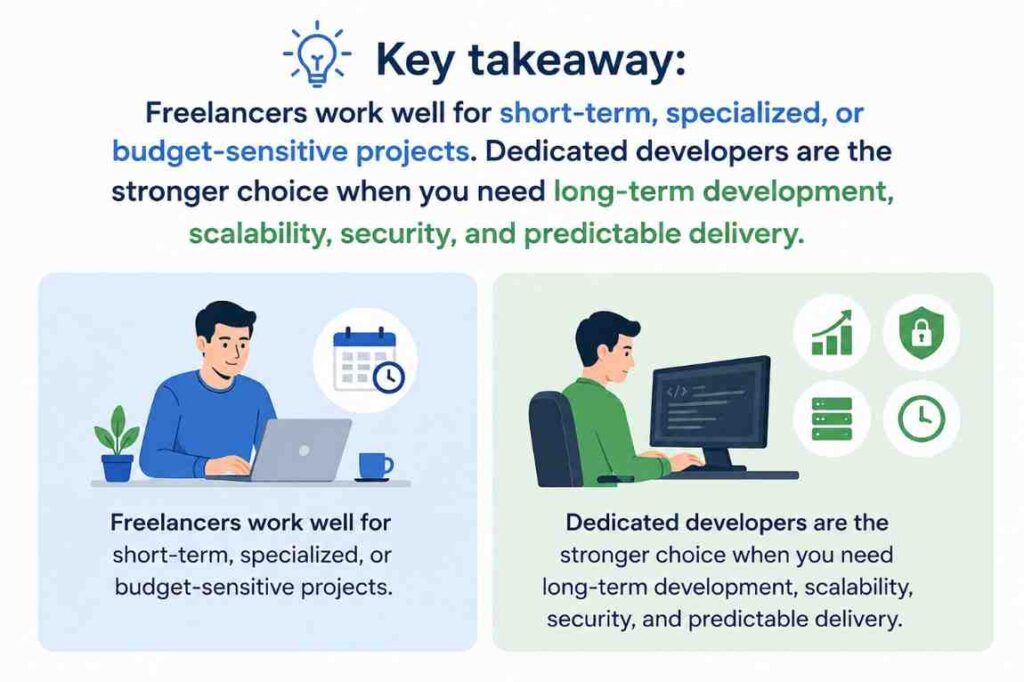
key takeaway

Understanding the Dedicated Developer Model

What Is a Dedicated Developer?

A dedicated developer is a skilled professional or team who works exclusively on your project for the duration of an engagement. They’re not splitting attention between five other clients. They’re ingrained in your workflows, aligned with your goals, and operate like an extension of your internal team.

Dedicated developers are typically sourced through a mobile app development company or a software development firm. That backing matters: it means you get project management, QA, and ongoing support built in, not bolted on.

Key Characteristics:

  • Works exclusively on your project
  • Integrates into your existing tools and workflows
  • Long-term engagement, usually 6 months or more
  • Backed by a development company’s support structure
  • Acts as an extension of your internal engineering team
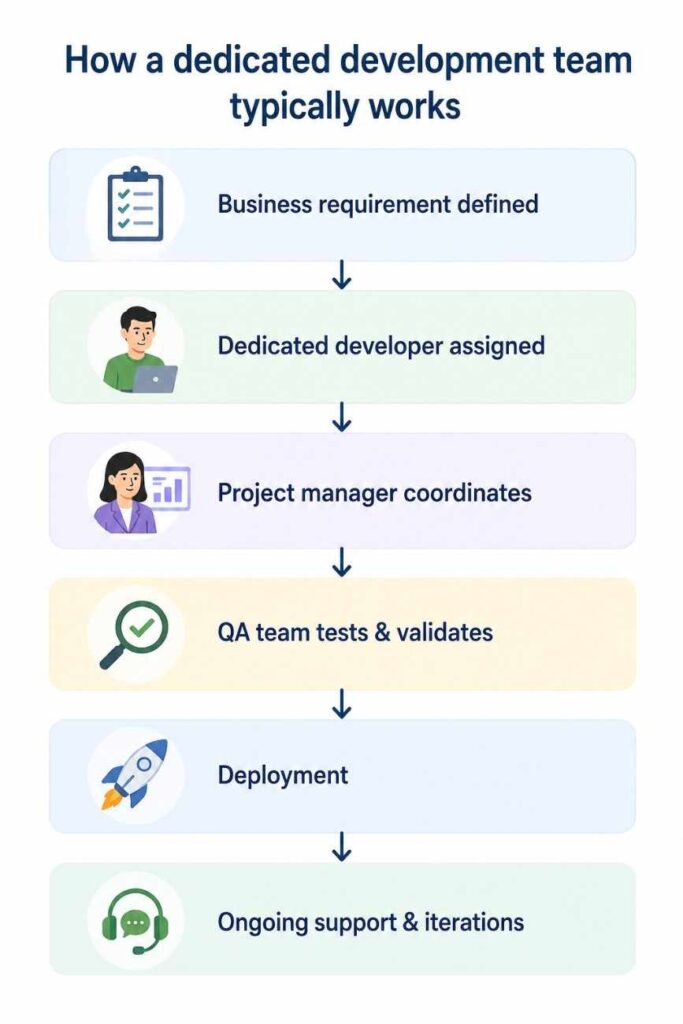
how dedicated development team works

Understanding the Freelancer Model

What Is a Freelancer?

A freelancer is an independent professional who takes on contract-based work. They’re typically hired on a per-project or per-hour basis, and they usually manage several clients simultaneously. Freelancers range from solo generalists to highly specialized experts in niche technologies.

The key difference is that a freelancer’s time and attention are not exclusive to your project.

Common Freelancer Engagement Models

ModelHow it worksBest for 
Hourly Pay per hour worked Undefined scope, ongoing tweaks 
Fixed cost One-time fee for a defined deliverable Small, well-scoped projects 
Retainer Monthly engagement for recurring work Ongoing but limited support 
Milestone-based Payment released after defined deliverables Phased development work 

Detailed Comparison: 7 Factors That Matter Most

(1) Cost 

Freelancer rates vary significantly. In 2026, freelance developer rates in Canada range from $80 to $150/hr for general software engineers. AI/ML specialists command $180 to $300/hr. Dedicated development teams from a mobile app development company have a higher upfront engagement cost, but that number includes project management, QA, and support infrastructure costs freelancers don’t include in their quoted rate.
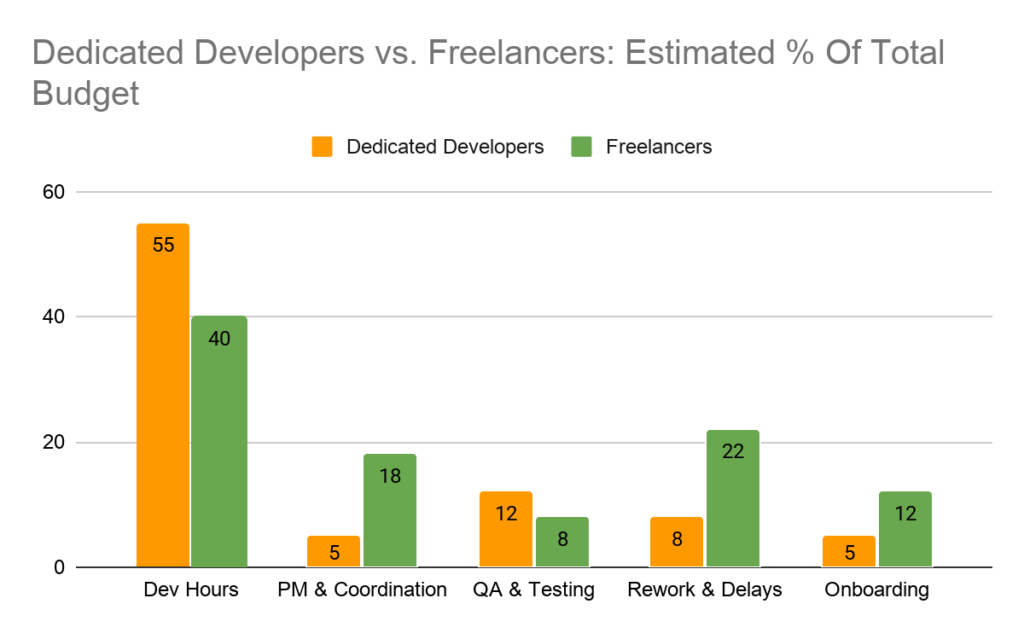
dedicated vs freelance budget

Hidden costs with freelancers are often ignored: hiring search time, coordination overhead, rework when freelancers leave mid-project, knowledge transfer when you hire the next one, and inconsistent code standards that create technical debt.

(2) Availability and Commitment

CriteriaDedicated DevelopersFreelancers
Full-time focus on your project Yes Usually no 
Working with multiple clients simultaneously No Yes
Consistent response time Yes Varies 
Sprint participation Yes Sometimes 
Available if scope expands Yes Not guaranteed 

(3) Quality and Consistency 

Quality in software development is not just about writing clean code on day one. It’s about maintaining standards. Dedicated developers working through a structured company follow shared coding standards, documentation practices, and code review processes. When a dedicated team member leaves, the next person onboards to existing documentation, not a blank slate. 

With freelancers, quality depends entirely on who you hired. Some are excellent. Many operate without documentation habits or peer review. When they exit the project, institutional knowledge exists with them.
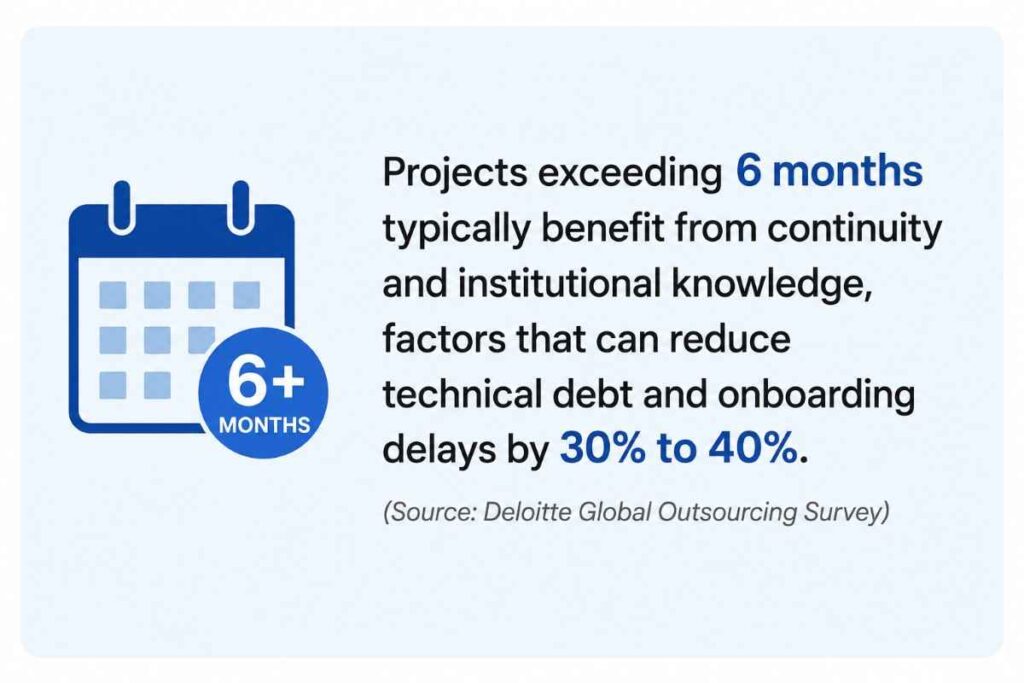
deloitte survey

(4) Communication and Collaboration

AreaDedicated DevelopersFreelancers
Daily standups Optional 
Slack/Teams integration Depends 
Jira/project tracking Depends
Team meetings & planning Limited 
Structured reporting ✅ Regular Varies 
Escalation channel if issues arise ✅ Company-backed Individual only 

(5) Scalability 

Picture this: your app launches with 10,000 users. Three months later, you have 100,000; can your development resources keep pace? 

What you need to scaleDedicated TeamFreelancers
Add more developers ✅ Easy ❌ Difficult 
Add QA resources ✅ Easy ❌ Difficult 
Add DevOps support ✅ Easy ❌ Difficult 
Add project management ✅ Easy ❌ You manage it 
Maintain velocity during scale ✅ Easy ❌ Usually no 

This is where the model difference becomes most visible. When you need to move fast, a dedicated team backed by a mobile app development company lets you scale without starting your hiring process from scratch.

(6) Security and IP Protection 

This matters especially for Canadian enterprises, where PIPEDA compliance and data control are real concerns. Dedicated development companies have formal NDA processes, structured access management, and clear IP ownership clauses built into contracts. Data doesn’t leave through informal channels. 

With freelancers, the responsibility falls on you. A freelancer working on three other projects may not have the same data hygiene practices, and enforcing an NDA with an individual across borders is genuinely difficult.
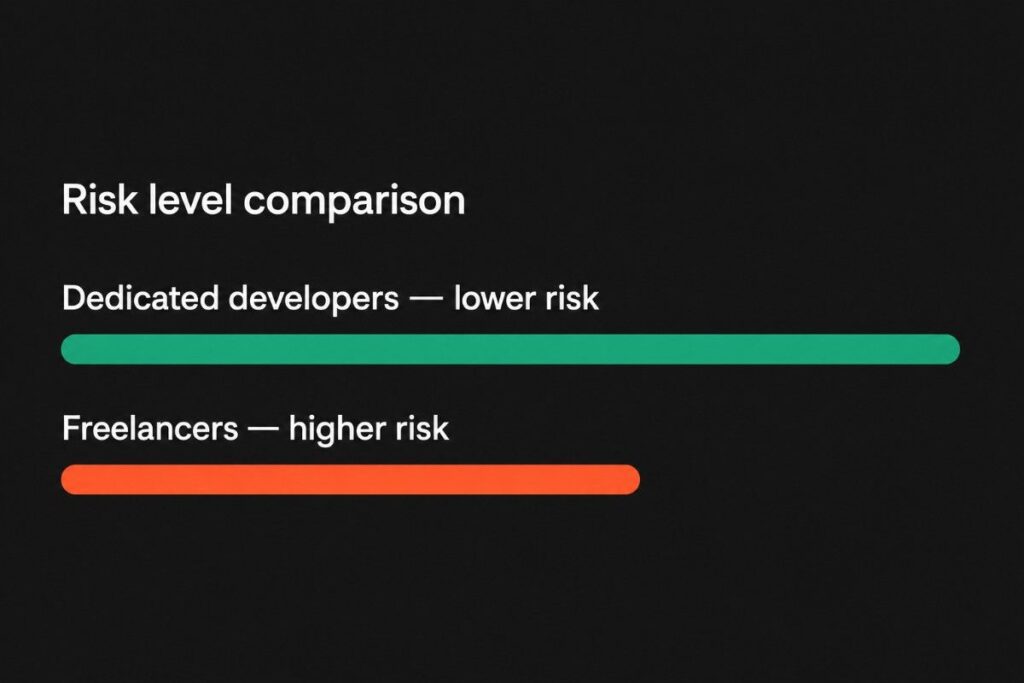
freelance vs dedicated risk level comparison

(7) Accountability and reliability

A dedicated development company has contractual obligations, replacement clauses, increasing channels, and a reputation to protect. If a developer leaves, they handle replacement; your project keeps moving. With a freelancer, if they disappear on week six of a twelve-week project, you’re starting a new search while your deadline doesn’t move.

Pros & Cons of Hiring Dedicated Developers

ProsCons
Long-term commitment to your project Higher upfront investment 
Better team collaboration Longer initial onboarding 
High scalability as you growBetter suited for ongoing, not one-off projects 
Strong accountability and support 
Enhanced IP and data security 
Faster project continuity 
Structured communication 

Pros & Cons of Hiring Freelancers

ProsCons
Lower cost Availability is never guaranteed 
Fast to hire Limited scalability 
Flexible, short-term contracts Knowledge loss when they leave 
Variable quality standards 
Communication challenges 
IP and security risk 

But Which Model Fits For Your Situation?

Your SituationRecommended Model
Quick website fix or bug patch Freelancers 
One-time design or content task Freelancers 
MVP validation with narrow scope Freelancers or small dedicated team 
SaaS platform development Dedicated developers 
Enterprise software/app build Dedicated developers 
React Native mobile app (including post-launch support) Hire React Native app developers (dedicated team)
Flutter cross-platform mobile app (including post-launch support) Hire Flutter app developers (dedicated team) 
AI/ML app/model development Dedicated developers 
Scaling an existing app/software Dedicated developers 
Long-term support and feature releases Dedicated developers 

The Actual Cost of Hiring

Most companies compare freelancer hourly rates against agency engagement costs and assume freelancers are cheaper. The actual math is more complicated.
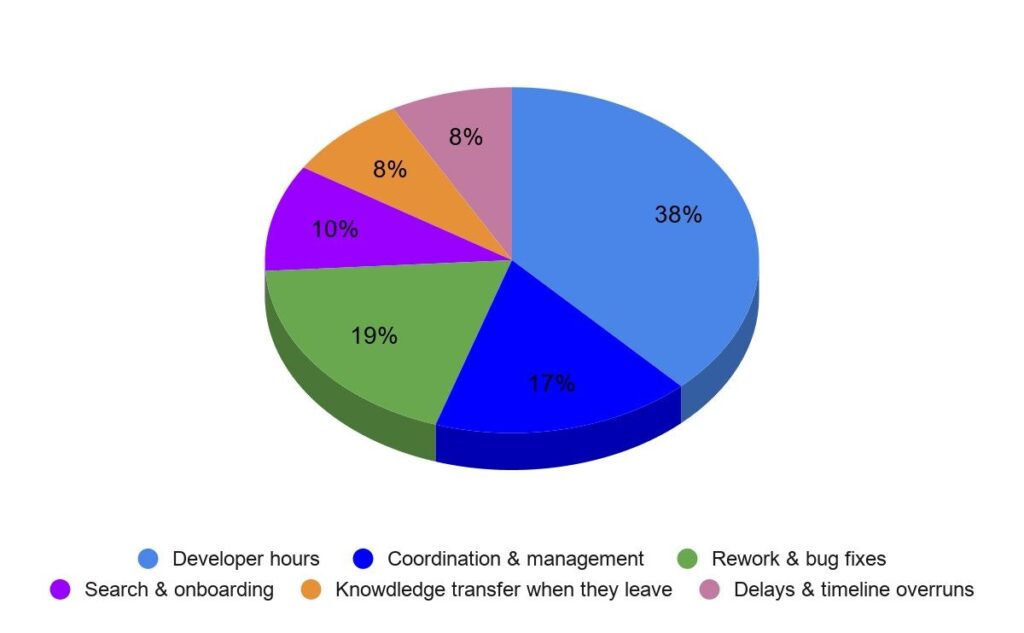
actual cost of hiring

The following is the decision-making checklist that you can follow:
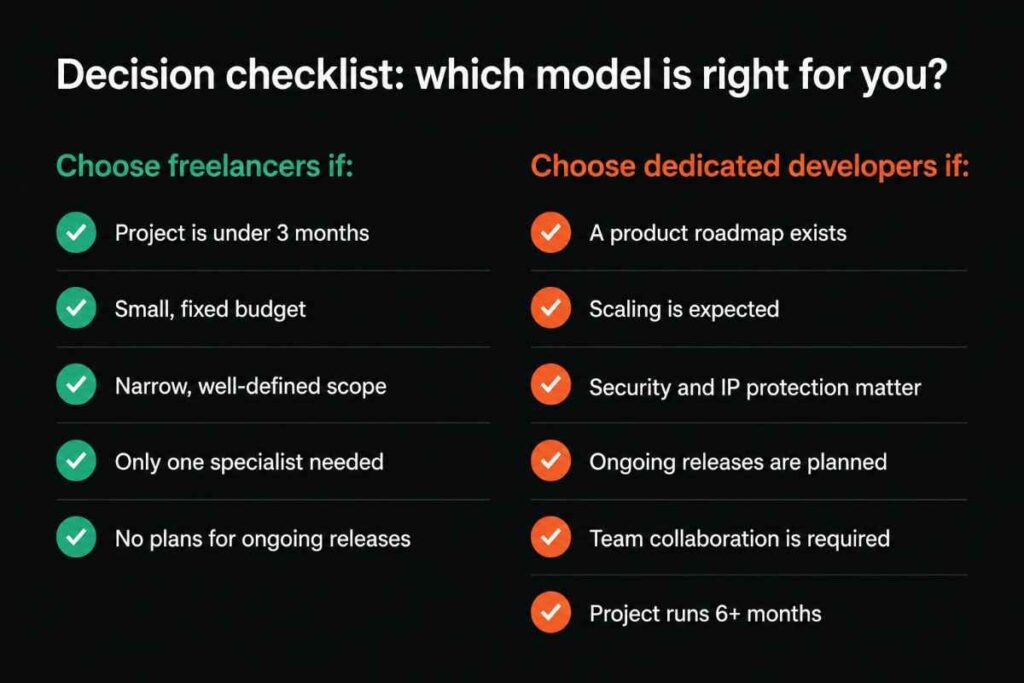
which model is right for you

In simple terms, freelancers help you complete tasks. Dedicated developers help you build and grow products.

Why More Canadian Businesses Are Choosing Dedicated Development Teams

Canadian businesses are investing more heavily in digital transformation than ever before. Whether it’s AI-powered applications, customer-facing mobile platforms, SaaS products, or enterprise modernization initiatives, software has become a long-term business asset rather than a one-time project.

That shift changes hiring priorities.

When software becomes central to business growth, decision-makers need development resources that can provide continuity, scalability, and accountability. A dedicated team offers all three.

Instead of repeatedly sourcing individual freelancers for different phases of a project, businesses gain access to a stable team that understands the product, retains institutional knowledge, and can adapt as requirements change.

This is particularly important for organizations building:

  • SaaS products
  • Enterprise software
  • Customer-facing mobile applications
  • AI-powered platforms
  • Digital transformation initiatives
  • Multi-year software roadmaps

As products become more complex, continuity often becomes more valuable than short-term cost savings.

How to Successfully Hire Dedicated Developers

Not all dedicated development teams deliver the same experience. Before making a hiring decision, evaluate providers against the factors that have the greatest impact on project success.

(1) Technical Expertise

Review their experience with the technologies your project requires. If you’re planning a mobile application, assess whether the team has proven experience building and maintaining similar products.

For example:

(2) Industry Experience

Developers who understand your industry require less ramp-up time and can often identify challenges before they become problems.

Ask for examples of projects completed in:

(3) Communication Processes

Strong communication reduces delays and keeps projects moving.

Look for:

  • Regular standups
  • Sprint planning sessions
  • Transparent reporting
  • Defined escalation channels
  • Shared collaboration tools

(4) Security Practices

Ensure the provider follows structured security processes, including:

  • NDAs
  • Role-based access controls
  • Secure code repositories
  • IP ownership agreements
  • Compliance-ready development practices
  • Scalability

Business requirements change. Your development partner should be capable of scaling resources up or down without disrupting delivery timelines.

(5) Client References and Portfolio

A strong portfolio provides evidence. Client references provide confidence.

Review both before making a final decision.

Looking for Dedicated Developers for Your Next Project?

Choosing between freelancers and dedicated developers ultimately comes down to your business goals.

If you’re building a long-term digital product, scaling an existing application, or planning a new mobile platform, working with a dedicated team can provide the consistency and technical depth required to support growth.

We help businesses extend their internal capabilities with experienced, dedicated developers; mobile engineers; designers; QA specialists; and DevOps professionals. Whether you need to hire dedicated developers for a full-scale software initiative or expand your existing team with specialized expertise, our flexible engagement models allow you to scale according to your business requirements.

From custom software and enterprise applications to React Native and Flutter development, our teams work as a seamless extension of your organization while maintaining complete transparency throughout the development lifecycle.

Conclusion

There is no universal winner in the dedicated developers vs. freelancers debate.

Freelancers remain an excellent option for short-term projects, specialized assignments, and businesses with limited development needs. Dedicated developers, however, often provide greater long-term value when projects require collaboration, continuity, scalability, and accountability.

Before making a hiring decision, evaluate the scope of your project, your growth plans, security requirements, and the level of involvement you expect from your development resources.

The right choice isn’t the one with the lowest hourly rate. It’s the one that gives your business the best chance of delivering a successful product today while supporting growth tomorrow.
Frequently Asked Questions

The answer depends on your project goals. Freelancers are often suitable for short-term or highly specialized tasks, while dedicated developers are generally better for long-term projects that require ongoing development, collaboration, and scalability.

You should hire dedicated developers when your project requires continuous development, strong security practices, team collaboration, and long-term support.

Dedicated developers typically have a higher upfront cost, but they often reduce hidden expenses associated with project delays, onboarding new resources, rework, and knowledge transfer.

Yes. Dedicated developers are specifically hired to integrate into your existing workflows, communication channels, and project management processes.

The right choice depends on your business requirements. React Native is often preferred for mature ecosystems and code reuse, while Flutter is popular for highly consistent cross-platform UI experiences.

Common challenges include availability issues, inconsistent communication, limited scalability, project continuity risks, and varying quality standards.

Yes. Most established mobile app development companies offer dedicated developer engagement models, allowing businesses to access developers, QA engineers, designers, and project managers as needed.

React vs React Native: Features, Benefits, and Use Cases

React vs React Native Features, Benefits, and Use Cases

You need a digital product. Your team says, “Let’s build it in React,” but your developers say, “We should use React Native.” Now you’re just Googling the difference, right before a budget meeting. Don’t worry, this guide is for you.

Most companies today need both a web presence and a mobile app. But the challenge? Choosing the wrong technology early can cost you months of rework and tens of thousands of dollars. Canadian businesses, from SaaS startups to worldwide logistics chains, are making this exact decision every day.

This blog breaks down React vs. React Native, including what each does, who should use which, what it costs, and how to avoid the most expensive mistake teams make when picking a tech stack.

what is React vs React Native

What is React? 

React is an open-source JavaScript library, created by Facebook in 2013, for building fast, interactive web interfaces. It runs in a browser. When you visit a web application, and it feels smooth, updating parts of the page without full reloads, that is almost certainly React (or something like it) at work. 

Key Features of React

  • Component-based Architecture: The UI is broken into small, reusable pieces. Change one component, and every page that uses it updates automatically. 
  • Virtual DOM: React updates only what changed on screen, not the entire page. This makes web apps feel quick and responsive. 
  • SEO-friendly Rendering: With server-side rendering (Next.js), React pages are readable by Google, which is critical for marketing sites and SaaS platforms. 
  • Massive Ecosystem: Over 4 million npm packages. Whatever your product needs, someone has likely built a plug-in for it. 
  • Fast Front-end Rendering: Complex dashboards, real-time data tables, and filtering UIs all feel instant. 
  • Large Global Talent Pool: Easier to hire React.js developers than almost any other front-end specialists.

Best use cases for React

  • Web-first Products: SaaS platforms, Admin dashboards, CRM systems, and Enterprise portals
  • Content & Commerce: eCommerce websites, Progressive web apps, Marketing sites with SEO, and Customer-facing portals

What is React Native?

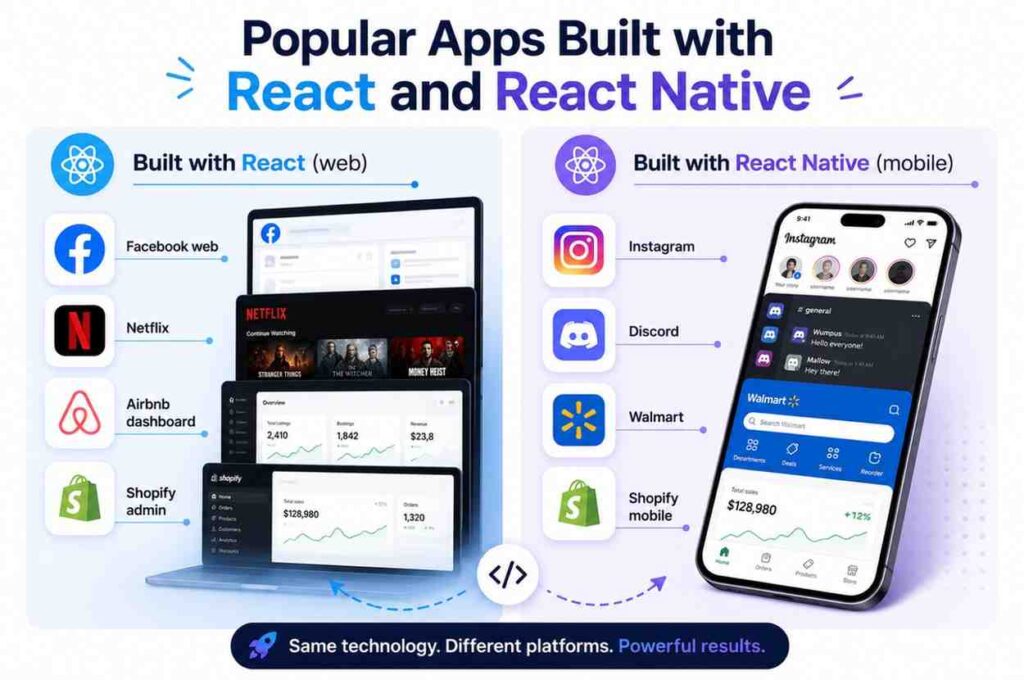
React Native is a framework, also created by Facebook, that lets developers write JavaScript code that compiles into real, native iOS and Android apps. Not a web app wrapped in a mobile shell. Actual native components that feel like they belong on your phone. 

Think of it this way: React builds what you see in Chrome or Safari. React Native app development builds what you download from the App Store or Google Play.

Key Features of React Native

  • Cross-platform Development: One codebase runs on both iOS and Android. Build once, deliver once. 
  • Near-native Performance: The UI renders using real platform components (not web views), so apps feel fast and familiar to mobile users. 
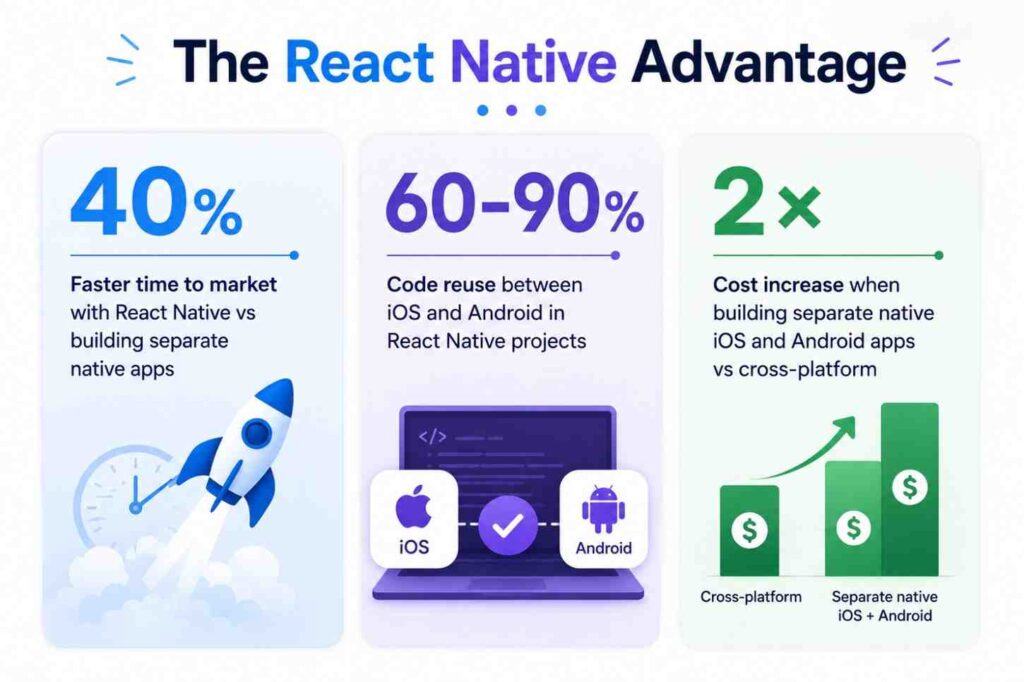
  • Shared Codebase (60% to 90%): Logic, API calls, and state management are shared. Only platform-specific UI elements differ. 
  • Faster MVP Launches: Deliver to both app stores simultaneously, cutting time-to-market by up to 40%.
  • Live Reload / Hot Reload: Developers see changes instantly without rebuilding the entire app. 
  • Access to Device APIs: Camera, GPS, push notifications, and biometrics are all accessible through native modules.

Best use cases for React Native

  • Consumer Apps: Startup MVPs, Delivery & logistics apps, Fitness & wellness apps, and Social networking apps
  • Business Apps: Fintech & payments, On-demand platforms, Booking & marketplace apps, and Field-service tools

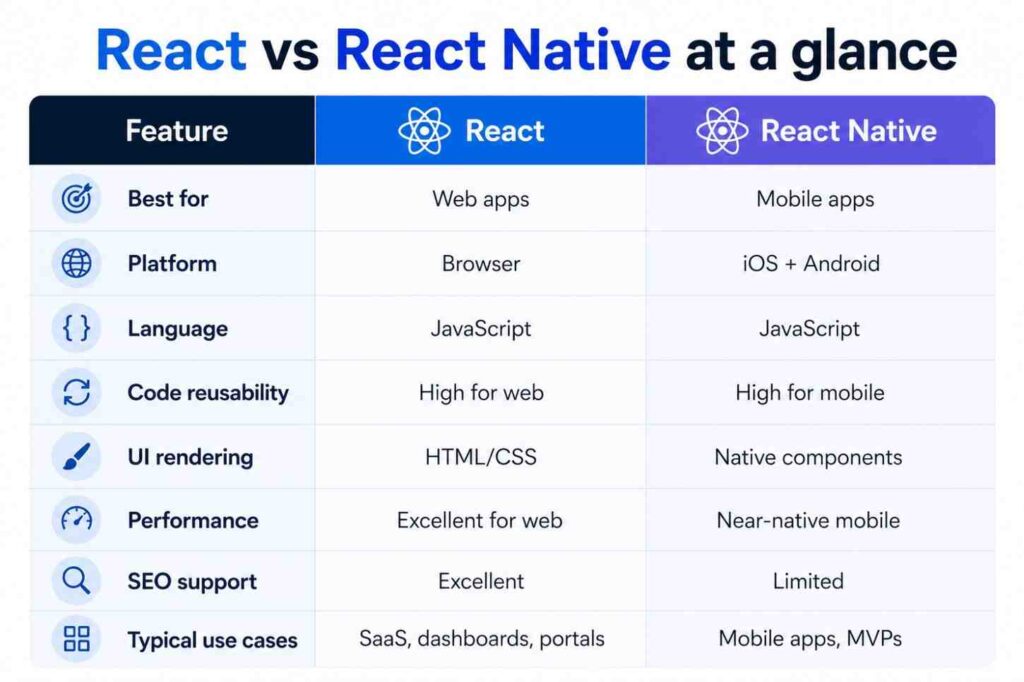
React vs React Native: Key Differences

Parameter React React Native
Platform Built for web applications that run inside browsers like Chrome, Safari, and Edge. Best suited for websites, SaaS platforms, dashboards, portals, and browser-based enterprise systems. Built specifically for mobile applications running on iOS and Android devices. Ideal for businesses targeting mobile-first audiences. 
Rendering Uses HTML and CSS to render UI elements inside the browser’s DOM (Document Object Model). Use native APIs and render actual native mobile UI components instead of web elements. 
Performance Optimized for browser performance and delivers fast rendering for dynamic web applications. Excellent for interactive websites and SaaS platforms.Optimized for mobile devices and delivers near-native app performance with smoother mobile interactions and gestures. 
Learning Curve Moderate learning curve for developers familiar with JavaScript and front-end development concepts. Moderate learning curve, but needs additional understanding of mobile concepts like navigation, device permissions, and platform-specific behaviors. 
SEO support Excellent SEO capabilities, especially with frameworks like Next.js that support server-side rendering (SSR) and static generation. Traditional SEO does not apply because apps are distributed through app stores instead of search engines. 
UI Components Users use web-based components such as div, span, button, and CSS styling. Uses native mobile components like view, text, image, and scrollView for platform-specific UI experiences.
Development Speed Enables fast development for cutting-edge web applications using reusable components and a large ecosystem of support. Faster mobile app development because one shared codebase can support both Android and iOS platforms. 
Code Sharing Primarily limited to web application development only. Allows businesses to share around 60% to 90% of the codebase across Android and iOS apps. 
Best ForBest for SaaS platforms, enterprise portals, admin dashboards, CRM systems, eCommerce websites, and progressive web apps. Best for mobile apps, startup MVPs, delivery apps, booking platforms, fintech apps, healthcare apps, and social applications. 
Maintenance Cost Moderate maintenance cost due to ongoing front-end updates, browser compatibility, and scalability improvements. Lower maintenance cost for multi-platform mobile apps because businesses maintain a single shared codebase instead of separate native apps. 
App Store Deployment No app store deployment is needed since applications are accessed directly through browsers. Requires deployment and approval through the Apple App Store and Google Play Store. 

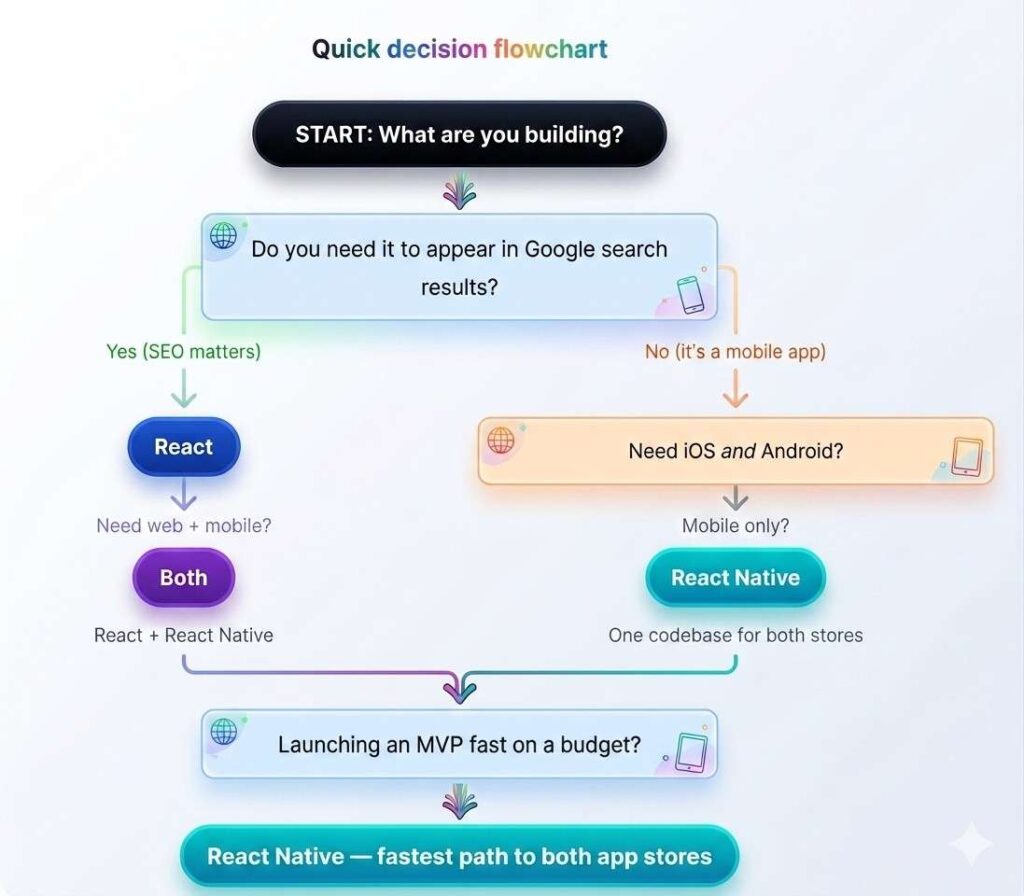
Should You Choose React or React Native?

The following flowchart helps you to make a very clear distinction between React and React Native.

Should You Choose React or React Native

React vs. React Native: Business Benefits

React for Business React Native for Business
Better SEO visibility → more organic traffic One codebase → lower dev cost vs 2 native apps 
Faster browser-side performance Up to 40% faster to market 
Easier web scalability for SaaS A single team manages iOS + Android 
Wide professional talent pool → Hire fast Easier long-term maintenance 
Ideal for complex dashboards & portalsConsistent UX across platforms 
Server-side rendering for data-heavy apps Strong for MVP validation before full build 
React vs. React Native Business Benefits

When Should Your Business Choose React?

Choose React if your product lives in a browser. If users will access it on a laptop or desktop, if you care about Google rankings, or if you’re building internal tools for employees, React is the right call.

Choose React If You Need to…

  • Rank on Google (SEO is a core growth channel) 
  • Build a browser-first product; no app store needed
  • Create SaaS software with complex dashboards or workflows 
  • Power internal tools, admin panels, or CRM systems 
  • Prioritize web scalability as your user base grows

Actual Business Examples

(1) Healthcare: Patient portals and booking systems where users log in from a web browser, and data privacy + SEO traffic matter.

(2) Logistics: Fleet management dashboards and dispatch tools that operations teams use on desktop computers all day. 

(3) B2B SaaS: Reporting tools, analytics platforms, and workflow automation software sold to other businesses. 

(4) E-commerce: Online stores and product catalogs where organic search traffic directly drives revenue. 

Working with a React JS development company that understands your industry is key. The framework is only as good as the team building with it. 

When Should Your Business Choose React Native?

Choose React Native if your users will be on their phones. If you are building something people download from an app store, whether it’s a delivery app, a booking tool, or a startup MVP, React Native saves you from paying for two separate native development teams.

Choose React Native If You Need to…

  • Launch a mobile app on both iOS and Android simultaneously 
  • Validate an MVP quickly without a large budget 
  • Keep one development team (not two separate native teams) 
  • Reduce long-term maintenance costs 
  • Push faster updates to both platforms at once

Actual Business Examples

(1) Startups: An MVP that needs to reach both iPhone and Android users by demo day, without hiring two engineering teams.

(2) Delivery & On-demand: Booking, delivery tracking, and marketplace apps where the mobile experience is the entire product.

(3) Fitness & Wellness: Apps using device sensors, GPS tracking, push notifications, and camera, all natively accessible in React Native.

(4) Fintech: Payments, wallets, and banking apps where performance and biometric security (Face ID, fingerprint) matter.

To move fast here, you will want to hire React Native developers who have delivered actual apps, not just engineers who know the framework theoretically.

Development Timeline Comparison: React vs. React Native

Project Stage ReactReact Native
UI development Medium – browser components Fast – component library built-in 
iOS + Android deployment Requires separate effort Unified – single build process 
MVP Launch Moderate (4 to 8 weeks typically) Faster (3 to 6 weeks for both stores) 
Feature Updates Instant (web deploy) Fast (OTA updates via Expo.) 
Ongoing maintenance Moderate Easier – one codebase to maintain 

Can React and React Native Work Together?

Yes, and many successful Canadian companies do exactly this. React handles the web experience. React Native handles mobile. The same backend APIs and business logic power both.

The combined approach gives you a single technology stack, a team that can switch between web and mobile, shared design systems, and far less hiring complexity than maintaining two completely separate codebases.

What is shared across both

  • Business logic and API integrations 
  • Authentication and state management 
  • Design tokens, colors, typography 
  • Developer knowledge (same language: JavaScript)

This setup is common at the scale-up stage, when a company has validated their mobile MVP and wants to add a web portal for enterprise buyers or operations teams. A good software development company will plan this architecture from day one to avoid rework later.

Can React and React Native Work Together

These aren’t niche tools; they’re category-leading products used by millions. Both technologies are proven at massive scale, which matters when you’re evaluating reliability for a business-critical application.

React vs React Native: Which Is Better for Startups?

React vs React Native Which Is Better for Startups
Startup GoalRecommended Technology
Build a SaaS platformReact
Launch a mobile MVP fastReact Native
Need SEO / organic trafficReact
Reduce app development costReact Native
Build a web + mobile ecosystemBoth
Validate a product idea quicklyReact Native

Startups that want to hire React Native developers for an MVP are making a smart financial decision: one team, one codebase, two app stores. Then they can layer in a React web app once the mobile product is validated.

Challenges to Know Before You Choose

No technology is perfect. Here’s what experienced teams run into so you are not unprepared after contracts are signed.

React – Known ChallengesReact Native – Known Challenges
Front-end only, you still need a separate back-endSome features require native modules (Java/Swift code)
SEO setup requires extra configuration (Next.js)Performance can lag in graphically intensive apps
Frequent ecosystem updates can require developer attentionDevice testing on multiple OS versions adds QA time
Opinionated choices around state management vary by teamApp store approval adds 1–3 days per release cycle

None of these are significant issues; they are manageable with the right team. But knowing them upfront helps you budget accurately and set realistic timelines.

The Future of React and React Native in 2026

Both technologies are advancing, not slowing down. Here’s what’s shaping the market conditions for Canadian businesses right now:

  • AI-powered Interfaces: React’s component model makes it the leading framework for integrating AI chat, suggestions, and real-time data into web UIs.
  • Cross-platform Dominance: Demand for React Native is surging as companies realize separate native teams are expensive and slow.
  • Mobile-first Development: With over 60% of global web traffic now on mobile, companies that don’t have a strong mobile app lose to those that do.
  • React Server Components: A major architectural shift (now stable in Next.js) that dramatically improves performance for complex web apps.
  • New React Native Architecture: The JSI (JavaScript Interface) rewrite delivers near-native performance, closing the gap with fully native development.

Businesses that choose React or React Native today are investing in technologies that will remain dominant for the next 5 to 7 years, not experimenting with something that might be deprecated tomorrow.

How to Choose the Right Development Partner

The framework matters less than the team building with it. Here is what to look for when evaluating a React Native app development company or a React JS development company for your project:

  • Cross-platform expertise: Can they build React web and React Native mobile? Fewer handoffs mean faster delivery.
  • Proven portfolio: Ask for live apps you can download or websites you can visit. Demos are nice; real production products are better.
  • Dedicated React developers: Not generalists who “also do React.” Specialists ship faster and make fewer expensive mistakes.
  • Agile delivery model: You should see working software every 2 weeks, not wait 3 months for a reveal.
  • Post-launch support: Apps need maintenance, OS updates, and bug fixes. Confirm this is included or available.
  • Canadian business understanding: Timezone alignment and familiarity with Canadian compliance requirements (PIPEDA, Quebec Law 25) reduce friction significantly.

Not sure where to start? A good development partner will help you define which technology is right for your business before any code is written. That conversation alone can save you months.

Build Scalable Web and Mobile Apps with iQlance Solutions

iQlance is a mobile app & software development company in Canada working with startups and enterprises across Canada (HQ: Toronto, Ontario). We specialize in React development, React Native app development, MVP launches, and scalable SaaS platforms, with an agile delivery model built for North American businesses. Book a free consultation or share your app idea with our React and React Native experts now!

Frequently Asked Questions

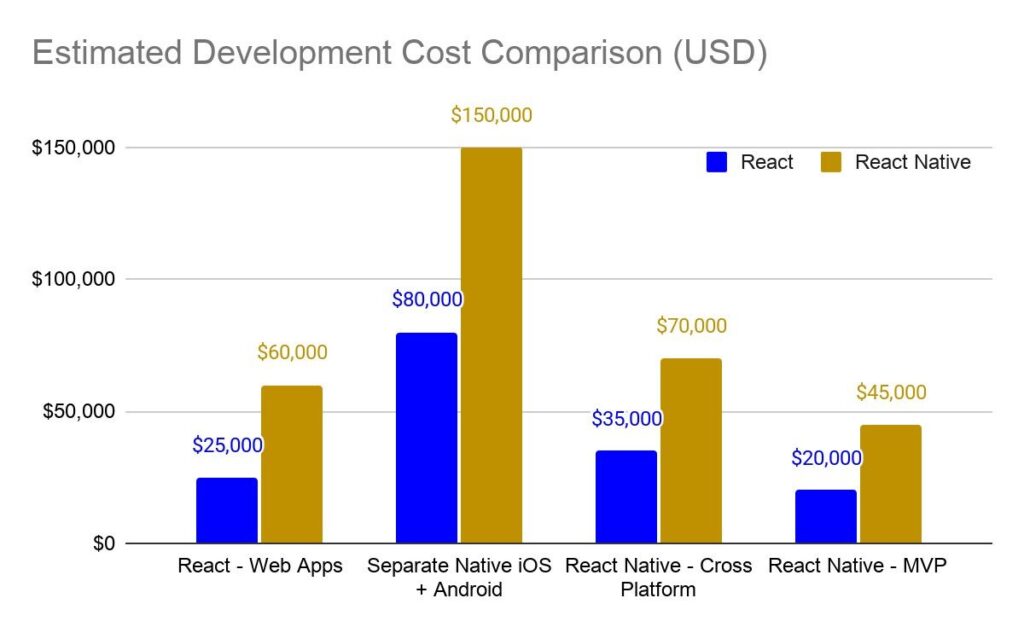
Building separate native iOS and Android apps can cost $80,000 to $150,000+ for a mid-complexity project. A React Native cross-platform app delivering the same functionality typically costs $35,000 to $70,000, roughly 40–50% less, because you have one codebase and one team.

Not natively. React builds web applications. You can make a React web app “mobile-friendly” with a responsive design, but it will not appear in the App Store or Google Play. For actual mobile apps, you need React Native (or another mobile framework).

React (especially with Next.js for server-side rendering) is excellent for SEO. Mobile apps built with React Native do not appear in Google search results; they are downloaded from app stores. If organic search traffic is a priority, React for the web is the right choice.

You can hire developers by engaging a software development company in Canada, like iQlance, that already has vetted, experienced React and React Native teams. For most businesses, working with an established company is faster and lower-risk than hiring individually.

How to Create an App in Canada: The Complete 2026 Guide

How to Create an App in Canada: The Complete 2026 Guide

Think about the last time you called a company to book an appointment, check a balance, or place an order. You probably didn’t; you tapped an app instead. That shift in customer behavior is exactly why mobile app development companies in Canada are building mobile apps.

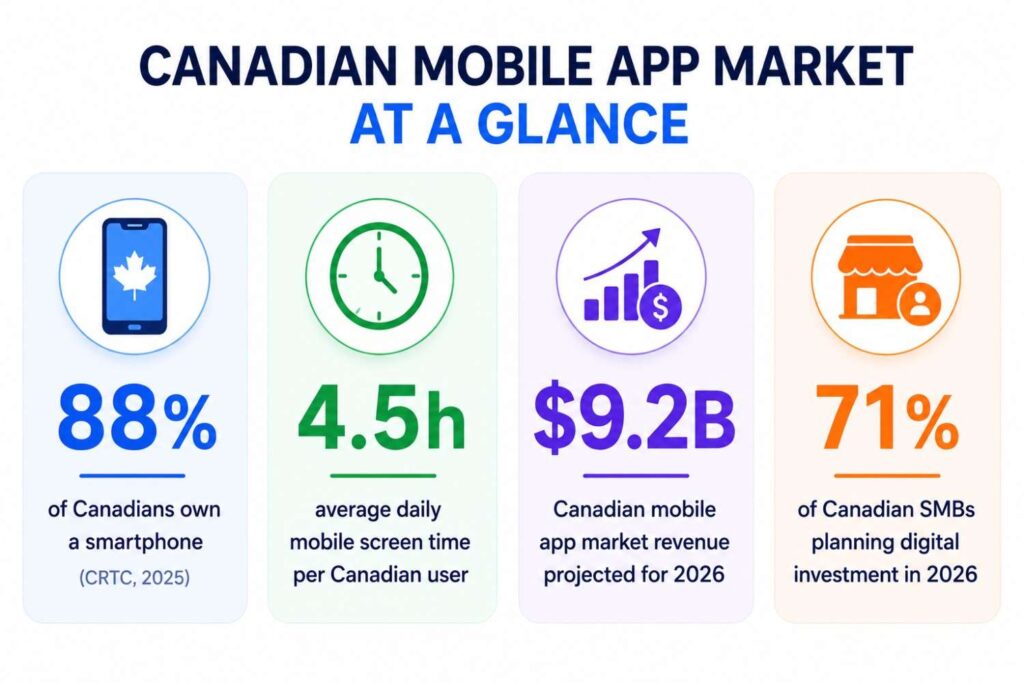
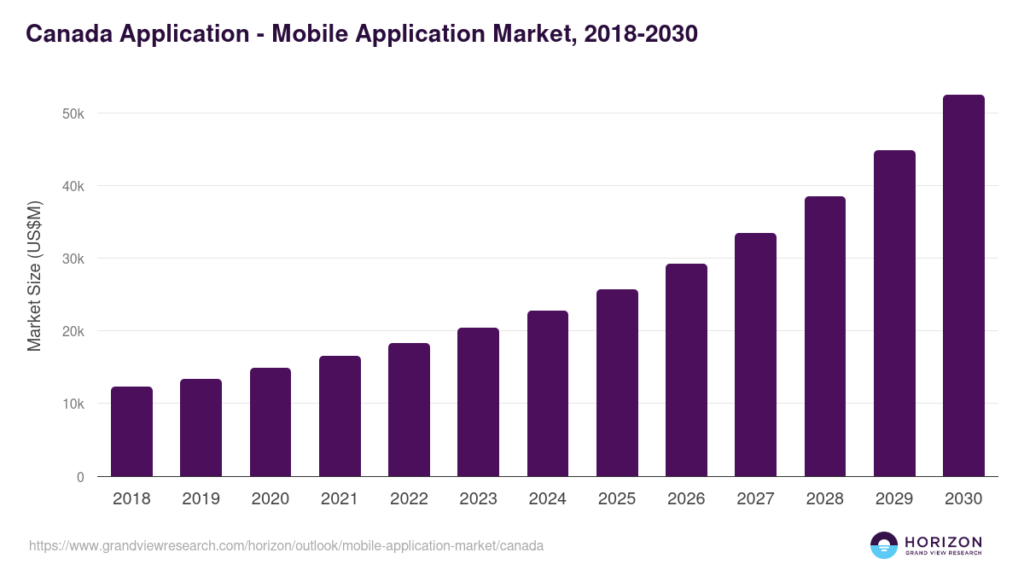
Canada’s digital economy is no longer a ‘future trend.’ It’s the operating reality. And businesses that don’t meet customers where they are, on their phones, are quietly falling behind those that do. The following states show the current scenario of the Canadian mobile app market.

building a mobile app in Canada

This guide is written for Canadian businesses that are thinking seriously about building an app but are not yet sure where to start, what it costs, or how to avoid expensive mistakes. No fluff, just a clear, step-by-step picture of what building a mobile app in Canada actually looks like in 2026.

Why Mobile Apps Are Becoming Essential for Canadian Businesses

A mobile app isn’t a fancy project. For businesses that do it right, it becomes the single most important customer touchpoint they own. Here is why Canadian companies across every industry are investing:

Sr. No.Business GoalHow an App HelpsIndustry Example (Just for reference)
1Customer RetentionPush notifications, loyalty programs, and personalized offersRetail, e-commerce
2Operational AutomationBooking, scheduling, and inventory are handled in-app without staffLogistics, healthcare
3AI-Powered CXChatbots, smart recommendations, predictive featuresFintech, SaaS
4Competitive AdvantageBe the first in your niche with a native mobile experienceReal estate, insurance
5Omnichannel CommerceSeamless web + mobile + in-store experienceRetail, hospitality

Whether you are a clinic managing patient appointments, a logistics startup optimizing delivery routes, or a SaaS company building tools for enterprise clients, a mobile app is increasingly the most direct path between your business and your customer.

What Type of App Should You Build?

Before you hire anyone or set a budget, the first actual decision is understanding which type of app fits your goals. This affects cost, timeline, and technology choices more than almost anything else.

App Type Best For Cost Range Performance Scalability 
Native iOS/Android Enterprise, complex features High Excellent Excellent 
Flutter Startups, fast cross-platform builds Medium Very Good High 
React NativeSMBs, existing web teams Medium Good High 
Progressive Web App (PWA) Budget-first businesses Low Moderate Moderate 
AI-Powered AppData-driven, personalization-heavy products HighExcellent Excellent 
SaaS Platform B2B software, subscription products High Very Good Excellent 

For most Canadian startups and SMBs, Flutter or React Native hits the sweet spot: strong performance, cross-platform reach (iOS + Android at once), and a significantly lower cost than building two separate native apps.

Step-by-step Guide to Building an App in Canada

(1) Define the Business Problem 

A successful app solves a real, specific problem, not a vague one. Before development begins, validate your idea against the market. Question to ask before you build:

  • What exact problem does this app solve, and for whom?
  • Who are your top 3 competitors, and what do they get wrong? 
  • Would your target customer pay for this or just use it for free? 
  • Can you describe the app’s core use in one sentence? 
  • Have you spoken to at least 10 potential users before building?

(2) Choose the Right App Features 

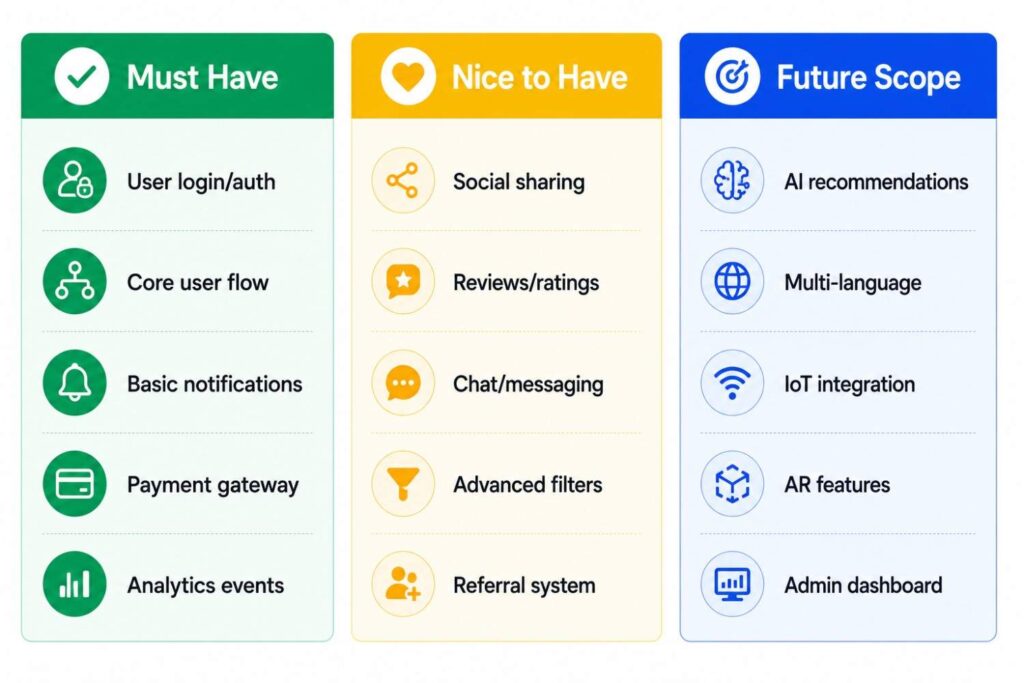
One of the biggest budget-killers is trying to build everything at once. Use a feature prioritization matrix to stay focused:

(3) Decide Your Budget 

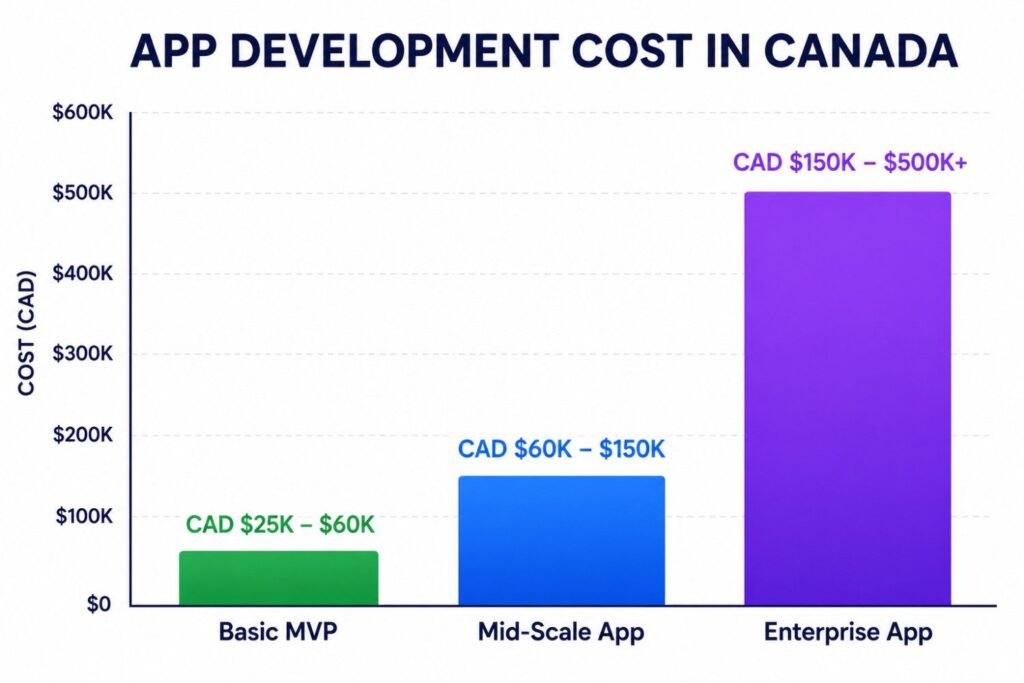
Most businesses underestimate what app development actually costs, not because they are deceived, but because no one explains what drives the numbers. Understanding mobile app development cost in Canada means looking beyond just ‘development.’ The following are some hidden costs most businesses forget to count:

  • App store fees: Apple: CAD $129/year; Google: USD $25 one-time
  • Cloud hosting: CAD $200 to $2000+ per month, depending on scale 
  • Third-party APIs (maps, payments, AI, SMS): CAD $500 to $5000 per month 
  • Post-launch maintenance: Typically 15-20% of development cost annually 
  • UI/UX design: Often a separate line thing from development

(4) Choose the Right Technology Stack

Layer Recommended Technologies (2026) 
Frontend / Mobile Flutter, React Native 
Backend Node.js, Python (FastAPI) 
Database PostgreSQL, MongoDB, Supabase 
Cloud AWS, Azure, Google Cloud 
AI Integration OpenAI APIs, Google Vertex AI 
DevOps / CI-CDGitHub Actions, Docker, Kubernetes 

(5) Hire an App Development Company or Team 

This is the single decision that will make or break your project. Here is how the key options compare:

Option Best ForAverage Cost Risk Level 
Freelancers Small, remote tasks Lowest High 
In-house Team Ongoing, large-scale productHighest Low 
Canadian Agency Accountability + local understanding Medium to high Low 
Offshore Agency Budget-conscious projects Low to medium Medium 

When you hire dedicated developers, you get a team fully focused on your product, with no context switching and no divided attention. For most Canadian businesses building their first serious product, partnering with a trusted mobile app development company in Canada delivers the best balance of cost, accountability, and quality.

(6) UI/UX Design Process 

Good design is not just visual appeal; it’s the difference between an app users love and one they delete after the first session. The process typically involves wireframes (low-fi layouts), interactive prototypes, user journey mapping, accessibility testing, and design system creation. In 2026, dark mode support and AI-driven UX personalization are expected to be increasingly available, not optional.

(7) Development Phase 

Professional development teamwork in Agile sprints, typically 2-week cycles, where features are built, reviewed, and tested continuously. This avoids the nightmare of a 6-month ‘big reveal’ that turns out to need major rework. Key practices include sprint planning, QA cycles within each sprint, DevOps automation, and CI/CD pipelines that push updates without downtime.

(8) Testing & Compliance 

Canadian businesses have specific legal obligations that don’t apply everywhere:

  • PIPEDA  Compliance: Canada’s federal privacy law governs how you collect and use personal data 
  • GDPR: Required if you serve users in the EU at any point 
  • WCAG 2.1 Accessibility: Increasingly mandated for public-facing Canadian apps
  • App Store Review Guidelines: Apple and Google both enforce strict content and privacy rules

(9) Launch Your App 

A launch without a plan is just publishing. Smart launches involve a beta release to a small user group, App Store Optimization (ASO) to improve discoverability, launch analytics set up before go-live, and a coordinated marketing push across email, social, and paid channels.

(10) Post-launch Maintenance 

An app is never ‘done.’ OS updates, new devices, user feedback, and competitive pressure mean you’ll be iterating continuously. Budget for ongoing monitoring, regular feature releases, security patches, and, increasingly in 2026, AI model updates that keep personalization features accurate and relevant.

How Much Does It Cost to Create an App in Canada? 

Understanding the mobile app development cost in Canada starts by separating what drives price from what’s just making fluff. Here is a factual breakdown:

How Much Does It Cost to Create an App in Canada
Cost Factor Why IT Matters Typical Impact on Budget 
Number of Features Each feature = design + dev + QA time Very high 
Third-party Integrations Payment gateways, CRMs, maps, and AI APIs High
AI Features Custom model training adds high cost High 
UI/UX Complexity Custom animations and design = more hours Medium to High 
Security Requirements FinTech and Health apps need extra layers Medium 
Team Location Canadian rates vs. offshore significantly differ Very High 
app development cost planning tips canada

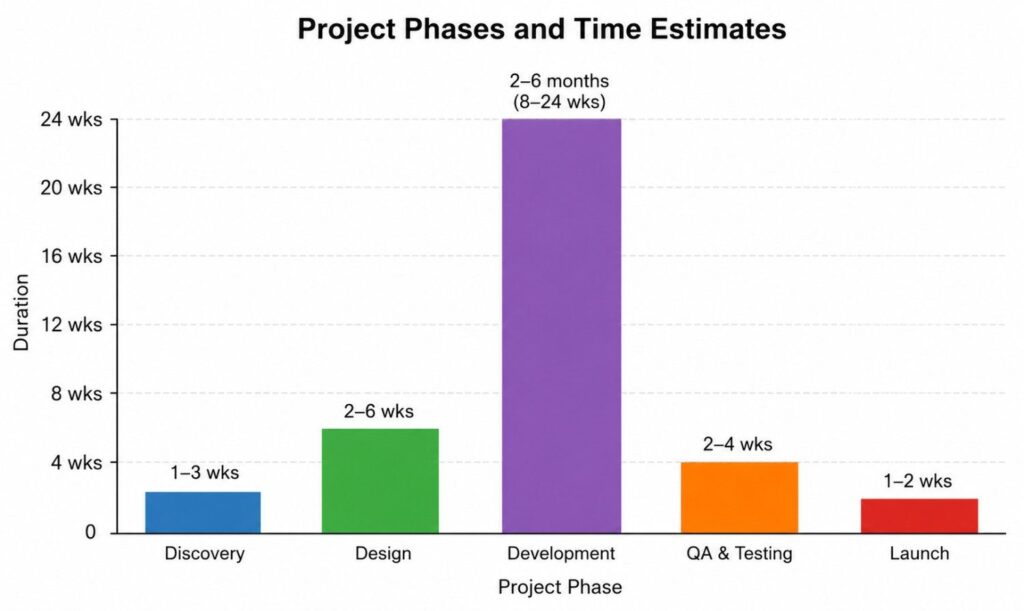
App Development Timeline in Canada

App Development Timeline in Canada

Common Challenges While Building an App 

Most app projects that go sideways don’t fail because of bad ideas. They fail because of avoidable process mistakes. Here is what to watch for and how to avoid it:

Challenge What It Looks Like How to Avoid It 
Scope Creep “Can we just add more features?” – repeatedly Lock the MVP scope before development begins; use a change order process 
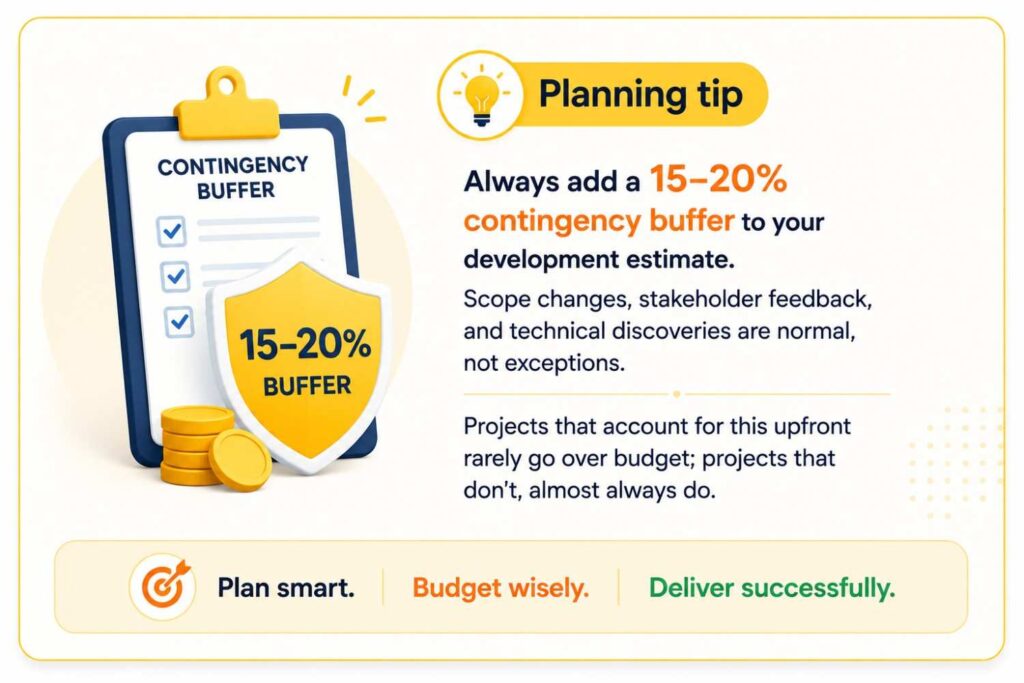
Budget OverrunsRunning out of money with 30% left to build Phase-based releases; keep 20% contingency budget
Poor UX Users can’t figure out how to use the core flow User test with real people before final development 
Wrong Agency Missed deadlines, no accountability, poor communication Check references; review live past work, not just screenshots 
Scalability Issues The app crashes when traffic spikes Design for scale from day one: use cloud-native architecture 
AI Integration Confusion Adding AI without a clear use case or budget Define exactly what AI feature solves for the user before building 

Why Most Canadian Businesses Start with an MVP

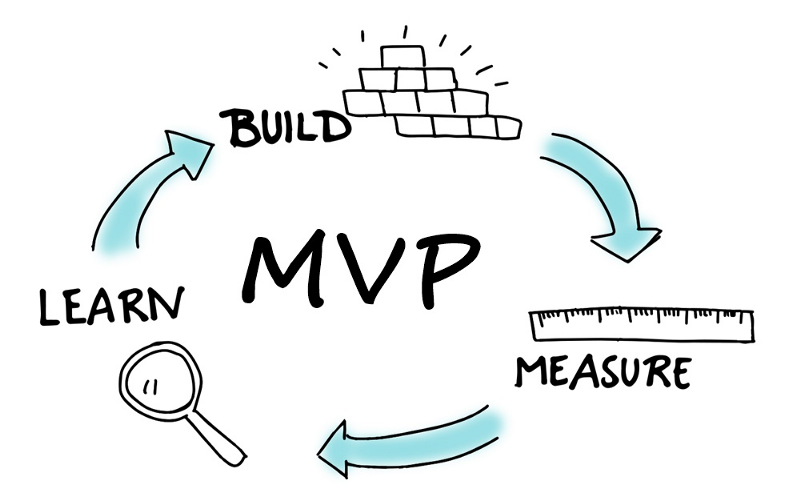
An MVP (minimum viable product) is not a cheap and half-developed version of your app. It’s the least expensive version that delivers real value and lets you learn from actual users before investing in the full build.

Factor MVP Approach Full Product Build 
Time to Market 2 to 4 months 6 to 14 months 
Upfront Investment Lower Much Higher 
Investor Validation Easier with live data Harder pre-launch 
User Feedback Built into the process Comes late 
Risk level Lower Higher 

Many Canadian startups choose MVP development first to validate product-market fit before committing to full-scale investment. The goal is not to build less; it is to learn faster. iQlance helps Canada-based businesses define and build strategic MVPs that generate real traction.

How to Choose the Right App Development Company in Canada

This is where the biggest mistakes happen. Choosing the wrong partner costs time, money, and sometimes the entire project. Whether you are looking at app development Toronto companies or coast-to-coast Canadian agencies, use the following checklist:

Green Flags to Watch For 

✔️ They sign an NDA and provide clear IP ownership from day one

✔️ They have a portfolio with live, downloadable apps, not just mockups

✔️ They have worked in your industry or a closely related one

✔️ They have experience with AI-ready architecture in past projects

✔️ They use Agile methodology with sprint-based reporting

✔️ They offer post-launch support and maintenance, not just “build and goodbye.”

✔️ They understand Canadian-specific compliance (PIPEDA, AODA, provincial privacy laws)

✔️ They ensure 100% IP-ownership transfer after compilation of the project

Red Flags to Watch For

❌ Unrealistically low pricing (often signals offshore subcontracting without disclosure)

❌ No post-launch support plan

❌ Vague about who actually owns the code after delivery

❌ No NDA or data security process

❌ Showing mockups for “past projects,” they can’t reveal live

When you decide to hire dedicated developers, the right team will feel less like a development company and more like a technology partner, invested in your outcome, not just billing hours.
Looking for anapp development Toronto option? iQlance works with startups, SMBs, and enterprises across Canada with full-cycle delivery, from discovery to post-launch support.

Future of Mobile App Development in Canada (2026-2027)

The businesses building apps today are making architectural decisions that will either put them ahead or force expensive rebuilds in 2027. Here is what is shaping the standards:

  • AI-powered apps with built-in personalization
  • Voice interfaces (Siri, Google, custom NLU)
  • Hyper-personalization at the user level
  • Super apps (one app, multiple services)
  • IoT integration for hardware-connected products
  • Low-code acceleration for internal tools
  • AI copilots embedded inside apps
  • On-device AI (reduced cloud dependency)

The trend that matters most: AI is no longer a premium add-on. Users in 2026 increasingly expect apps to anticipate their needs, not just respond to them. If your app does not have a clear AI roadmap, your product planning should start there.

Frequently Asked Questions

Yes, iQlance signs a Non-Disclosure Agreement (NDA) before discussing your app idea or business requirements. We ensure complete confidentiality, data security, and intellectual property protection throughout the development process.

Yes. iQlance is a legally registered Canadian app development company headquartered in Toronto. We are available for both virtual and in-person meetings to discuss your project requirements, strategy, and development roadmap.

Yes. iQlance has experienced and certified app developers, designers, and technology consultants working with Canadian businesses across multiple industries. Our team specializes in mobile app development, AI integration, SaaS platforms, and custom software solutions.

The cost of building an app in Canada typically ranges from CAD 25,000 to CAD 150,000+, depending on the app’s complexity, features, platform, UI/UX requirements, integrations, and development timeline. MVP apps generally cost less compared to enterprise-grade applications.

Most mobile apps take around 2 to 6 months to develop. A basic MVP can be completed within 6-8 weeks, while larger enterprise applications with advanced features and AI integrations may require several months.

Yes. iQlance provides ongoing post-launch support, including app maintenance, performance monitoring, security updates, bug fixes, feature enhancements, and scalability support to ensure long-term app success.

Once the project is completed and all payments are cleared, the complete intellectual property (IP), source code, and project ownership rights are transferred to the client. iQlance maintains full transparency regarding ownership and legal agreements.

The Ultimate List of 10 Best Mobile Apps for Toronto Residents (in 2026)

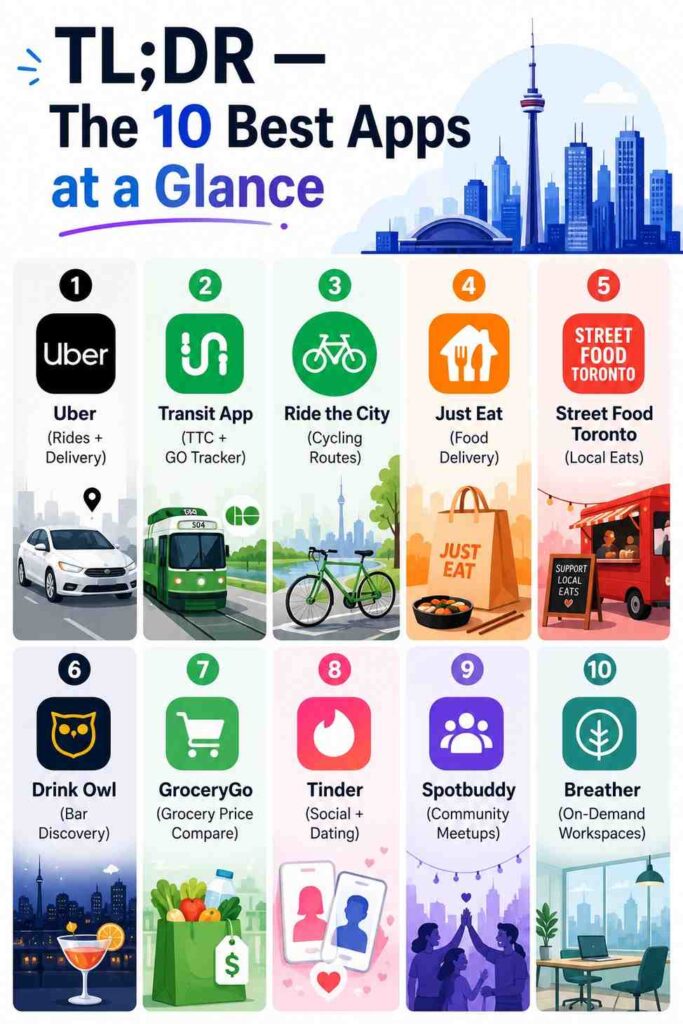
10 Best Mobile Apps for Toronto Resident

Living in Toronto means managing transit, payments, food, and city services, often across a dozen different screens. Here is the shortlist that actually makes life easier.

Mobile Apps for Toronto Resident

Think about a regular Monday in Toronto. You need to catch the TTC, find a parking-free launch spot near King Street, send a quick invoice, and maybe meet someone after work. Those are at least four major decisions you have to make, and in 2026, there is a smarter app for each one.

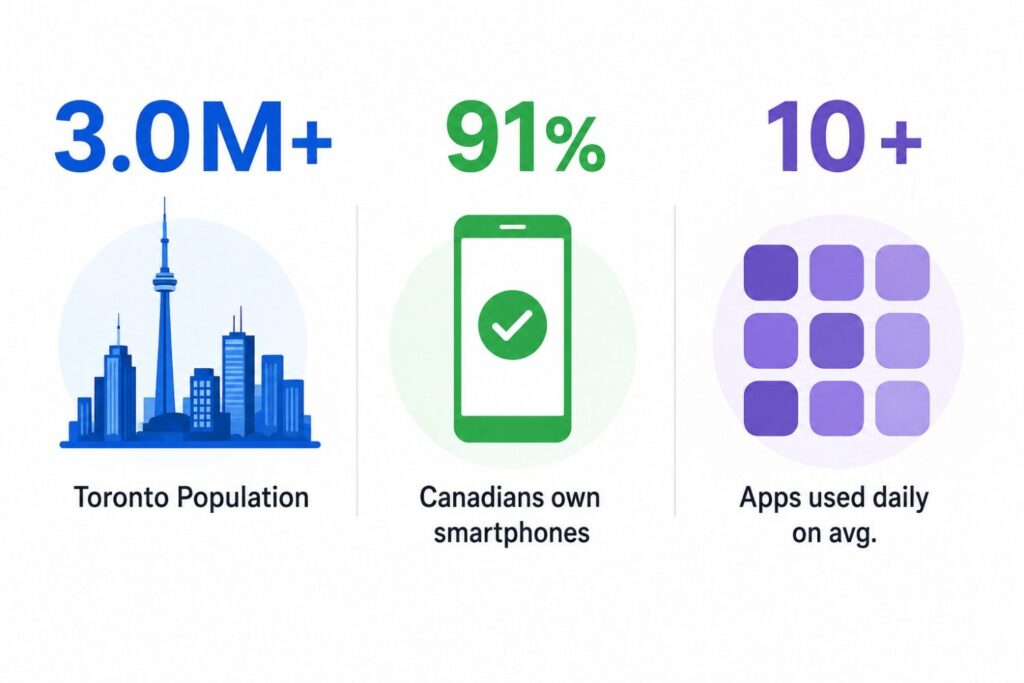
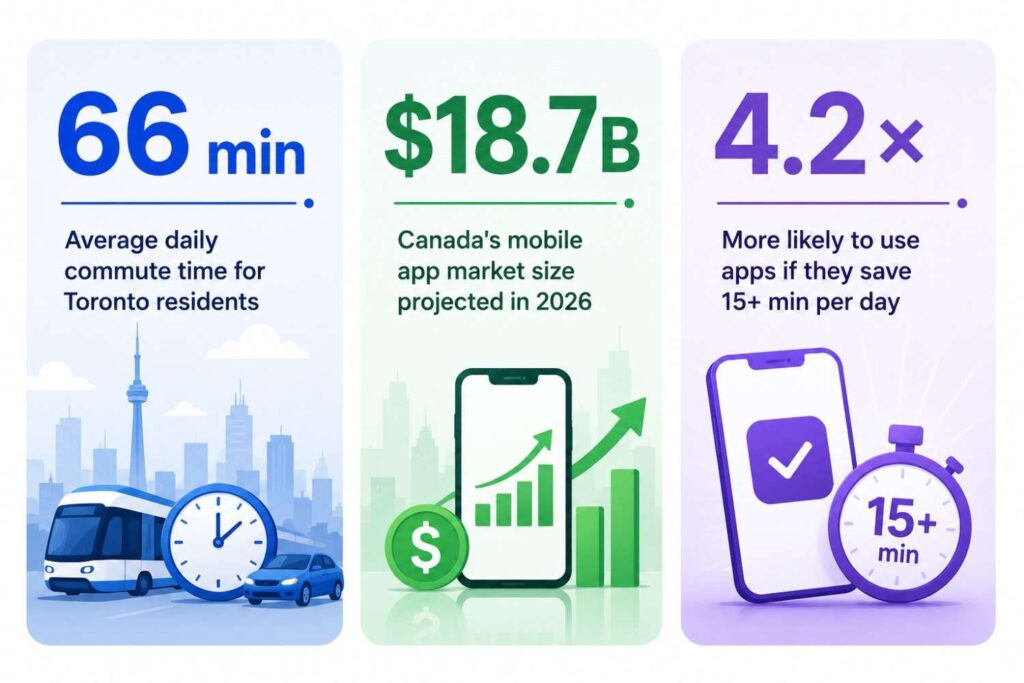
Smartphone usage in Canada has crossed the 91% mark, and Toronto residents are among the most digitally active in the country. It’s no coincidence that app development Canada-wide has become one of the fastest-growing tech sectors. The demand is right here, on every streetcar and every lunch break. But more apps don’t mean better ones.

The city’s unique mix of multi-modal transit, dense neighborhoods, and a fast-paced professional culture means residents don’t need a hundred apps; they just need the best 10. This guide breaks down exactly that, organized by category, ranked by actual utility, and written for people who actually live and work here.

best mobile apps for toronto resident

Why App Choice Actually Matters in a City Like Toronto

Toronto isn’t a one-speed city. A commuter in Scarborough has different needs from a startup founder in the Financial District. A student near UofT looks for different tools than a restaurant owner on Queen West. The apps you choose quietly shape how much friction or flow you experience every single day. And as app development Toronto continues to accelerate, the tools available to residents are only getting sharper.

Why App Choice Actually Matters in a City Like Toronto

The city’s public transit network, TTC, GO, UP Express, etc., is expensive but not always predictable. That alone creates a need for real-time data apps. Add the food scene (Toronto has over 9000 restaurants), a co-working boom post-pandemic, and one of Canada’s most active social calendars, and you start to see why the average Torontonian reaches for their phone more than 80 times a day.

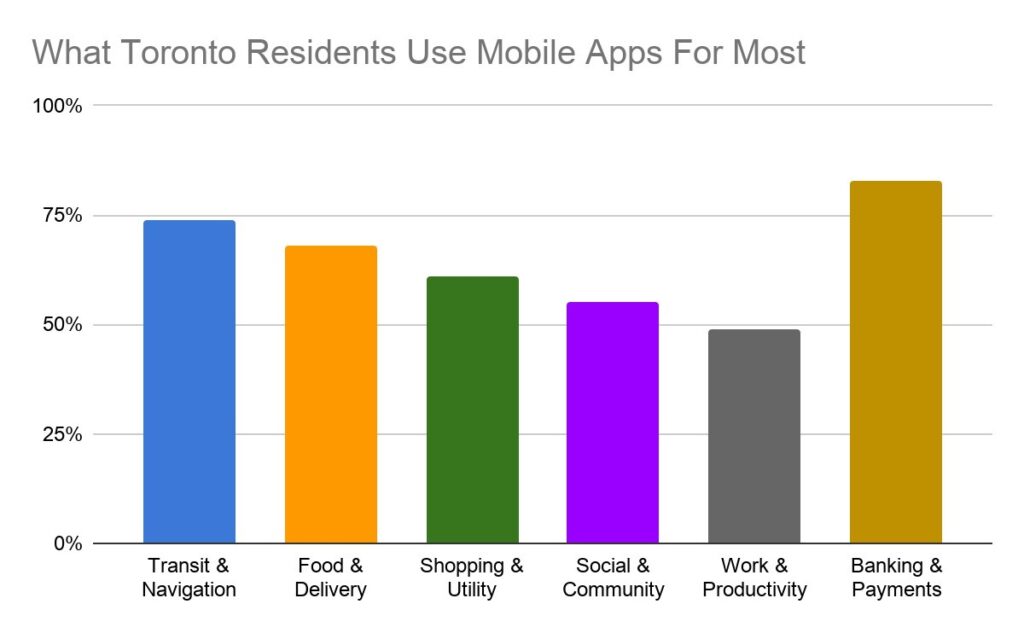
most used mobile apps in toronto

The Best 10 Mobile Apps for Toronto Residents in 2026

The following are the apps broken down by what it does, who it’s for, and why it earns its place on your phone.

(1) Uber 

(⭐ 4.8 in App Store)

Uber in Toronto is more than a ride. It is a transit fallback when the TTC is delayed, a food delivery platform via Uber Eats, and for businesses, a reliable way to move clients across the city without dealing with parking. The integration between rides, food, and Uber for business makes it the single highest utility app on this list. The best features of this app are ridesharing, parcel delivery, business billing, and real-time tracking.

(2) Transit App 

(⭐ 4.7 in App Store)

Think of this as your personal TTC dispatcher. The Transit app pulls live data from TTC buses, subway lines, GO Transit, and even Uber, displaying everything on one map. It shows you exactly how many minutes until your bus arrives (not the scheduled time, the actual time) for daily commuters. This is arguably the most important app in Toronto. The best features of this app are TTC live data, GO Transit, multi-model routing, and trip planning.

(3) Ride the City 

(⭐ 4.3 in App Store)

Toronto’s cycling infrastructure has expanded significantly, and Ride the City maps it all. The app recommends the safest, most bike-friendly routes through the city. Avoid high-traffic roads and highlight protected lanes. If you are part of the growing crowd using Bike Share Toronto or your own wheels, this app removes the guesswork from cycling in the city. The app offers cycling routes, Bike Share Toronto, safety-first navigation, etc., features.

(4) Just Eat 

(⭐ 4.4 in App Store)

Just Eat holds a unique edge over competitors in Toronto: it includes smaller independent restaurants that aren’t on Uber Eats or DoorDash. If you want to support a local Kensington Market shawarma spot or a family-run Vietnamese restaurant in Scarborough, Just Eat is where you find them. Price transparency is also notably better; you see delivery fees upfront, not at checkout.

(5) Street Food Toronto 

(⭐ 4.1 on Google Play)

Toronto’s street food scene is underrated and largely invisible unless you know where to look. Street Food Toronto maps licensed food trucks and pop-up vendors across the city in real time. It is a niche app, but it fills a real gap: finding a great launch under $12 near you. Particularly useful during summer months around the waterfront and downtown core.

(6) Drink Owl 

(⭐ 4.2 in App Store)

Drink Owl is essentially a Yelp platform built specifically for Toronto’s bar culture. It curates cocktail bars, craft beer spots, wine bars, and rooftops with filters by neighborhood, vibe, price point, and even happy hour timing. For professionals entertaining clients or a team post-work outing, it saves the “where should we go?” back-and-forth entirely.

(7) GroceryGo 

(⭐ 4.5 in App Store)

GroceryGo does one thing extremely well: it compares grocery prices across Loblaws, Metro, Walmart, Costco, and No Frills in real time so you always know which store has the lowest price on the items you actually buy. In a city where the cost of living continues to climb, this is one of those apps that genuinely puts money back in your pocket, often $30 to $50 per week for a family of four.

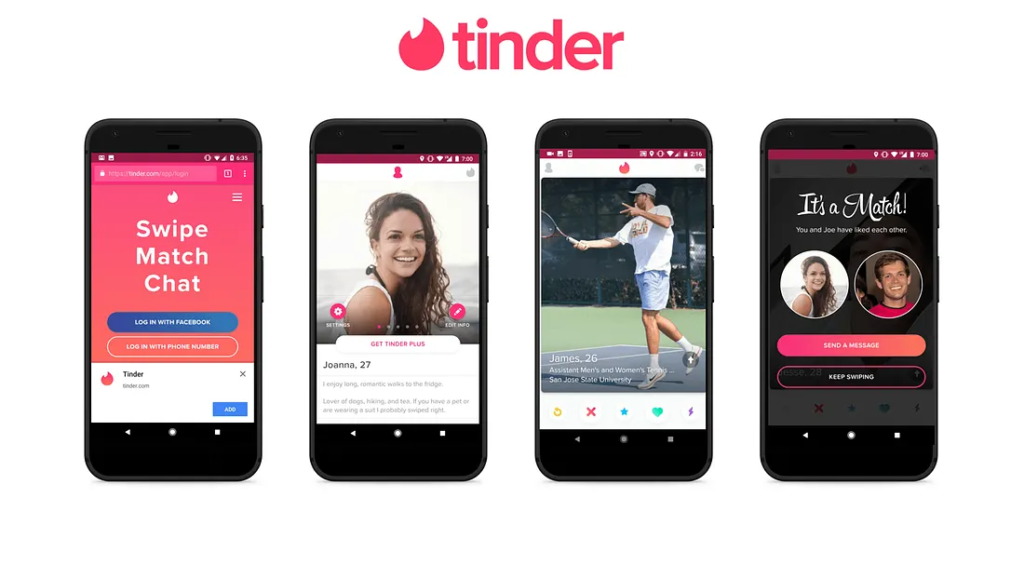
(8) Tinder 

(⭐ 4.0 in App Store)

Toronto is one of North America’s most diverse cities, which makes Tinder’s user base here unusually rich. Beyond just dating, the app increasingly surfaces event-based connections and shared interests. In 2026, features like ‘Tinder Explore’ make it a social discovery tool as much as a dating one. For newcomers to the city, it’s also been widely cited as a genuine way to find community.

(9) SpotBuddy 

(⭐ 4.3 in App Store)

SpotBuddy is built for shared interests; find running partners, hiking groups, sports leagues, or hobby clubs near you in Toronto. Unlike Facebook Groups (which are chaotic) or Meetup (which feels stale), Spotbuddy focuses on spontaneous, location-based activity matching. It’s especially useful for professionals and newcomers who want to build a social life beyond the office.

(10) Breather 

(⭐ 4.5 in App Store)

Breather is an on-demand workspace booking app, and it was built in Canada, making it particularly well-suited for Toronto’s downtown core. Need a quiet room for a two-hour client call? A small meeting space for 4 people near Union Station? Book it on Breather in under a minute. It’s a practical solution for hybrid workers, freelancers, and growing teams that don’t want to commit to a full office lease.

AppCategoryBest ForFree?
UberTransitRides, food delivery, business travelFree (pay per use)
Transit AppTransitDaily TTC + Go commutersFree
Ride the CityTransitCyclists and bike-share usersFree
Just EatFoodSupporting local restaurantsFree (delivery fees) 
Street Food TorontoFoodFinding food trucks and pop-upsFree
Drink OwlFoodBar & nightlife discoveryFree
GroceryGoUtilitySaving on weekly groceriesFree
TinderSocialDating, social discovery, eventsFreemium
SpotBuddySocialActivity groups + communityFree
BreatherWorkOn-demand meetings + workspacePay per booking

How to Choose the Right App Stack for Your Situation

Not everyone needs all the above-mentioned apps. Here is a simple framework based on how you actually use the city, so you are not downloading apps you will ignore.

(1) If You Commute Daily

  • Transit App (real-time TTC data) 
  • Uber (backup when transit fails) 
  • Ride the City (if you cycle) 
  • Breather (for flexible work hours)

(2) If You Run a Business

  • Uber for business (client travel) 
  • Breather (Team meeting spaces) 
  • Transit App (know your team’s routes) 
  • Drink Owl (client entertaining)

(3) If You Are New to Toronto

  • Transit App (learn the city’s routes) 
  • SpotBuddy (build a social circle) 
  • GroceryGo (learn local price benchmarks) 
  • Street Food Toronto (explore affordably)

(4) If You Are Watching Costs

  • GrocerGo (save on groceries) 
  • Just Eat (transparent delivery fees) 
  • Transit App (avoid costly Uber habit) 
  • Street Food Toronto (cheap-quality meals)

Top 4 App Trends Reshaping How Toronto Operates in 2026

The apps we have discussed are all used to solve users’ pain points. But modern tools are changing how the entire city thinks about mobility, services, and productivity. These trends matter if you are a business leader thinking about where digital products are running.

(1) AI-powered Civic Apps

Tools like SolveTO are using AI to help residents report city issues, navigate permits, and access government services in simple language, ensuring no bureaucratic jargon is needed.

(2) Super Apps + Ecosystem Bundling

Rather than 10 separate apps, platforms are building transit, payments, food, and services into one, following the WeChat model. Toronto is early, but the direction is clear.

(3) Real-time + Predictive Mobility

Apps are moving from ‘where is my bus now’ to ‘you should leave in 4 minutes based on your meeting, route congestion, and weather.’ Predictive intelligence is the new real-time.

(4) Contactless-first Economy

Cash is nearly irrelevant in Toronto’s core. From transit fares to street food, the entire urban experience is moving toward tap-to-pay and in-app payments by default.

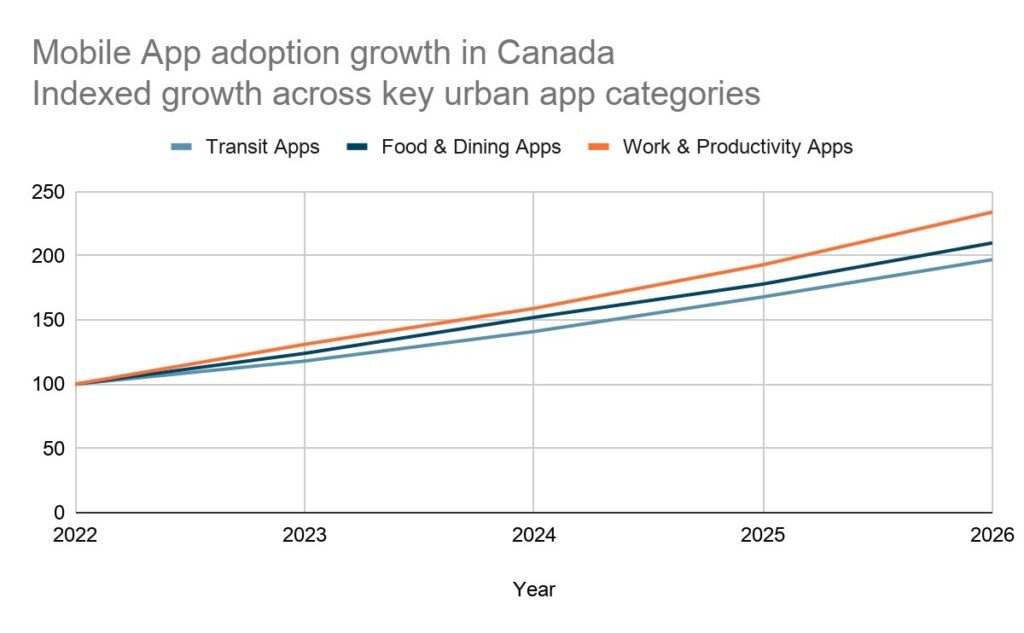
mobile app growth in toronto
(The base year here is 2022.)

What This Tells Us About Where Businesses Need to Invest

Every app on this list started as someone’s answer to a problem that wasn’t being solved well enough. Businesses across Canada, from startups to enterprises, are increasingly recognizing that a well-built mobile app isn’t a nice-to-have; it’s a competitive channel.

Whether it’s a retail brand needing a loyalty and commerce app, a logistics company wanting real-time fleet visibility, or a healthcare provider building a patient engagement tool, the underlying challenge is always the same: turning an idea into a reliable, well-designed product that people actually use.

That’s where a trusted mobile app development company comes in. The most successful mobile products in 2026 share a few traits: they solve one problem extremely well, they’re built with a mobile-first mindset, and they’re maintained iteratively based on real user feedback.

Building a mobile app for the Canadian market?

iQlance helps Canadian businesses design, develop, and launch mobile apps from MVPs for startups to feature-rich apps for enterprises. Let’s talk about what you want to build. Contact us now, or explore our portfolio to know more about us.

Conclusion

Apps Are Infrastructure… and Toronto Proves It

A decade ago, “Which apps do you use?” was a casual conversation. In 2026, it’s closer to asking someone how they get around, eat, work, and connect with people. The ten apps in this list aren’t unique; they’re part of how Toronto actually functions.

The real message is not just which apps to download. It’s that every one of these products was built to solve a specific, real problem for a specific group of people. That clarity of purpose is what separates apps people actually use from the 80% that get deleted within a week.

For businesses, the lesson is equally clear: mobile is not a feature your product might eventually need; it’s often the primary way your customers, employees, or partners will interact with you. The companies investing in thoughtful app development Canada-wide today are building the infrastructure their businesses will run on tomorrow. Whether you choose to work with a mobile app development company or hire dedicated developers to work directly within your team, the important thing is starting with clarity: who is this app for, what problem does it solve, and what does success look like in 90 days?

If you’re at the stage of thinking about what it would take to build something for the Canadian market, whether that’s a customer-facing app, an internal tool, or a full product, the smartest first step is talking to a team that’s done it before. Learn how iQlance approaches mobile app development in Canada.

How Much Does Software Development Cost in Canada? Detailed Breakdown for 2026

Software development in Canada costs between CAD 55,000 to over CAD 550,000, yet most businesses still walk into any random software development company’s conversations without a realistic budget. The result? Blown timelines, surprise invoices, and scope creep that eat into ROI before the product launches.

If you are figuring out what it actually costs to build software in Canada, then this guide is for you. No tech jargon, no vague ranges, just a clear breakdown of what drives the cost, where the money actually goes, and how to plan a budget before consulting any software development company in Canada.

Quick Snapshot of Software Development Costs in Canada (2026) 

The following table shows the average cost Canadian businesses are spending on software projects in 2026, broken down by the complexity of the software:

Average software development cost in Canada, 2026
Project TypeEstimated Cost (CAD)Approximate TimelineExample
MVP / Basic Software Solution$55,000 to $100,0003 to 6 monthsSimple web app, internal tools
Mid-level Software Solution$100,000 to $330,0006 to 12 monthsSaaS product, customer portal
Enterprise-grade Software Solution$330,000 to $550,00012 to 24 monthsERP, feature-rich platform integrated with cutting-edge technologies

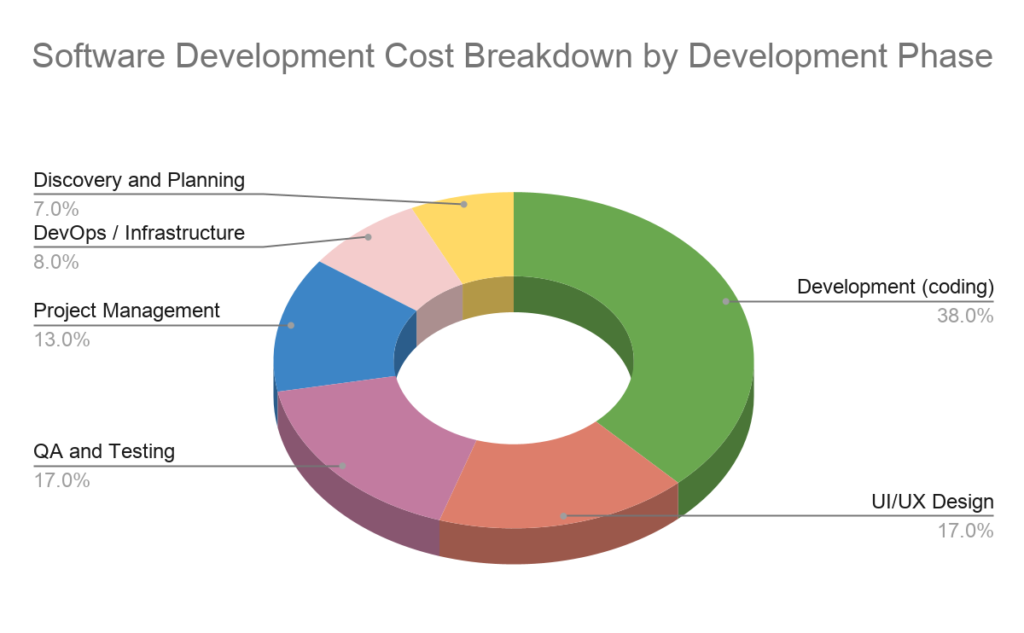
No one tells you the exact cost of the custom software development. Coding is only about 35% to 40% of the total software project cost. The rest goes to design, testing, infrastructure, and project management, which are the areas that most businesses forget to consider while deciding on a budget for software development.

What Actually Drives Software Development Cost? 

(1) Project Scope and Complexity 

Each feature you add will cost more time, and every hour costs you more money (because Canadian professionals charge on an hourly basis). That is a simple calculation that you have to understand first. The following table shows how features break down by complexity:

ComplexityFeature InclusionRelative Cost Impact
Basic Software SolutionForms, data lists, user profiles, simple CRUDLow
Medium Software SolutionLogin or authentication, dashboards, notifications, search, and moreModerate
Advanced Software SolutionAI features, real-time data, payments, multi-tenancy, and moreHigh

(2) Team Structure and Location (Canada vs. Offshore) 

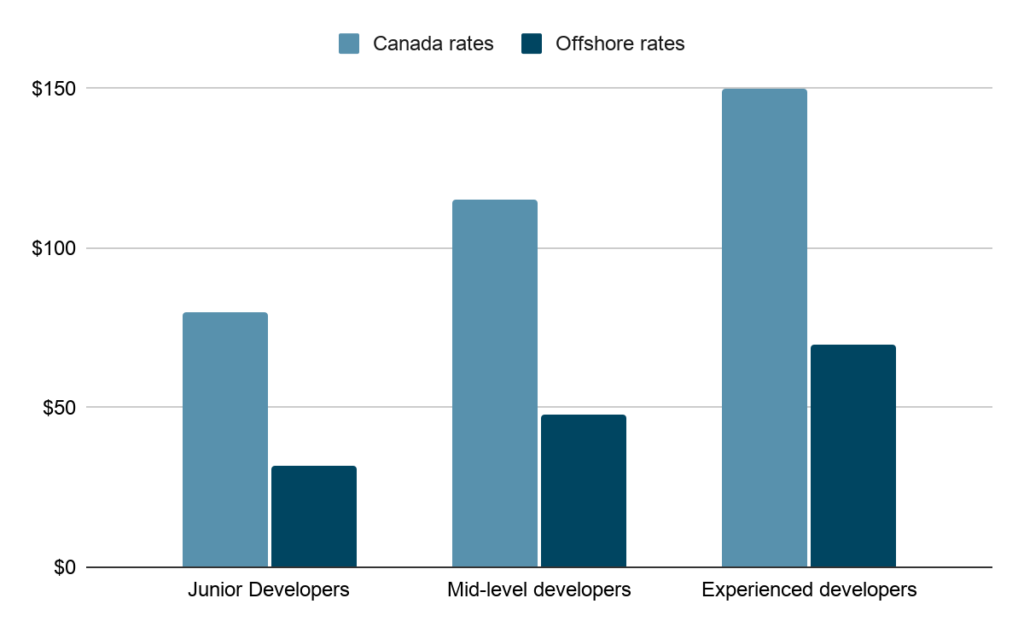
Where your developers sit has a massive impact on what you pay per hour. The following graph shows the current rate scenario.

Team Structure and Location (Canada vs. Offshore)

The offshore team can reduce costs by 30% to 70%. But this comes with trade-offs: zone gaps, communication overhead, and regulatory risks. Many Canadian companies today use a hybrid model, a local tech lead paired with offshore developers, for the best of both parties.

(3) Technology Stack and Architecture 

Building a monolith (one big system) is faster and cheaper. Microservices (separate, independent components) cost more to build but scale much better. Choosing the wrong architecture early can mean expensive rebuilds down the road.

  • Cloud-native software solutions cost more initially, but reduce long-term infrastructure overhead
  • React, Node.js, and Python are widely available and cheaper to hire 
  • Niche stacks (COBOL, legacy enterprise) significantly increase the costs and risks

(4) Integration and 3rd-party Dependencies 

Every time your software needs to ‘talk’ to another system, a payment gateway, a CRM, a logistics API, or anything, it’s the integrations. And each integration adds development time, testing time, and potential ongoing maintenance costs.

Integration TypeAdded Cost Estimate (CAD)
Payment Gateway (Stripe, Square)$3,000 to $8,000
CRM (Salesforce, HubSpot)$5,000 to $15,000
ERP (SAP, Oracle)$15,000 to $40,000 or more
Custom API integration$4,000 to $20,000

(5) Security and Compliance

If your business operates in a regulated industry, then compliance is a must; it’s built into the total cost of development. Canadian businesses often need to meet the following:

  • PIPEDA – Canada’s federal privacy law for private-sector organizations
  • PHIPA – Health information privacy law for Ontario-based health companies 
  • PCI DSS – Required for any software handling card payments 
  • SOC 2 – Common need for SaaS companies serving enterprise clients

Compliance-ready development can add 20% to 35% to your total project cost. But it is far cheaper to build it in from the start than to retrofit it later.

Software Development Cost Breakdown

(1) Cost by Development Phase

The following is something most cost guides skip, where the budget actually goes to a software project. Coding is just a single phase of the end-to-end process of development.

Development PhaseShare of Total BudgetWhat It Covers
Development (Coding)~38%Building features, APIs, backend logic, data models, and more
UI/UX Design~17%Wireframes, prototypes, visual design, user testing, and more
QA and Testing~17%Manual testing, automated tests, performance and security testing, and more
Project Management~13%Sprint planning, stakeholder updates, risk management, and more
DevOps / Infrastructure~8%Cloud setup, CI/CD pipelines, monitoring deployments, and more

The most common budget mistake is planning only for the development (coding) part, which is just ~38% of the final budget, and forgetting about QA, design, and infrastructure, which make up the other ~62% of costs. This is where it went over budget.

(2) Cost by Software Type

Software TypeSimpleMid-levelComplex
Web Application$25k to $60k$60k to $120k$120k to $300k or more
Mobile Software Solution 
(iOS or Android)
$40k to $80k$80k to $160k$160k to $350k or more
SaaS platform$80k to $150k$150k to $250k$250k to $500k or more
Enterprise ERP/CRM$150k to $250k$250k to $400k$400k to $550k or more

(3) Cost by Business Size

Business TypeTypical Budget Range (CAD)Focus Area
Startup / Early Stage$55,000 to $120,000Lean MVP, 3 to 5 core features, validate the idea first
SMB (Small-Medium Business)$100,000 to $280,000Scalable systems, integrations, automation
Enterprise$300,000 to $550,000 or moreCompliance-heavy, multi-region, legacy integrations

(4) Hidden Costs

The following table shows the costs at which projects quietly go over budget. These are predictable, yet most cost estimates omit them.

Hidden CostTypical ImpactNotes
Annual Maintenance+15-20% of build cost per yearBug fixes, security patches, updates
Scope Creep+20-40% to project totalEvery small addition compounds
3rd-party tools and APIs$500 to $2000/month ongoingCloud, analytics, and communications
Technical debtSlows future development opportunities by 30-50%Shortcuts today = higher costs later
Staff training (if needed)$5000 to $20,000 (one-time cost)Often overlooked in enterprise builds

How to Estimate The Software Development Cost

You don’t need a technical background to build a perfect estimate. Follow the following five-step framework:

StepsActionDetail
Step 1Define your featuresList the feature you want; don’t filter yet, just note down everything
Step 2Categorise complexitySort each feature into basic, medium, or advanced using the complexity table above
Step 3Estimate hours per feature.Basic features – 20 to 50 hours 
Medium features – 50 to 150 hours 
Advanced features – 150 to 400 hours
Step 4Multiply by the rateUser CAD $90 to $120/hour for hybrid teams; multiply total hours by this blended rate
Step 5Add 20% buffetEvery project has hidden costs. Keep 20% contingency before finalizing your budget.

How to Reduce Software Development Cost Without Cutting Corners

(1) Start with an MVP: Launch the core product, gather actual feedback, and then build a complete, feature-rich software.

(2) Choose a hybrid team model: Canadian oversight with global delivery efficiency.

(3) Prioritize must-have features: Defer nice-to-have features for version 1 and version 2 of your software.

(4) Invest in proper discovery upfront: A $10k scoping phase prevents a $50k rework later.

(5) Avoid switching vendors mid-project: Onboarding a new team resets weeks of context.

Build vs. Buy vs. Outsource: Which Makes Sense for You?

ApproachBest ForCost ProfileControl
Build in-houseCore IP, long-term product roadmapHigh upfront + ongoing salariesFull
OutsourceSpeed, budget-conscious projectsProject-based, predictableModerate
Buy (off-the-shelf)Standard needs, fast deploymentLow build, ongoing licensingLow
Hybrid ModelScale and IT protectionBalance, best overall ROIHigh

For most Canadian mid-size businesses, outsourcing to a local software development company in Canada or working with a hybrid team delivers the best cost-to-quality ratio. You get experienced developers without the overhead of full-time hires and a local partner who understands Canadian compliance requirements.

Why Canadian Businesses Are Choosing iQlance Solutions

As a leading software development company with Canadian roots and a distributed delivery model, we work with startups, SMBs, and enterprise clients across the country. Here’s what makes the difference when you hire software developers through iQlance:

  • Local presence across Canada, and in-person meetings available in major cities
  • Deep experience in regulated industries like healthcare, fintech, and logistics
  • The hybrid team model, along with Canadian oversight, has global delivery efficiency
  • Transparent project pricing with fixed-cost milestone options
  • End-to-end capability including discovery, design, development, QA, DevOps, and maintenance

Want to know what your project would actually cost?

Share your project requirements, and our team will put together a detailed, no-obligation estimate specific to your scope, team structure, and compliance needs.

FAQs

Timelines vary from 3 months for a simple MVP to 18-24 months for an enterprise-grade system. Most mid-level projects land between 6-12 months, including design, development, and QA phases.

Offshore developers are 30-70% less expensive hourly, but this doesn’t account for project management overhead, communication delays, and time zone friction. A hybrid model, where a Canadian company manages offshore execution, often delivers the best value.

  • Junior developers: CAD $70-$90/hr.
  • Mid-level developers: CAD $100-$130/hr.
  • Senior developers: CAD $140-$160/hr.
Rates vary by city, specialty, and experience. Toronto and Vancouver tend to be on the higher end.

Fixed-price works well when the scope is clearly defined upfront. Time-and-materials is better for growing products where requirements change. Most agile projects use a blended approach: fixed milestones with flexible scope.

Realistically, CAD $55,000 is the floor for a production-ready MVP. Anything less typically means missing critical components like QA, security, or proper infrastructure setup.

Look for transparent pricing, experience in your industry, references from similar projects, clear communication processes, and post-launch support options. A first conversation should feel like problem-solving, not a sales pitch.

Mobile App Development Trends Businesses Must Know 2026

mobile-app-development-trends-2026

If you think having an app is enough to build an online presence, I am sorry to say you’re headed in the wrong direction. Because it needs the right app, flawless software that fits your targeted niche, and a leading mobile app development company that understands your business goals. The business’s growth today depends on how well its app connects with target users, streamlines operations, and keeps things moving in a highly competitive market. 

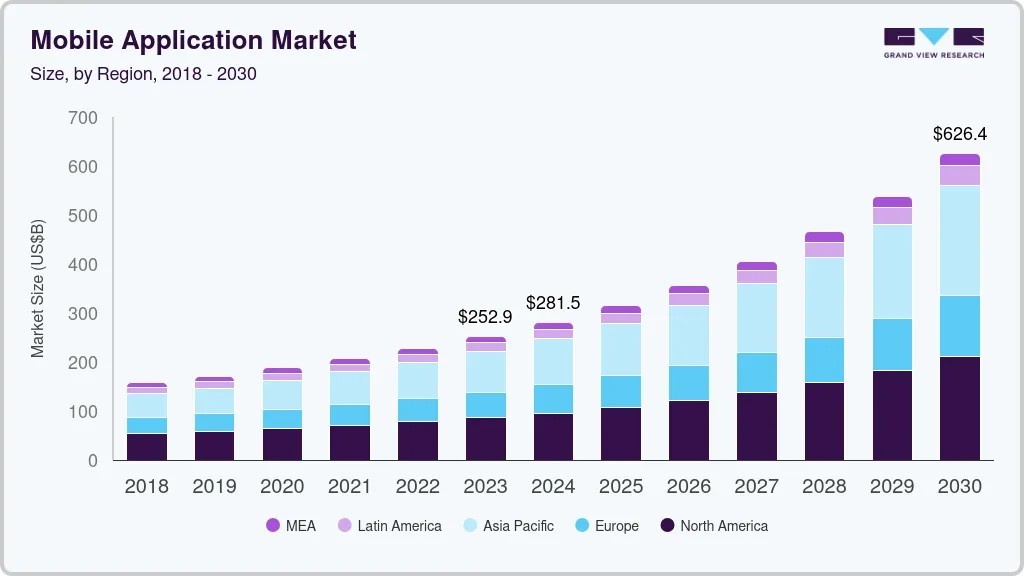
According to Grand View Research, the global mobile application market was valued at USD 252.89 billion in 2023 and is projected to reach USD 626.39 billion by 2030, growing at a CAGR of 14.3% from 2024 to 2030. These numbers clearly show how deeply mobile experiences now shape how businesses operate and how people interact with brands every day.

Users raised the bar; they don’t want just an app; they want something that feels personal, quick, and smooth, using AI, AR/VR, 5G, and cloud technology to make each tap feel effortless. If you are planning to grow your digital presence, 2026 is the right time to execute your plans. In this blog, we will discuss the latest mobile app development trends for 2026 and how to choose the best one for your business. 

Top 12 Mobile Apps Development Trends in 2026 

The following is the comprehensive list of the top 12 mobile app development trends in 2026 that every business should know.

(1) AI Native and On-device Intelligence 

AI has moved from backend support to the core architecture of mobile apps. What is changing in 2026 is where AI operates on-device instead of purely cloud-based. This means apps can process data locally, making them faster, more secure, and highly responsive, even without internet connectivity. 

What this looks like in real life: 

  • Apps adapting layouts based on user habits
  • Auto-reply suggestions to messaging apps 
  • Real-time photo improvement without uploading raw images 
  • Voice assistants working offline 
💯 Fact Check 
Apps using on-device AI can reduce latency by up to 60% to 80% compared to cloud-dependent models.
User BenefitsEnterprise Benefits
Instant responses without lag, even in low connectivity areas.Reduced dependency on cloud infrastructure lowers long-term costs.
Stronger privacy since data stays on the device.Better compliance with strict data protection regulations.
Offline functionality for key features.Improved app reliability and uptime.
Personalized experience that grows in real time.Higher user engagement due to smarter interactions.

(2) 5G-enhanced Mobile Experiences

Here, 5G is not just showing high speed, but it is all about offering experiences that were previously not possible on mobile devices. Enabling ultra-low latency and high bandwidth, apps can now offer real-time and data-heavy interactions seamlessly. 

Where users feel the difference:

  • Buffer-free 4K and 8K video streaming 
  • Lag-free multiplayer gaming 
  • Real-time AR navigation 
  • Instant cloud sync
User BenefitsEnterprise Benefits
Lightning-fast app loading and smooth navigation.Ability to build high-performing and feature-rich apps.
Seamless streaming and gaming without interruptions.Increased user satisfaction and app ratings.
Real-time collaboration and communication.Better engagement metrics and session duration.
Improved AR/VR experiences.Opportunity to develop new ideas with comprehensive features

(3) Cross-platform & Low-code/No-code Development 

Speed is the topmost priority in apps nowadays. Cross-platform development ensures apps run on multiple OS (operating systems) using a single codebase, while low-code or no-code tools simplify the development process. This combination is making app development quick, more efficient, and scalable. 

Many businesses are now collaborating with an experienced app development company like iQlance Solutions to leverage these tools without compromising quality. 

Why is this trend growing?

  • Quicker prototyping and deployment 
  • Reduced development complexity 
  • Easier updates across platforms
User BenefitsEnterprise Benefits
Uniform experience across Android and iOS devicesSignificant reduction in development time
Faster feature updates and bug fixingLower development and maintenance costs
Stable and consistent performanceFaster go-to-market strategy
Better app reliabilityEasier scalability for future features

(4) Touchless UI 

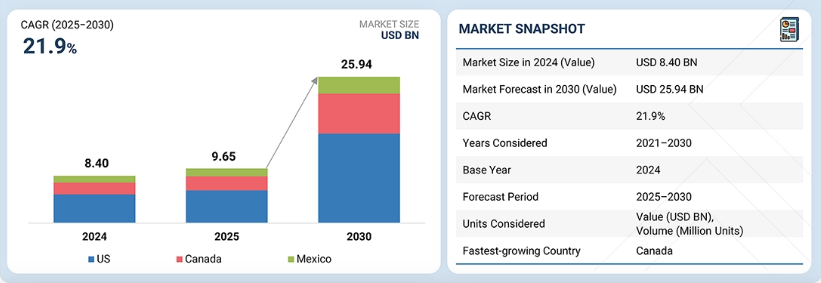
The trend of touchless UI is growing rapidly, and users are widely expecting it in mobile apps. Because touchless interfaces are transforming how users interact with apps. Instead of tapping screens, users can now control apps using voice, gestures, or even facial recognition (the latest update). This trend is making apps more intuitive, accessible, and convenient. The following image shows the growth of touchless UI in the US, Canada, and Mexico.

💯 Fact Check  
Voice-based interactions are expected to power over 50% of mobile searches in the near future.
User BenefitsEnterprise Benefits
Interaction improves convenience in daily use because there is no need to use your handsExpands accessibility for differently-abled users 
Faster task completion without manual inputIncreased adoption across wider user segments 
Improved hygiene and safety in public environmentsHigher engagement due to ease of use
More natural and intuitive app navigationStronger brand perception as innovative 

(5) Hyper-personalization With AI Analytics 

Nowadays, users expect apps to feel ‘custom-made’ for them. Hyper-personalization uses AI and data analytics to customize every aspect of the app experience. This goes far beyond simple recommendations; it reshapes the entire user journey. 

How apps personalize experiences:

  • Dynamic content feeds 
  • Personalized notifications 
  • Behavior-based UI changes 
  • Predictive suggestions
User BenefitsEnterprise Benefits
Contact and features custom to individual preferencesHigher conversion rates and sales
Reduced time spent searching for relevant information Better understanding of user behavior
More meaningful and engaging interactions Increased retention and lifetime value
Personalized offers and recommendationsImproved ROI from marketing efforts
Future outlook: 

The global hyper-personalization market is projected to grow from US $25.73 billion in 2025 to US $58.34 billion by 2030. This reflects strong demand for intelligent personalization solutions.

(6) Apps For Foldable and Wearable Devices 

With the growing demand for foldable smartphones and wearable devices like smartwatches, apps must now adapt to multiple screen sizes and interaction styles. This trend is pushing developers to think beyond traditional layouts. Teams specializing in app development Toronto are already focusing on adaptive UI/UX for these emerging devices. 

What’s changing:

User BenefitsEnterprise Benefits
Smooth experience across various device typesAccess to new and growing device markets
Better multitasking capabilitiesOpportunities to innovate with unique app features
Improved usability on smaller screensIncreased user engagement across devices
Seamless device connectivityFuture-proof app development strategy

(7) Predictive Analytics 

Predictive analytics allow apps to think ahead. Instead of reacting to user actions, apps anticipate needs and provide proactive solutions. 

Actual applications:

  • Predict the next purchase 
  • Suggesting routes based on traffic patterns 
  • Recommending content before search
User BenefitsEnterprise Benefits
Reduced effort in searching or navigatingMore accurate targeting and recommendations
Faster decision-making with relevant suggestionsIncreased conversions and sales
Smarter and more intuitive app experienceData-driven product improvements
Time-saving interactionsStronger competitive positioning

(8) Extended Reality (XR) 

Extended Reality (AR, VR, and MR) is turning mobile apps into immersive environments where users can interact with digital content in real-world contexts. 

Where users see XR:

  • Virtual try-ons in shopping apps 
  • Interactive gaming experiences 
  • AR-based learning tools
  • Virtual tours and simulations
💯 Fact Check  
XR adoption in mobile apps is growing rapidly, with user engagement increasing by over 40% in comprehensive experiences.
User BenefitsEnterprise Benefits
Highly interactive and engaging experiencesStrong differentiation in crowded markets
Better visualization before making decisionsIncreased conversion rates
Improved learning and entertainmentImproved customer engagement
Real-world interaction with digital contentInnovative brand positioning

(9) Advanced Mobile Security and Privacy 

Security is not an option; it is a fundamental expectation. Users demand transparency and control over their data. Cutting-edge apps are implementing advanced security measures to protect sensitive information. 

Leading mobile app development companies in Canada use various cutting-edge technologies, including biometric authentication (fingerprint, face ID, or more), end-to-end encryption, secure APIs, and zero-trust architecture, to ensure high-tech security of the application.

💯 Fact Check  
Over 80% of users are more likely to trust apps that clearly communicate data protection practices.
User BenefitsEnterprise Benefits
Strong protection of personal and financial dataReduced risk of cyberattacks and breaches
Secure transactions and communicationCompliance with global regulations
Greater control over privacy settingsIncreased user trust and loyalty
Compliance with data-protection law ensures data is safe while using appsStronger brand credibility

(10) Blockchain and IoT-Integrated Mobile Apps 

The combination of blockchain and IoT builds secure and connected mobile apps. Blockchain ensures transparency and data integrity, while IoT enables real-time communication between devices. 

Smart home automation, secure financial transactions, supply chain tracking, connected healthcare devices, etc., are some use cases of blockchain and IoT-integrated mobile apps.

User BenefitsEnterprise Benefits
Transparent and tamper-proof transactionsReduced fraud and data manipulation risks
Seamless connectivity between devicesImproved operational efficiency
Real-time updates and monitoringBetter data accuracy and tracking
Improved trust in digital interactionsAutomation of complex processes

(11) Instant Apps (Try-Before-Install Experiences) 

Instant apps allow users to use apps without downloading them. Users can get access to all app features instantly. Instant apps or try-before-install experiences reduce friction and improve user onboarding. 

These apps don’t need storage; users can get instant access, and they can make quick decisions whether they want to download or not. These are some advantages of the Instant apps for which this model is trending in 2026. Moreover, the apps that give instant experiences can improve conversion rate by 20% to 30%, as per the study; hence, businesses are widely adopting this approach.

User BenefitsEnterprise Benefits
No need to install full appsIncreased user acquisition rates
Saves mobile storage spaceReduced drop-offs during onboarding
Get immediate access to featuresHigher conversion from trial to install
Faster and smoother interactionsBetter first impression

(12) Sustainable or Green App Development 

Sustainability is becoming the first priority for businesses, which is why businesses nowadays widely shift to green app development. These are the apps that focus on lowering energy consumption and optimizing performance. 

These apps include writing efficient code, minimizing server usage, and optimizing app performance. The MVP app development approach supports sustainability by building only essential features first, avoiding unnecessary resource usage. 

Sustainable practices include the following:

  • Lightweight app design 
  • Energy-efficient coding 
  • Reduced background processes 
  • Optimized data usage
User BenefitsEnterprise Benefits
Longer battery life and better device performanceLower infrastructure and energy costs
Reduced data consumptionPositive environmental impact
Smooth and efficient app performanceStronger brand reputation
Eco-friendly digital usageAlignment with sustainability goals

Steps To Follow While Choosing Mobile App Trends for Your Business in 2026

The following are the steps you must follow while deciding on the mobile app development trend that suits your business.

(1) Business Impact & Revenue Alignment 

Firstly, understand how a trend will improve revenue generation, customer retention, operational efficiency, and competitive differentiation. If you don’t get a clear answer, skip that particular trend. Hire dedicated developers and follow a particular trend only when they support measurable business outcomes. 

(2) Relevant to User Experience 

Implementation of the mobile app development trend demands significant time and cost investment. So, you have to ensure that the end users get something valuable from it. Here, you have to evaluate whether the trend improves usability, personalization, performance, or engagement for your end users. Partner with a leading mobile app development company to ensure the trend you are following is solving real user pain points. 

(3) Scalability and Architectural Fit 

You have to check whether the existing infrastructure is able to support the trend you want to implement or not. Here, the app development company you partner with will guide you further if the trend needs to be replaced or the infrastructure needs to be changed. 

(4) Regulatory and Security Implications 

Analyze compliance requirements, data governance impact, and risk exposure. Partnering with iQlance Solutions, a leading app development Toronto company, helps you to understand all the legal implications and security needs your app requires. 

(5) Long-term Sustainability and ROI 

While implementing an emerging mobile app development trend, one must consider all factors, including implementation cost, maintenance complexity, talent availability, and future adaptability. The right trend balances long-term sustainability and ROI.

Take the Next Step With iQlance Solutions

Building a successful mobile app in 2026 is not just about following the development trends; it is all about choosing the right approach, the right technology, and the right team to bring your idea to reality. Whether you are planning for a new app or upgrading an existing one, having the right development partner can make all the difference. 

iQlance Solutions focuses on turning ideas into meaningful digital experiences that users actually enjoy. As a trusted mobile app development company, our approach is centered around understanding user behavior, designing intuitive interfaces, and building scalable, future-ready applications. The following is how we help you move forward with confidence: 

We offer end-to-end mobile app development services in Canada, from planning to deployment and post-deployment support too. Our approach ensures transparency, efficiency, and quality while helping you clearly understand and optimize the app development cost in Canada

Whether you want to build the app from scratch or want to improve an existing app, iQlance Solutions provides the expertise and support you need to move forward with confidence and build something truly impactful.

Frequently Asked Questions

AI is making apps smarter by enabling real-time personalization, predictive recommendations, and on-device processing for a faster and more secure user experience.

It allows developers to build apps for multiple platforms using a single codebase, reducing development time & cost, and ensuring a consistent UX. iQlance Solutions has hands-on experience building cross-platform apps. Connect with us to know more.

With increasing cyber threats, users expect strong data protection through encryption, biometrics, and secure authentication methods.

These trends make apps faster, more personalized, secure, and immersive, significantly improving overall user satisfaction.

Key factors include target audience, scalability, security, performance, and alignment with the latest technology trends.

How Much Does It Cost to Build a Mobile App in Canada?

The Canadian mobile application market generated a revenue of USD 22,823.4 million in 2024 and is expected to reach USD 52,473.4 million by 2030. The following chart shows how the Canadian mobile app market has grown since 2018.

The app development market in Canada grows at a CAGR of 15.3% from 2025 to 2030, with users spending more than 4.5 hours on apps per day. These created the best opportunities for app developers Canada. But app development demands significant investment, and hence, each business’s first question is about the development cost. 

The answer is simple: the app development cost in Canada varies with several factors, including complexity, features & functions, and development time. But on average, we can classify the cost of the development as follows: 

Types of appsDevelopment Cost
Simple app with basic features $40,000 ($54,000 CAD) 
Complex app with advanced features $400,000 ($540,000 CAD) or more
Enterprise-grade or large-scale global brands$700,000 ($945,000 CAD) or more

Let’s break down the development cost in detail, along with its hidden expenses, optimization strategies, and actual insights, which help businesses to decide their budget effectively for their mobile app project.

80% of businesses are adopting mobile apps for their business strategy in 2026, and you are still thinking! Discuss your project idea more precisely with us and get a free development cost quote.

How to Calculate an Estimate App Development Cost

Basically, to estimate the development cost, you need to consider the app’s features, design complexity, and the type of platform you choose (iOS, Android, or cross-platform). The following is a basic formula to estimate the cost: 

Cost Estimate = Developer’s hourly rate * Estimated hours  

For example, if the Canadian professional you choose is charging $60 USD ($81.47 CAD) and they will need 445 hours to complete the work, then the estimated cost will be (60 * 445) 26,700 USD and $36,250.59 CAD.

The App Development Cost in Canada: A Comprehensive Table

Type of AppsInclusionsEstimated Cost (in USD) Estimated Cost (in CAD) 
Simple apps Minimal features, straightforward UI, and no backend database $40,000 to $75,000$54,000 to $101,250
Medium-complexity apps More features than simple apps, user accounts, basic backend integration, APIs, and interactive UI. $75,000 to $150,000$101,250 to $202,500
Advanced apps Extensive features, intricate backend architecture, multiple 3rd-party integrations, real-time data synchronization, custom animations, and advanced security measures. $150,000 to $400,000 or more $202,500 to $540,000 or more 
Enterprise-grade apps A sophisticated app includes a custom app design, huge data management features, and integration with existing legacy systems, and prioritizes robust security, scalability, and specific business logic. $400,000 to $945,000 or more $540,000 to $1,283,002.88 or more

Factors Affecting Mobile App Development Cost in Canada

1.Complexity of Design

A friendly app design is non-negotiable in 2026. The basic UI, having a simple/generic design, costs less, while the mobile app development company in Canada that offers custom animations and comprehensive UX costs you more. Hence, we can consider the basic UI costs you $5,000 to $15,000 USD ($6,750 to $20,250 CAD), and custom UI/UX will cost you approximately $15,000 to $50,000 USD ($20,250 to $67,500 CAD).

2.Backend Development 

Backend infrastructure, APIs, servers, and databases are important for any app. Simple apps have minimal backend work, while complex apps considering real-time data or AI demand robust systems, which cost you more. 

Backend Type Cost Range (USD) Cost Range (CAD) Capabilities 
Basic Backend $10,000 to $25,000$13,500 to $33,750 Simple database and basic APIs
Standard Backend $25,000 to $60,000$33,750 to $81,000 Complex database and multiple APIs
Enterprise Backend $60,000 to $150,000$81,000 to $202,500Microservices and high availability 

3.Complexity of Features 

Feature complexity is the most important cost driver for each app developers Canada. Every small feature, including user registration to real-time chat, requires separate UI/UX design, development, and testing, which increases the cost. The following is an estimated cost of app development based on features.

Feature Complexity Cost Range (USD) Cost Range (CAD) 
Basic features $2,000 to $8,000 $2,700 to $10,800 
Intermediate features$8,000 to $25,000 $10,800 to $33,750 
Advanced features $25,000 to $80,000 $33,750 to $108,000
Enterprise features $80,000 to $200,000$108,000 to $270,000 

4.3rd-party App Integration 

3rd-party app integration, including payment gateways like PayPal, Stripe, Google Pay, debit/credit card, etc., social media logins, or GPS integration, costs you more. These integrations need individual development and testing. 

The basic integration, like social media login, will cost you $2,000 to $10,000 ($2,700 to $13,500 CAD). While the advanced integration, like payment gateways and GPS, will cost you $10,000 to $30,000 ($13,500 to $40,500 CAD). 

5.Technological Trends 

Integrating cutting-edge technologies like AI, ML, IoT, GenAI, AR/VR, etc., is complex, and hence, the mobile app development company in Canada costs you more. According to the prediction of Gartner, 33% of enterprise software apps will include agentic AI by 2028, which shows the importance, growth, and demand of the cutting-edge technologies in mobile app development. 

Technology Type Cost Range (USD) Cost Range (CAD) Applications 
AI/ML Integration $15,000 to $50,000$20,250 to $67,500Chatbots, recommendations, and analytics
AR/VR Features $20,000 to $80,000 $27,000 to $108,000Virtual try-ons and immersive experience 
IoT Connectivity $10,000 to $40,000 $13,500 to $54,000 Smart device integration and sensors 
Blockchain Integrations $25,000 to $100,000$33,750 to $135,000Cryptocurrency and smart contracts 

6.Security Measures 

Security measures are the topmost priority for each app owner to prevent any unnecessary app vulnerabilities. Integrating data encryption techniques, secure APIs, and compliance with GDPR or PIPEDA increases the overall app development cost. 

Security Level Cost Range (USD) Cost Range (CAD) Features 
Basic security $5,000 to $12,000 $6,750 to $16,200SSL, basic encryption 
Standard security $12,000 to $25,000 $16,200 to $33,750 Two-factor auth and data encryption 
Advanced security $25,000 to $50,000 $33,750 to $67,500 Advanced encryption and compliance 

7.Platform Selection 

You have to choose between iOS, Android, or cross-platform development, and your choice affects the costs. The cross-platform frameworks like Flutter or React Native can reduce the app development cost by up to 30%, as per the generic studies. 

Platform Strategy Cost Range (USD) Cost Range (CAD) Market Reach 
iOS $40,000 to $150,000 $54,000 to $202,500 60% Canadian Market (approximately) 
Android $35,000 to $140,000 $47,250 to $189,000 40% Canadian Market (approximately)
Cross-platform $50,000 to $200,000 $67,500 to $270,000 100% market coverage 

8.Compliance Measures 

Each app needs to handle sensitive data like personal information, financial information, health-related data, and more, which is why it is essential to comply with regulatory standards like HIPAA, GDPR, and PIPEDA in Canada. Compliance integration, audits, and legal reviews increase the development cost. 

Compliance Type Cost Range (USD) Cost Range (CAD) Requirements 
Basic PIPEDA $3,000 to $8,000 $4,050 to $10,800Privacy policy and consent mechanisms 
Industry Compliance $8,000 to $20,000 $10,800 to $27,000 Healthcare and finance regulations 
Enterprise Compliance $20,000 to $40,000 $27,000 to $54,000SOC 2 and ISO 27001 certifications 

The Hidden Development Cost That You Must Consider

The following are some overlooked expenses that demand 20% to 30% of your initial investment. You must consider the following costs while preparing a budget for app development.

1.App Maintenance

Precisely, the app maintenance cost will be 15% to 20% of the initial development cost per annum, which includes

  • Bug fixes and minor updates: $500 to $1500 CAD per month
  • Feature additions: $2000 to $8000 CAD per feature 
  • OS compatibility updates: $3,000 to $10,000 CAD annually 
  • Security cost: $1,000 to $3,000 CAD quarterly 
  • Performance optimization: $2,000 to $5,000 CAD quarterly

2.App Hosting

The cost of cloud hosting varies based on user base and data requirements. As the app grows, hosting expenses scale accordingly, requiring careful planning for sustainable growth. 

  • Basic hosting (up to 10k users): $100 to $500 CAD per month 
  • Scalable hosting (10k to 100k users): $500 to $2,000 CAD per month 
  • Enterprise hosting (100k+ users): $2,000 to $10,000 CAD per month 
  • Content Delivery Network (CDN): $200 to $1,000 CAD per month 
  • Database hosting: $300 to $1,500 CAD per month

3.App Promotion and Marketing

To launch the app successfully, the mobile app development company needs marketing investment too to reach the targeted users. 

  • App Store Optimization (ASO): $2,000 to $5,000 CAD 
  • Digital marketing campaigns: $5,000 to $20,000 CAD per month 
  • Partnership with influencers (not compulsory, but beneficial): $3,000 to $15,000 CAD per campaign 
  • PR and media outreach: $2,000 to $8,000 CAD per month 
  • Social media marketing: $1,500 to $6,000 CAD per month 
  • Paid ads (Google/Facebook): $3,000 to $15,000 CAD per month

4.Legal and Licensing Fees 

Canadian businesses must consider various legal needs and licensing costs to ensure compliance and protect intellectual property. 

  • Privacy policy and terms of service: $1,500 to $5,000 CAD 
  • Trademark registration: $1,000 to $3,000 CAD 
  • App store fees: $135 CAD (Apple) + $35 CAD (Google) per annum 
  • PIPEDA compliance consulting: $3,000 to $10,000 CAD 
  • Software licensing: $500 to $2,000 CAD annually 
  • Legal review and contracts: $2,000 to $8,000 CAD

Ready to turn your app idea into a powerful digital product? Discuss your vision and plan the right development strategy with iQlance app experts.

Partner with iQlance – A Leading Mobile App Development Company in Canada

Estimating app development cost in Canada can seem challenging. From idea discussion to getting a fully functional, market-ready app, each step carries important decisions that impact the overall budget and quality of the app, too. 

However, partnering with iQlance Solutions, a leading mobile app development company in Canada, helps you to estimate step-by-step costs and hidden costs too, which helps you to manage your investment accordingly. 

As trusted app developers Canada, we understand the nuances of the Canadian market and the global tech environment, ensuring your app is not just built, but built for success and overall business growth. We have delivered 1000+ successful projects across various industries, including logistics and supply chain, ride-sharing, taxi-booking, education, healthcare, health & fitness, finance, and more. Our professional app developers guide you through every phase of development, from initial cost calculation to post-launch maintenance and more. 

Hence, don’t let the biggest question on the cost deter your vision, and let’s discuss how we bring your app idea to a fully functional mobile app, ensuring a seamless development journey and growth in business ROI.

FAQs

App development timelines vary on the basis of various factors, including the complexity of the app, features, and platform requirements. However, the basic app takes 4 to 6 months, the complex app takes 6 to 9 months or more, and the enterprise-grade app takes 6 to 12 months or more to develop. This timeline includes discovery, design, prototyping, development, testing, and deployment.

Start by reviewing the company’s portfolio, expertise, client testimonials, communication & transparency, and post-launch support. Check whether the team has experience with cutting-edge technologies or not. A trusted company should offer an end-to-end app development process along with transparency and a strategic app development roadmap to build scalable apps.

Begin with a well-defined project scope and prioritize important features. Launching a Minimum Viable Product (MVP) can help you test the market before investing in advanced features. Choose the right platform strategy, avoid unnecessary complexities, and working with an experienced development team can also help you manage the app development cost effectively.

Yes, we sign a non-disclosure agreement (NDA) before discussing or starting any projects. The NDA ensures your business idea, project details, and sensitive information remain confidential and protected throughout the development process.

Yes, we integrate cutting-edge technologies, including AI, into your existing mobile apps. AI features like smart recommendations, chatbots, predictive analytics, and automation can improve user experience, improve engagement, and add advanced capabilities to your current app without rebuilding it from scratch.

Why Hire App Developers in Toronto for Your Business?

Mobile apps were a nice-to-have once, but recently, they’ve become a must-have business asset. Every niche, including retail, healthcare, logistics, and financial companies across Canada, is shifting towards mobile technology that improves customer engagement, streamlines operations, and gives them opportunities to create fresh revenue channels.

This might seem extreme, but as per the studies, 31 million smartphone users are spending more than 4.5 hours daily on mobile apps. But these numbers alone are saying one should not neglect the mobile app. However, the CEOs of the Canadian companies are questioning how to strategically develop an app and how to find the right app development Toronto partner. 

The Canadian mobile app market is generating over $3 billion in annual revenue every year as businesses are rapidly adopting digital solutions. These trends are pushing businesses, regardless of size, to explore app development for small business and enterprise solutions that deliver convenience and accessibility to their customers.

However, building a successful app requires the right expertise. This is why many organizations prefer working with experienced app developers Toronto businesses trust, ensuring their mobile solutions are scalable, secure, and aligned with market expectations.

12 Reasons To Hire App Developers Toronto

1.Access to Highly Skilled Developers 

Canada is one of the best places for the world’s most talented software engineers and mobile developers. The country is offering training to thousands of tech graduates every year from well-known universities and technical industries. The professionals working in Canadian development companies are highly trained in cutting-edge technologies, including: 

This technical expertise ensures that businesses receive high-quality native apps that are scalable, reliable, and future-ready.

2.Strong Technology Ecosystem 

Canada has a powerful technology ecosystem supported by government initiatives, innovation hubs, and venture capital investments. Cities like Toronto, Vancouver, and Montreal have rapidly grown into major global technology centers. This ecosystem encourages innovation, collaboration, and continuous improvement. As a result, the professionals in Toronto stay updated with emerging technologies and development frameworks, helping businesses build cutting-edge apps that meet growing user expectations. 

3.High Development Standards and Quality Assurance 

App quality is one of the biggest advantages of hiring Canadian developers. Most app development companies in Canada follow structured development methodologies such as Agile, Scrum, or DevOps. These processes ensure that: 

  • Projects remain transparent 
  • Development cycles are efficient 
  • Regular testing improves quality 
  • Bugs are minimized before launch 

This commitment to quality significantly reduces project risks and helps businesses deliver reliable mobile applications to their users. 

4.Expertise Across Multiple Industries 

Another major advantage of working with the Canadian developers is their experience across diverse industries. Canadian companies have worked with businesses in sectors such as logistics, ride-sharing, taxi booking, healthcare, education, health and fitness, real estate, and more.

Because of this cross-industry experience, developers can quickly understand business needs and build customized solutions that address real operational challenges. 

5.Cost-Effective Development Without Compromising Quality

While Canada offers top-tier development talent, the overall cost of hiring app developers Toronto is often more reasonable compared to developers in certain high-cost tech hubs. Businesses benefit from: 

  • Transparent pricing models 
  • Efficient development processes 
  • Reduced project delays 
  • High-quality output 

6.Strong Focus on Innovation

Canadian technology companies are known for adopting innovation. Many companies actively experiment with emerging technologies to build advanced digital solutions. These innovations include AI-powered apps, ML integrations, blockchain-based applications, augmented reality experiences, and IoT-connected systems. This approach helps businesses stay ahead of competitors and build apps that deliver unique user experiences.  

7.Reliable Communication and Collaboration

Communication plays a critical role in the success of any development project. Canadian development teams are known for their professional communication style and transparent collaboration.

Businesses working with app development Toronto teams often experience the following:

  • Clear project documentation
  • Regular progress updates
  • Structured development sprints
  • Collaborative feedback sessions

This communication culture ensures that projects remain aligned with business goals from the initial concept to the final launch.

8.Strong Data Security and Compliance

Security has become one of the most critical concerns for modern businesses, especially when mobile applications handle sensitive customer data.

Canada has strong data protection laws and regulatory frameworks that encourage companies to follow strict security practices. Most app development companies implement advanced security measures, such as data encryption, secure authentication systems, privacy-focused architecture, and compliance with international standards. 

For businesses handling customer data, financial information, or healthcare records, this security focus provides an additional layer of trust.

9.Experience with Global Clients

Canadian app development firms frequently work with international businesses across North America, Europe, and Asia. This global exposure gives professionals a strong understanding of international markets and diverse customer expectations.

Because of this experience, developers can:

  • Design apps for global audiences
  • Build a scalable architecture
  • Integrate multilingual features
  • Ensure global performance optimization

This makes Canada an ideal destination for businesses planning to expand their digital products worldwide.

10.Agile Development for Faster Time-to-Market

Speed is a critical factor in today’s competitive digital environment. Businesses cannot afford long development cycles when launching new applications.

Most app development companies in Canada use agile development methodologies that break projects into smaller, manageable iterations.

Benefits of agile development include:

  • Faster feature releases
  • Continuous improvements
  • Early detection of issues
  • Flexibility to adapt to new requirements

This approach helps businesses launch applications faster while continuously improving performance and features.

11.Long-Term Support and Maintenance

Launching a mobile application is only the first step. Continuous updates, bug fixes, and performance improvements are essential to maintain user satisfaction.

Reliable app development companies in Canada provide long-term support services, including app updates, security patches, performance optimization, feature enhancements, and compatibility updates for new devices

This ongoing support ensures that applications remain functional, secure, and competitive in the growing mobile ecosystem.

12.Perfect Partner for Small Businesses and Startups

Startups and small businesses often face unique challenges such as limited budgets, evolving ideas, and rapid market changes.

Canadian app development for small business services is specifically designed to help growing companies launch efficient applications without high costs.

Experienced app developers Toronto can help startups by refining app ideas, creating MVPs (Minimum Viable Products), providing scalable architecture, and offering flexible development models. This approach allows small businesses to test their ideas in the market quickly while keeping development budgets under control.

Why Local Expertise Matters for Canadian Businesses

Working with local developers offers various strategic advantages for businesses in Canada.

First, local developers understand the country’s regulatory environment, including privacy laws and data protection standards. This ensures that applications remain compliant with relevant regulations.

Second, local collaboration allows businesses to build stronger relationships with their development teams. Face-to-face meetings, workshops, and strategy sessions become easier when teams operate within the same region.

Finally, local developers provide more reliable long-term support. As businesses grow and expand, they need partners who can continuously improve and scale their applications.

Why Businesses Choose iQlance Solutions for App Development in Toronto

When businesses look for reliable app development companies, they want a partner that understands both technology and business strategy. This is where iQlance Solutions stands out. With years of experience in mobile app development, iQlance Solutions has helped startups, small businesses, and enterprises transform their ideas into powerful digital products.

1.Local Presence in Canada

Having a strong presence in Canada allows iQlance to work closely with clients and understand their specific business needs. This local accessibility helps build trust and ensures smoother collaboration throughout the project lifecycle.

2.Experienced Mobile App Developers

The company’s development team includes skilled professionals who specialize in iOS, Android, and cross-platform app development. Their expertise ensures that businesses receive high-quality applications tailored to their goals.

3.Custom Development Approach

Every business is unique, and so are its digital requirements. Instead of offering one-size-fits-all solutions, iQlance focuses on building custom applications designed to address specific business challenges.

4.Agile and Transparent Development

iQlance follows an Agile development methodology, allowing clients to stay involved throughout the development process. Regular updates and clear communication help ensure that projects progress smoothly and meet expectations.

Conclusion

Mobile technology continues to reshape how businesses operate and interact with their customers. Companies that invest in well-designed mobile applications can improve customer engagement, enhance operational efficiency, and get new revenue opportunities.

However, building a successful app requires expertise, strategic planning, and a reliable development partner. By hiring experienced app developers Toronto businesses trust, organizations can ensure their applications are secure, scalable, and aligned with market expectations.

If you are planning to develop a mobile application for your business, working with a trusted partner like iQlance Solutions can help transform your vision into a powerful digital product.

FAQs

The cost of mobile app development in Toronto depends on several factors, including the app’s complexity, features, design requirements, and development platform. Simple applications may cost less, while complex enterprise solutions require a larger investment.

Development timelines vary depending on the project scope. A basic app may take a few months, while feature-rich applications can take six months or longer to develop.

Yes. Many development companies offer scalable solutions designed specifically for small businesses. These solutions allow companies to start with essential features and expand the application over time.

Most professional development companies offer ongoing maintenance and support services. These services include bug fixes, updates, performance optimization, and feature improvements.

To choose the right developers, businesses should evaluate the company’s portfolio, technical expertise, client reviews, communication practices, and post-launch support services. Working with an experienced and transparent team ensures a smoother development process.

MVP App Development in Toronto: A Comprehensive Guide for Startups

Let me guess! You are planning to build apps like Facebook, TikTok, Tinder, Uber, Spotify, and more, right? And you are planning to hire a mobile app development partner in Toronto for the same. But wait, have you checked their history? I agree, they have multifunctional apps with intuitive features and app designs to give an engaging user experience. However, it was not always the scenario; they started with developing an MVP or a minimum viable product.

Let’s take an example of Gen Z and millennials’ favorite app, Tinder. The ‘Match Group’ first introduced Tinder as an MVP in 2012. Initially, there were no swipe functions; instead, they gave ‘♥️’ for like and ‘❌’ for dislike. They also introduced gamified success with the “It’s a Match” screen, especially designed to trigger a winning feeling! Early profiles focused heavily on photos, name, and age, reducing the “job application” feel of traditional dating sites compared to the fully functional platform we use today.

Through MVP app development, Tinder has gradually grown over time and extended its reach by introducing more features and adding more functionalities. They have made $1.94 billion in revenue in 2024, a 1.1% increase on the year prior. It had 60 million monthly active users and 9.6 million subscribers in 2024. And in 2026, the app had 75 million monthly active users (MAU) globally.

These data clearly say that building a minimum viable product (MVP) is a way to test the success of a business idea at a minimal cost. This incremental approach of starting from minimal features and scaling over time helps you minimize an initial investment as well as allow for flexible adaptation to users. 

In this blog, we will discuss MVP development for startups, its benefits, how to develop it, cost, and many more things that will help you to know this approach inside out.

What is an MVP in a startup?

In simple words, MVP is the most basic version of a product with just enough features to be usable by early users and to validate the business idea. The following image shows what an MVP actually is for startups. 

Now the question is, why should startups follow the MVP approach? MVP enables you to test your assumptions, understand your audience’s actual needs, and make data-driven improvements, all without committing substantial time or resources upfront. This approach helps reduce risk and ensures that the product you are building is agile with market demand.

Why Do Startups Choose MVP Development the Most?

The following are some important reasons why startups, SMBs, and even enterprises must invest in MVPs and consult the best app development company Toronto

1. Market Validation 

Startups often operate with uncertainty about user needs and preferences. MVP helps allow them to test their core idea with actual users and validate market demand before developing a fully functional app. It ensures that the product aligns with what users actually want. 

2. Risk Mitigation 

Launching a fully functional app without testing can lead to significant financial losses if it fails to resonate with the targeted audience. The MVP development approach minimizes these risks by focusing on important features and gathering feedback early on, helping with adjustments before investments are made. 

3. Efficient Resource Allocation 

Startups can avoid wasting time and money on unnecessary features by developing an MVP. The MVP approach ensures that resources are directed toward what truly matters to the target audience, optimizing development processes and reducing waste. 

4. Competitive Advantage 

Custom MVP development services allow startups to enter the market quickly, potentially outpacing competitors with similar ideas. The early-mover advantage can be important for establishing market presence and brand recognition. 

5. Investor Attraction 

A functional MVP demonstrates progress and viability, making it easier for startups to secure funding and gain investor trust. Investors are more likely to support projects that show tangible results and a clear growth path.

How to Build an MVP?

The following is the process that the leading mobile app development company Canada follows to build a successful MVP. 

1. Conduct Market Research 

The first step of any mobile app development is conducting thorough market research. It will help you understand the growing needs of your target market and what they are looking for in a product or service. Many platforms conduct paid surveys and can help target the right respondents for your MVP in business. 

2. Identify Your Target Market 

After completing market research, the next step is to identify your target market and user persona. It includes identifying the demographics of your targeted niche by answering a few questions, like 

  • Who will be our target user? 
  • What do they actually need? 
  • Why would they use our app?
  • What benefits will they get by using our app? And more. 

After figuring out all the answers, you can easily determine who will use your MVP and what they are expecting from the particular app. 

3. Outline Key MVP Features 

Now you have a complete idea of your target market and their needs, right? So, the next step is to outline the key features of your app. It includes identifying the core functionalities of your MVP solution and services. “Less is more” is what you need to always remember while choosing the MVP approach. Hence, you should focus only on the important features that address the needs of your targeted niche. 

4. Build and Launch MVP 

The feature list is ready! Now you can go ahead and build and launch an MVP. You can partner with the leading app development company in Toronto, like iQlance Solutions, to build a user-friendly product and make it available to the target market. This step also involves promoting your minimum viable product and getting user feedback for adding value to your app. The feedback you will receive will be invaluable, as it will help determine what features to add or remove and how to improve your app. 

5. Analyze the Feedback 

After launching an MVP, it’s time to analyze users’ feedback and figure out what is working and what is not. Remember, a minimum viable product will have flaws and areas of improvement. However, the feedback and data you receive will help refine your app and eventually develop a fully functional version for the end users.

How Much Does It Cost To Build an MVP in Canada

1. Cost Breakdown by the Complexity of MVP

Type of MVPApproximate cost (in CAD) Tentative Time Taken Inclusion 
Simple/Basic MVP$5,000 to $50,0003 to 5 months Core features, simple UI, limited, and no third-party integrations.
Mid-Level/Standard MVP$15,000 to $100,0004 to 9 months Multiple workflows, dashboards, and moderate integrations.
Advanced/Enterprise MVP$50,000 to $300,000 or more8 to 12 months or more High security, AI, or complex, real-time features.

2. Cost by Team Structure

Team Structure Approximate cost (in CAD) 
Freelancers$30,000 (best for tight budgets)
Offshore/Outsourcing$11,999 to $36,000
Local Canadian Agency$70,000 to $180,000 or more

A Quick View on Factors Affecting MVP Cost 

Factors Details/Approximate cost (in CAD)
Feature ComplexityMore complex features will cost you more. 
Design RequirementsTemplate-based design: $3,000 to $8,000 (uses UI kits like Material Design)
Custom design: $8,000 to $25,000 (unique brand identity, custom components)
Premium design: $25,000 to $50,000 or more (animation, micro-interactions, illustration)
Platform ChoiceSingle platform: Launch on iOS or Android only ($15,000 to $40,000)
Cross-platform: React Native or Flutter for both iOS/Android from one codebase ($25,000 to $70,000)
Progressive Web App: Works on all devices through browsers ($20,000 to $50,000)
All three separately: iOS, Android, and web with native code ($60,000 to $180,000)
Integrations and 3rd-party ServicesStripe payments: +$2,000 to $5,000 (setup, testing, handling webhooks)
Google Maps: +$1,500 to $4,000 (integration, customization)
Push notifications: +$1,000 to $3,000 (OneSignal, Firebase setup)
Social login: +$1,500 to $3,000 per platform (OAuth, token management)
Email service: +$1,000 to $2,500 (SendGrid, templates)
Analytics: +$1,000 to $3,000 (Mixpanel, Amplitude setup)
Backend ComplexitySimple backend: Firebase/Supabase ($5,000 to $15,000) – CRUD operations, basic auth
Custom API: Node.js, Python, or Rails ($15,000 to $40,000) – Business logic, integrations
Complex backend: Microservices, real-time processing ($40,000 to $100,000+) – Scale, performance
AI/ML components: Additional $20,000 to $80,000 depending on complexity
Team Structure and LocationIn-house team: $25,000 or more per month
Local agency: $50,000 to $150,000
Freelancers: $50 to $150/hour
Post-Launch CostsHosting: $50 to $500/month, depending on users and data
Third-party services: $100 to $500/month (Stripe, SendGrid, AWS, etc.)
Maintenance: $2,000 to $5,000/month for bug fixes and updates
Iteration: $10,000 to $30,000 over 6 months based on user feedback

The Different Types of MVPs

The following are different types of MVPs that you should know as a startup. The best app development company Toronto guides you with all the MVP models and helps you to choose the best fit for your app idea.

1. Concierge MVP 

A concierge MVP flips the idea of automation on its head. Instead of building a fully functional product, you manually deliver the service to early customers. This approach includes: 

  • Direct interaction with users: Spend time understanding individual needs and customizing your service accordingly. 
  • Personalized experiences: Offer a high level of customization to showcase your product’s value. 

2. Wizard of Oz MVP 

You can create the illusion of a complete product with the Wizard of Oz MVP approach. But behind the scenes, everything is operated manually. The following is how this approach works: 

  • Simulated functionality: Design a user-facing interface that looks fully operational. 
  • Manual backend operations: Manually handle all the processes, including data collection and customer support. 

3. Single-feature MVP 

A single-feature MVP focuses on delivering one core functionality of the product that addresses a specific user problem. Instead of building a product with a suite of features, this approach prioritizes simplicity and direct value. 

  • Single focus: The MVP concentrates on one feature that solves a critical user pain point or highlights the product’s unique selling proposition. 
  • Ease of development: With fewer features, the product can be developed quickly and with minimal resources. 
  • User feedback: The simplicity of a single-feature MVP allows users to focus on evaluating the primary feature, making feedback more targeted and actionable. 

4. Piecemeal MVP 

A piecemeal MVP leverages existing tools, technologies, and services to create a functional product prototype without starting the development process from scratch. This type of MVP combines off-the-shelf components to deliver a coherent experience to users. 

  • Use of pre-built tools: This approach involves integrating various platforms and 3rd-party APIs, such as WordPress, Google Forms, or other software solutions, to provide necessary functionalities without extensive coding. This allows startups to quickly assemble a product using readily available resources. 
  • Core Functionality First: The primary focus is on solving the main user problem. The MVP should demonstrate the product’s potential value by showcasing its essential features without unnecessary complexity. 

5. High-fidelity MVP 

A high-fidelity MVP app development is a more polished, functional version of your product. It closely resembles the final product, offering a better UX, but it needs more resources to develop. 

  • Advanced prototyping: High-fidelity MVPs are more polished and closely resemble the final product. They include a higher level of design and functionality, allowing for a more realistic UX. 
  • Comprehensive features: These MVPs often incorporate multiple features, providing a better representation of how the product will function in its final form. 

6. Low-fidelity MVP 

A low-fidelity MVP is a basic and cost-effective prototype designed to test the core concept or validate the initial idea quickly. 

  • Simpler design: Focused on essential features and minimal design. 
  • Quick development: Needs fewer resources and can be built in a shorter timeframe. 

7. Landing page MVP

A landing page MVP is one of the simplest and most effective ways to validate a product idea before diving into the full-scale development process. It involves creating a single webpage designed to: 

  • Introduce your product or service: Clearly explain what your product is about, the problem it solves, and the benefits it offers. Use simple, concise language to grab attention quickly. 
  • Include engaging visuals: Use images, graphics, or videos to make the page visually appealing and help users better understand the concept. Visuals are especially important for demonstrating the product’s value. 
  • Provide calls to action (CTAs): Add sign-up forms, learn more buttons, or pre-order options to measure user interest. CTAs help collect valuable data, like the number of visitors who are willing to engage or leave their email address.

Challenges Startups Face While Developing MVP

1. Defining the Right Scope: Startups often struggle to identify which features should be included in the MVP and which should be left for future updates. Choosing the wrong scope can either make the product too basic or unnecessarily complex.

2. Budget and Resource Constraints: Limited funding and smaller teams can make it difficult for startups to manage development costs, hire skilled developers, and maintain consistent progress during the MVP development process.

3. Balancing Speed with Quality: Since MVPs are meant to launch quickly, many startups face the challenge of maintaining app quality, performance, and stability while trying to reduce development time.

4. Gathering Accurate User Feedback: Collecting meaningful feedback from early adopters can be difficult, as users may provide unclear suggestions or feedback that does not align with the product’s core objective.

5. Overcoming Technical Limitations: Many startups lack technical expertise when choosing the right technology stack, integrations, or architecture, which can affect the scalability and performance of the MVP.

Build a Cost-Effective MVP With iQlance Solutions

Turning a great idea into a successful product requires the right strategy, technology, and development partner. This is where iQlance Solutions comes in. As a trusted mobile app development company Canada, we help startups and growing businesses transform their innovative ideas into scalable digital products through efficient MVP app development services.

Our team focuses on building a functional MVP that includes only the most important features needed to validate your business idea in the real market. Instead of spending months and a large budget on a fully developed product, we help you launch quickly with a streamlined solution that gathers actual user feedback and market insights.

We follow a structured development approach that begins with understanding your business objectives, target audience, and product vision. Our experienced developers, designers, and strategists work collaboratively to identify the core functionalities required for your MVP. This ensures that your product solves a real problem while maintaining simplicity, usability, and performance.

As a reliable app development company Toronto, we also prioritize scalable architecture and future-ready technology. This means the MVP we build today can easily grow into a fully functional application as your business grows and new user requirements emerge. Our team carefully selects the right technology stack, development framework, and integrations to ensure flexibility, security, and long-term sustainability.

Another key advantage of partnering with iQlance Solutions is our focus on cost optimization. We help startups avoid unnecessary development expenses by prioritizing essential features, adopting agile methodologies, and delivering iterative updates based on user feedback. This approach not only reduces the initial investment but also helps businesses make data-driven improvements over time.

From idea validation and UI/UX design to development, testing, and deployment, iQlance Solutions provides end-to-end mobile app development services custom to the unique needs of startups and enterprises. With a proven track record of delivering high-quality applications across various industries, we support businesses to launch faster, reduce risk, and achieve sustainable growth in the competitive digital marketplace.
If you are planning to launch a startup or test a new product idea, partnering with an experienced mobile app development company Canada like iQlance Solutions can help you build a reliable and cost-effective MVP that sets the foundation for long-term success.

FAQs

The cost of MVP development in Canada varies depending on the feature complexity, UI/UX design, platform choice (iOS, Android, or cross-platform), backend infrastructure, and third-party integrations. But precisely, you can consider the app development cost between CAD $5,000 and $300,000 or more.

Again, the development timeline highly depends on the feature complexity, UI/UX design, backend infrastructure, and more. But typically, the MVP development will take 3 to 9 months or more.

An MVP implementation strategy focuses on launching a product with the minimum set of features required to solve a core user problem. The process usually includes market research, defining target users, prioritizing core features, developing the MVP, launching it to early adopters, and collecting user feedback. Based on actual user insights, the product is gradually improved with additional features and improvements through iterative updates.

Yes, most professional development companies, like ours, sign a non-disclosure agreement (NDA) before starting the project. The NDA ensures that your app idea, business model, technical information, and other confidential details remain fully protected throughout the mobile app development process.

No, an MVP, prototype, and POC are all different. A prototype is an early visual representation used to demonstrate the design and user flow of the product. A proof of concept (POC) is created to test whether a particular idea or technology is technically feasible. While an MVP is a functional product with essential features that can be launched to real users to validate the business idea and gather feedback.