What Is Staff Augmentation? Benefits for Canadian Businesses

Introduction

Hiring the right people for your Canadian business can be difficult. In the last 12 months, 35.1% of Canadian businesses said they struggled to hire candidates with the skills they needed. This becomes even more critical when a company needs specialized expertise for a specific technology or project.

Startups and established businesses both want to strengthen their teams. They need professional experts. They must be flexible, too. The traditional hiring process can be time-consuming. Delegating an entire project can also mean the company isn’t directly involved in day-to-day operations. Staff augmentation is an effective solution.

So, what is staff augmentation? It is flexible and enables companies to integrate existing IT professionals such as developers, designers, QA personnel, etc. into their current teams. They collaborate with the internal team and help handle fluctuations in project needs without committing to permanent employees.

This can help companies gain targeted expertise when they need it. It can also help scale resources as project needs change. But how does staff augmentation work? But why is it a business model worth considering for greater team efficiency?

Let’s take a closer look.

What Is Staff Augmentation?

Staff augmentation is a flexible hiring model that lets companies hire qualified IT professionals for a specific project, skill need, or time frame. Rather than building from scratch, businesses can add outside experts who collaborate with their own staff.

Augmented professionals integrate into daily processes. They adhere to the company’s project needs, processes, and priorities. The company also controls task allocation, communication, and day-to-day work decisions. 

Under this model, businesses can hire various kinds of IT professionals. Popular roles include software developers, mobile app developers, web developers, UI/UX designers, QA engineers, DevOps engineers, and project managers.

For instance, if a company is building a mobile app, it might need more React Native developers before a major release. The company doesn’t have to hire more people permanently; they can bring in experienced developers for the project and reduce the team once it’s over.

To learn more, check out our IT Staff Augmentation Services in Canada.

How Does the Staff Augmentation Model Work?

Understanding how staff augmentation works starts with identifying where an existing team needs additional support. The process usually follows a few straightforward steps.

1. Identify skill or resource gaps: 

The business determines which skills, roles, or resources it needs.

2. Define the requirements: 

The business clearly defines the required technology, experience level, responsibilities, and project duration.

3. Select suitable professionals: 

A staffing partner presents professionals who match the technical and project requirements. The business can evaluate their skills and experience before selecting them.

4. Integrate the professionals: 

Selected team members join the existing workflow and collaborate with in-house employees.

5. Manage tasks and collaboration: 

The internal team continues to manage priorities, assign tasks, and monitor progress.

6. Scale resources as needed: 

Professionals can be added, reduced, or replaced as project requirements change.

This staff augmentation model gives businesses flexibility while keeping project management and technical direction in-house.

Key Staff Augmentation Benefits for Businesses

Staff augmentation lets us find skilled people, adjust team size easily, and use resources better without changing our current teams. It is especially helpful when project needs, deadlines, or technical requirements change.

• Access to IT talent:

Staff augmentation lets us add experts with skills our team doesn’t have. This helps when a project needs knowledge of a specific technology or system.

• Flexible team scaling:

Staff augmentation lets teams grow when work increases and scale back when extra help isn’t needed. This gives businesses flexibility throughout a project.

• Faster access to professionals:

Working with an experienced staff augmentation partner reduces the time spent finding and vetting tech candidates. Businesses can focus on choosing the right professionals.

• Resource allocation:

Staff augmentation allows extra experts to handle specific tasks or parts of a project. This helps businesses use resources efficiently and keeps workloads balanced. pressure:

• Reduced recruitment pressure:

Staff augmentation frees businesses from managing all the details of finding and checking extra tech talent. This makes it easier to meet short-term needs.

• Long-term hiring commitment:

Staff augmentation lets businesses bring in experts temporarily without hiring someone permanently for a role that may not be needed long term.

• Support for changing requirements:

Staff augmentation lets resources shift as project priorities change. This works well for businesses working on projects with changing technology or workload needs.

• Strengthen existing teams:

Staff augmentation is not meant to replace staff. Outside experts can work alongside the team, adding skills and support while the main team stays central to the project.

How Staff Augmentation Improves Team Efficiency

Adding external IT professionals can help an existing team work more efficiently without changing its overall structure. The biggest impact comes from placing the right expertise where it is needed most.

Here are several ways this approach can improve team efficiency and project performance:

• Fill Technical Skill Gaps

A project may require skills that are not available within the internal team. A business can bring in specialists with experience in specific technologies, platforms, or development practices. This allows the project to move forward without asking existing employees to spend significant time learning unfamiliar tools.

• Reduce Workload on Internal Employees

Additional professionals can take responsibility for defined development tasks. This distributes the workload more effectively and gives internal employees more time to focus on their primary responsibilities. For example, an additional developer can handle new feature development while the internal team focuses on existing product improvements.

• Minimize Development Bottlenecks

Projects can slow down when too many tasks depend on a limited number of specialists. Adding resources in these areas can reduce wait times and keep dependent tasks moving. This is particularly useful when a project has tight deadlines or several development activities running in parallel.

• Increase Project Capacity

An augmented team can handle more work without requiring the internal team to take on every additional task. Businesses can add developers, designers, or QA professionals when project demands increase. This makes it easier to manage multiple features or workstreams at once.

• Support Faster Project Delivery

Additional skilled resources can help teams divide large workloads into manageable tasks. With the right coordination, more work can progress simultaneously, helping businesses maintain development schedules and meet important milestones.

• Keep Internal Teams Focused

Internal employees can continue focusing on product strategy, architecture, business priorities, and key decisions. External specialists can support the technical execution required to move those priorities forward.

• Encourage Knowledge Sharing

Experienced professionals can bring new technical approaches and development practices to the team. Collaboration can also help internal employees learn from their experience, strengthening the team’s capabilities over time.

Businesses looking to strengthen their mobile development capabilities can also explore options to Hire Mobile App Developers.

When Should Canadian Businesses Consider Staff Augmentation?

Staff augmentation suits Canadian businesses that already have an internal team but need extra capacity or specialized expertise for a defined period. Several situations can make this model a practical choice.

Businesses can bring in external technical professionals when they have a skill gap, an overloaded development team, or a project that requires additional resources. It can also help when development deadlines are tight and more people are needed to keep work moving.

The model is particularly useful for temporary expertise, adopting a new technology, or adding developers during a specific project phase. For example, a Canadian SaaS company preparing for a major product release may add two developers for three months without creating permanent positions.

It also allows businesses to scale their technical team as project requirements change, without committing to long-term hiring.

However, this model may not suit a business that wants an external provider to take full responsibility for planning, managing, and delivering the project. In that situation, outsourcing or managed services may be a better fit.

Staff Augmentation vs. Outsourcing: What’s the Difference?

Understanding staff augmentation vs. outsourcing helps businesses choose the right way to add external technical resources. The key difference is who manages the team and who takes responsibility for project delivery.

FactorStaff AugmentationOutsourcing
Team structureExternal professionals join the existing team.The provider forms and manages the delivery team.
Project managementThe client manages tasks, priorities, and workflows.The provider generally manages project execution.
Level of controlThe business maintains direct control over daily development activities.The provider generally controls how the agreed scope is planned and delivered.
ResponsibilityThe client remains responsible for overall project direction.

The provider takes responsibility for delivering the agreed scope.


CommunicationProfessionals typically communicate directly with the internal team.Communication usually involves the provider’s project or delivery team.
FlexibilityResources can be added or reduced based on project needs.The engagement is generally structured around an agreed scope and delivery plan.
Best use caseStrengthening an existing team with additional skills or capacity.Delegating an entire project or defined scope to an external provider.

A SaaS company needing two developers for three months may choose staff augmentation. For complete project delivery, outsourcing may be more suitable.

Staff augmentation strengthens existing teams, while outsourcing shifts project delivery to an external provider.

Staff Augmentation vs. Traditional Hiring

When comparing staff augmentation vs. hiring, the right choice depends largely on how long the business needs the resource and how quickly it must fill the role. Both approaches can provide skilled professionals, but they offer different levels of flexibility and commitment.

FactorStaff AugmentationTraditional Hiring
Hiring speedProfessionals can typically be added faster.Recruitment, interviews, and onboarding can take longer.
FlexibilityResources can be scaled based on project requirements.Employees are generally hired for ongoing roles.
Cost and commitmentSuitable for defined periods without a permanent employment commitment.Involves an ongoing employment commitment and related costs.
Recruitment responsibilityThe staffing partner handles sourcing and candidate screening.The business manages the recruitment process.
Specialised skillsProvides access to professionals with specific technical expertise.Skills depend on the candidates available and hired.
ScalabilityTeam size can be adjusted as requirements change.Scaling usually requires additional recruitment.
Long-term suitabilityBetter suited to temporary or changing resource needs.Better suited to permanent, long-term positions.

For example, a business that needs extra developers for a six-month product development period might benefit from adding temporary staff. A company looking to hire a permanent software architect to support its long-term technology plans might find regular hiring more suitable.

The choice depends on whether the business needs temporary flexibility or permanent team growth.

How to Choose the Right Staff Augmentation Partner

Selecting the right provider takes more than technical skills. Consider several factors before deciding.

• Technical expertise: Ensure the professionals have experience with the technologies, frameworks, and tools you need.

• Experience and quality: Check their experience, previous projects and knowledge of development standards.

• Industry expertise: Industry experience can help them grasp project needs and business processes faster.

• Communication: Evaluate how they communicate and work with on-site employees.

• Security and IP protection: Make sure the provider follows security protocols, respects the NDA, protects data, and has arrangements for IP protection.

• Scalability: Ensure the provider can scale resources up or down based on project requirements.

• Replacement policy: Ensure someone can replace a member if they are unavailable or do not meet expectations.

• Engagement flexibility: Review the range of engagement sizes, models, and costs.

• Experience: Client feedback, case studies, and past project results can help assess the provider’s dependability and service quality.

Why Staff Augmentation Is Becoming Popular Among Canadian Businesses

There is a high demand for qualified IT workers to assist Canadian businesses in their digital growth, such as in technology, health, finance, retail, manufacturing, and logistics. Staff augmentation lets them tap into specialist skills and grow teams as project needs evolve. It also offers more flexibility in resource management and doesn’t require a full-time hire for every technical role.

Conclusion

Staff augmentation helps Canadian businesses strengthen teams, access specialized talent, and scale resources as project needs change. It can also reduce bottlenecks and improve project efficiency without the long-term commitment of traditional hiring.

Businesses should evaluate their project needs, technical requirements, and team structure before choosing this model. iQlance can help Canadian businesses access skilled IT professionals aligned with their project requirements. Contact us today to discuss your needs.

Frequently Asked Questions About Staff Augmentation

Providers assess technical skills and professional experience. They also evaluate communication skills and project fit. The provider then presents suitable candidates to the client.

Yes. Businesses can review candidate profiles and conduct interviews. They can select the professional who best fits their project.

The client manages daily tasks, priorities, and project communication. The provider manages employment and administrative responsibilities.

Businesses should review the provider’s replacement policy before starting. A clear replacement process can help prevent project delays.

Yes. Businesses can add or reduce resources as project needs change. They can also extend the engagement when required.

Providers usually base pricing on skills, experience, role, and engagement duration. They may offer hourly or monthly pricing options.

Yes. Professionals can use the client’s existing development tools and workflows. They can also follow established communication and project management processes.

The agreement should define the key engagement terms. It should cover responsibilities, rates, duration, confidentiality, IP ownership, security, and replacement procedures.

The Future of AI in Software Development for Canadian Businesses

Introduction

Artificial Intelligence (AI) is driving significant changes in the software development industry. Indeed, Canadian companies actively adopt AI to improve their operations and increase their digital capacity. In 2026, 19.2% of Canadian businesses reported using AI to produce goods or deliver services, an increase from 12.2% in 2025 and 6.1% in 2024. This data shows that AI adoption has more than tripled over the two years. In this case, businesses use AI to make their development process easier and create intelligent software. With AI, businesses can introduce new digital products or improve their existing IT systems.

As AI adoption continues to grow, partnering with an experienced software development company in Canada can help businesses transform AI opportunities into practical, scalable solutions. As AI changes industries, working with an experienced Canadian software development company can turn AI possibilities into real business results. The right partner will help you plan, build, and add AI solutions that match your goals, while ensuring they are secure, can grow with your business, and last over time.

This blog looks at how AI affects software development, important trends shaping its future, the advantages and difficulties of using AI, and how to choose the right AI development partner for lasting business success.

What Is AI in Software Development?

Artificial Intelligence (AI) in software development is the use of AI to improve processes like planning, creation, testing and maintenance of software. Moreover, it allows businesses to build applications with features that enable them to automate processes, perform data analysis, and personalize the user experience.

During the software development life cycle, AI can be used in activities like coding, software testing, bug fixing, planning and performance assessment. By reducing time-consuming tasks, AI helps developers work more productively.

AI technologies are also integrated into applications to deliver features like virtual assistants, recommendations, predictive analytics and intelligent automation. For businesses, it means developing software with high responsiveness and scalability.

Key AI Trends Driving the Future of Software Development

AI technology is revolutionizing the software development process, making it faster and more efficient to produce quality software. Here are some of the trends in Canada driving these changes:

• AI-Generated Code

With AI-generated code, developers can write code more quickly and efficiently while eliminating repetitive coding activities and introducing new features faster. As adoption increases, development time will shorten, and developers can focus more on solving complex business challenges.

• AI Code Review and Debugging

Using software that incorporates AI, code analysis will become much easier, and it will become possible to detect bugs and security flaws early and suggest improvements much earlier. This way, teams can avoid rework and maintain software quality and reliability.

• AI Testing

With AI, software testing can be automated, tests can be generated automatically, and errors can be detected much earlier in the process. With this technology, companies can shorten their release cycles, improve software quality, and ensure more stable releases.

• DevOps and CI/CD With AI

In DevOps and CI/CD, AI automates software releases, monitors application performance, and detects potential issues. These capabilities help companies improve system reliability, reduce downtime, and accelerate software updates.

• AI-Driven Cybersecurity

AI can enhance application security, detect vulnerabilities, and monitor systems in real time. This proactive approach helps protect sensitive information, increase compliance, and secure customer trust.

• Low Code and No Code Development

AI makes low-code and no-code platforms easier to use, speeding up app building and automating tasks. This helps developers spend less time on custom software.

• Generative AI and Intelligent Automation

Generative AI will be useful for software development, enabling automatic code generation, technical documentation creation, workflow optimization, and improved customer experience. As AI adoption becomes more frequent, these features will drive efficiency, innovation and digital experiences.

Benefits of AI in Software Development for Canadian Businesses

In today’s world, companies operating in Canada use AI to develop software more efficiently, contributing to digitalization and enabling organizations to develop high-quality software at a quicker pace. Below are some of the main advantages of using AI during software development.

• Faster Development and Deployment of Software

Development cycles become shorter because AI performs many coding and testing activities, reducing overall time. Organizations can thus offer new products or services to customers more quickly and react to changes in market conditions in a timely manner.

• Improved Software Reliability and Productivity

Bug detection, code reviews, and AI-based testing enable companies to develop more reliable applications, reducing the likelihood of errors. As a result, developers can focus on innovation and offer better solutions.

• Reduced Development Costs

AI helps minimize rework and optimize development processes, decreasing overall project costs. Faster delivery and higher process efficiency allow organizations to make better use of technology investments.

• Better Customer Experiences

Personalized experiences provided by intelligent recommendations, intelligent automation, and AI-driven virtual assistants help improve customer engagement and satisfaction, and establish relationships with them.

Also Read: How Much Does Software Development Cost in Canada?

Real-World AI Applications Across Canadian Industries

The impact of AI extends well beyond software development teams. Across Canada, organizations are using AI-powered solutions to improve patient care in healthcare, strengthen fraud detection in finance, personalize shopping experiences in retail, optimize manufacturing operations, streamline logistics, and enhance learning in education. These real-world applications demonstrate how AI is creating measurable value across industries.

As AI adoption continues to grow, these benefits are helping Canadian businesses innovate faster, improve operational efficiency, and build future-ready software that supports long-term growth.

Challenges Canadian Businesses Face When Adopting Artificial Intelligence

Artificial Intelligence can really help businesses, but it needs to be done carefully. Here are the main challenges Canadian businesses should think about.

• Data Privacy, Security and PIPEDA Compliance

When Canadian businesses use Artificial Intelligence, they often work with customer and business information, so they need to ensure it is private and secure. Canadian companies also have to follow the Personal Information Protection and Electronic Documents Act, which is called PIPEDA for short. If they control their data, use strong security practices, and follow the rules, they can reduce risk and build customer trust.

• Integrating Artificial Intelligence with Existing Business Systems

Many businesses in Canada use software and systems that were not made for Artificial Intelligence. So when they want to add Artificial Intelligence capabilities, they need to plan carefully so it does not disrupt their daily work, and they need to make sure their systems can work well together and can grow with the business.

• Finding the Right AI Expertise and Implementation Strategy

Using Artificial Intelligence successfully is not about technology. Canadian businesses need people who are good at Artificial Intelligence, understand what the business wants to achieve, can identify the right situations to use it, and can implement solutions that work and deliver results.

• Managing Costs and Demonstrating ROI

Using Artificial Intelligence costs money for development, infrastructure and making sure it keeps working. So Canadian businesses should start by saying what they want to achieve, choose the most serious situations to use Artificial Intelligence and measure how well it is working. This helps them get the most out of their investment and reduce the risks.

• Ensuring Ethical Artificial Intelligence Adoption

As Artificial Intelligence becomes a bigger part of daily business, Canadian businesses need to make sure their systems are fair, transparent, and overseen by people. If they use Artificial Intelligence in a way that reduces bias, they can build customer trust, improve long-term success, and support sustainable growth.

While these challenges need planning, they should not stop Canadian businesses from using Artificial Intelligence. With a plan and the right technology partner, Canadian businesses can use Artificial Intelligence with confidence, reduce risks, and get long-term benefits.

Choosing the Artificial Intelligence software development company is also very important. The right partner should have the knowledge and understanding to build secure, scalable, and future-ready Artificial Intelligence solutions that help Canadian businesses succeed in the long term.

Why Choose iQlance for AI Software Development?

At iQlance, we help Canadian businesses build scalable AI solutions tailored to their business goals. So why do businesses choose iQlance as their trusted AI development partner?

• Experienced AI Specialists

If you want to hire AI developers, our AI engineers and software developers can build custom solutions that fit your business goals and deliver measurable results.

• Custom AI Solutions

We design AI software tailored to your business needs. This helps you automate tasks, improve efficiency, and keep your customers happy.

• Agile Development

We use an agile development approach. This means we communicate clearly, deliver faster, and can adapt as your project evolves.

• End-to-End Support

We take care of every stage of your AI project. We help with planning, developing, deploying, and supporting it afterward. This makes sure everything goes smoothly.

• Trusted Technology Partner

We combine our skills with our industry experience. This helps Canadian businesses use AI to change the way they do things and grow.

Final Perspective

AI is changing the way we make software and giving businesses chances to innovate, be more efficient and grow in a way that lasts. Businesses that use AI in this way will be better able to compete in the digital world we live in today.

At iQlance, we use AI expertise and custom software development to build scalable solutions that fit your business goals.

Looking to hire software developers for your next AI project?

Partner with iQlance to turn your ideas into AI-powered solutions that deliver long-term business value.

Frequently Asked Questions

Yes. Artificial Intelligence helps small and medium-sized businesses automate tasks, improve customer experiences, and make better business decisions. A lot of businesses start small. Then get bigger as they need to.

No. Artificial Intelligence makes things easier by doing repetitive tasks. We still need developers to build safe, reliable software that can handle many users.

The cost varies by project. It depends on what you want the software to do, what features you need and what your business needs. We make a custom plan that fits your goals and budget.

Artificial Intelligence helps many industries in Canada, like healthcare, finance, retail, manufacturing, logistics, and education. It makes things more efficient. Improves customer experiences.

You should choose a company with strong knowledge of Artificial Intelligence, experience in your industry, and transparency about how they work. They should build safe software, work well, and support your business.

First, you need to know what you want to achieve with your business. Then look at your systems and data. After that, work with a team that has experience with Artificial Intelligence to make a plan that works for you.

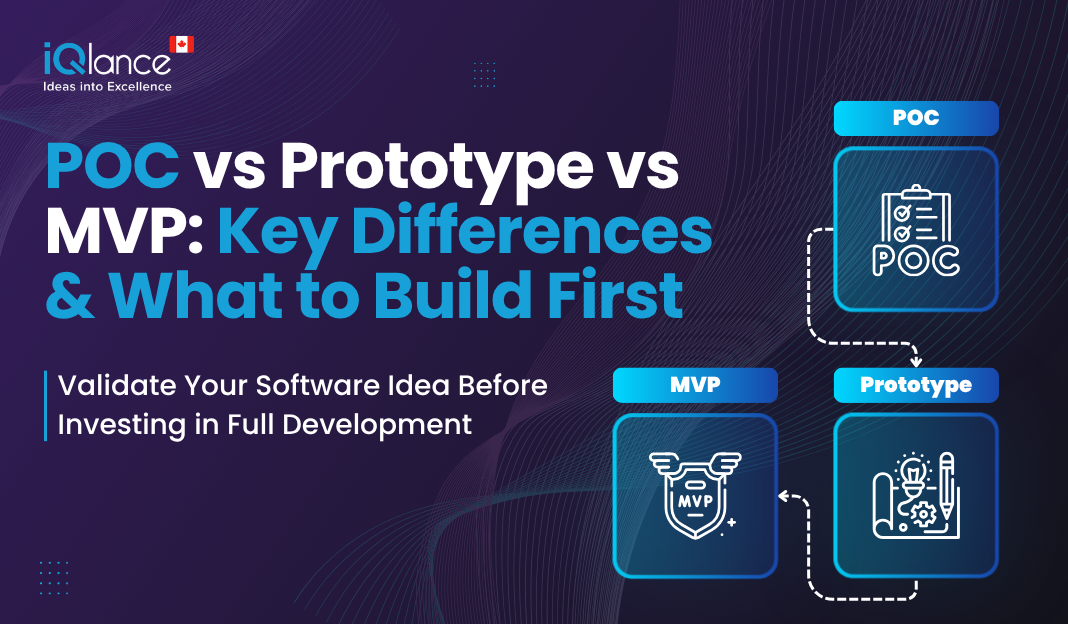
POC vs Prototype vs MVP: Key Differences & What to Build First

Introduction

Every software idea starts with a problem to solve. The hard part is deciding how much to build before you have proof that the software idea will work. Starting with a product can mean months of coding, a large budget, and many untested guesses.

There is a good reason to validate those assumptions early. CB Insights’ 2026 analysis of 431 failed VC-backed companies found that 43% cited product-market fit as a reason for failure.

Before investing, a business must answer questions. Is the technology capable of delivering the software idea? Will users want the proposed experience? Importantly, will customers actually use the product when it reaches the market?

A Proof of Concept (POC), a Prototype, and a Minimum Viable Product (MVP) are approaches that address these questions at different stages. POC focuses on feasibility. A prototype explores the product experience. MVP gives a working version to users to test market demand.

The real challenge is figuring out which approach makes sense for the software idea. You may not need all three. Starting with the approach can waste a lot of time and resources.

This guide explains POC, Prototype and MVP. This guide tells you when each approach is useful and helps you decide what to build.

POC vs Prototype vs MVP: What’s the Difference?

A POC, Prototype, and MVP can all be used to reduce uncertainty before a business commits to building a complete software product. The difference lies in the type of uncertainty each addresses. Choosing between them is less about how much software you build and more about what you need to learn first.

Proof of Concept: Check the Technical Idea

A POC is suitable when people are unsure if the underlying technology can support the idea. The effort is usually focused on one or more challenges rather than on the finished product.

For example, a business might want to create an application that uses an AI model to analyze data in real time. Before spending money on the application, the development team can test if the model can process the needed data accurately and quickly enough.

The POC may never resemble an application. Its value is in showing that the hard technical part can be done.

Prototype: Explore the Product Experience

A Prototype focuses on what happens from the user’s perspective. It can represent the screens, navigation, interactions, and key steps a user would take while using the product.

Consider a new online booking platform. Before developers build the booking system, a business can create an interactive Prototype showing how customers search, select an option, choose a time, enter their details, and confirm a booking. Stakeholders and test users can review this flow and identify problems while changes are still relatively easy to make.

The Prototype therefore helps turn an idea into something people can see and interact with before significant development begins.

MVP: Test the Product With Real Customers

An MVP is a working version of a product that includes the essential features needed to solve the target problem. It is not an incomplete or unfinished version of the final product. The aim is to launch with enough functionality to provide real value while keeping the initial scope focused.

For example, a new food delivery business may begin with customer registration, restaurant listings, ordering, payment, and basic delivery tracking. Features such as loyalty programmes, advanced recommendations, and other additions can be added later if customer feedback indicates they are worth building.

An MVP gives the business something usable in the real market. Customer feedback, usage patterns, and business results can then help shape future development.

In simple terms, a POC helps prove that the technology can work, a Prototype helps shape how the product should work, and an MVP helps determine whether the product is worth taking further. The right choice depends on which question needs an answer first.

Comparison Table
FactorPOCPrototypeMVP
Main purposeTechnical feasibilityDesign and user experienceMarket validation
Main questionCan we build it?How should it work?Will people use it?
FocusTechnology and technical risksUI/UX, design, and user flowCore features and customer needs
UsersInternal team and technical stakeholdersStakeholders and selected test usersReal customers and early adopters
OutputTechnical proof or test resultInteractive product modelWorking software product
Typical testingTechnology, APIs, integrations, and algorithmsNavigation, screens, workflows, and usabilityCustomer behaviour, feedback, and demand
Level of functionalityLimited technical functionalityMostly visual or interactiveFunctional core features
Key outcomeConfidence that the technical idea is possibleConfidence in the product experienceEvidence of market interest and product value

What Should You Build First?

Choosing between a POC, Prototype, and MVP should not be based on what other businesses are doing. The right starting point depends on the biggest uncertainty behind your product idea. Before investing in development, identify what you need to prove first.

Choose a POC if the technology is uncertain

A POC makes sense when the product depends on technology that has not been proven in your specific use case. This could include artificial intelligence, complex algorithms, advanced data processing, or multiple third-party integrations.

For example, if you want to build an application that uses AI to analyze images, the first question may be whether the technology can deliver accurate results. Proving this early can prevent you from investing in a full product before knowing whether the technical foundation will work.

Choose Prototype if you are not sure about the user experience.

A Prototype is a way to start when you already know how the technology works but do not know how people will actually use the product. I find this approach very helpful for products with different screens, complex workflows, or many different user roles.

Testing the product flow before you start development can help you identify confusing navigation or unnecessary steps. It is much easier to fix these mistakes before you spend too much time building everything.

Choose an MVP if you are unsure about market demand.

An MVP is the choice when the technology works, and the product concept is clear, but you still need to see how real customers react to the idea. Instead of building every single feature you planned, you should just launch the most important parts and learn from how people use those parts.

For example, a startup might have a solution and a simple technology stack but no proof that customers will actually use or pay for the product. A focused MVP can give you that proof by using real-world feedback from people.

A Simple Decision Flow

Technical uncertainty- POC

Design or UX uncertainty- Prototype

Market uncertainty – MVP

You also do not have to follow all three stages. If the technology has already been proven, a POC may add little value. If the user journey is simple and well understood, you may not need a detailed Prototype. Likewise, if both technical and UX risks are low, moving directly toward an MVP may be the most practical option.

The goal is not to build more. It is to validate the most important assumption before making the next major investment.

In simple terms, a POC tests whether the technology can work, a Prototype tests how the product should work, and an MVP tests how the market responds to the working product. The right choice depends on the question that needs to be answered first.

Selecting an Appropriate Development Team

Not every company has a technical team on staff, and starting one from scratch is not always possible. Getting help from outside can be a choice when you need special skills, have complicated tech needs, or want to go fast from planning to building.

When you hire software developers, look for more than coding skills. The best team should know your business goals, who your users are, what tech you need and what limits you have. Having experience can also help the team spot problems early. Suggest the best way to build things.

A software development company can be useful when a product uses technology, integrates with other services, runs on multiple devices, or requires regular updates. A good partner should know what to check, set the project plan, and decide whether a test, a model, or a basic version is right without making the project too big.

Before choosing the right Software Development Company, check their skills and experience with similar projects. Doing so can make a significant difference to your product’s success. Make sure the plan and what you want are clear and keep talking during the project. Testing and quality checks are also important to make sure the product works well before it’s ready.

Consider the post-launch phase of the partnership. End users may identify additional requirements, technical challenges, or areas for enhancement. Your development partner should be capable of delivering ongoing support, implementing updates, and facilitating further development as the product matures.

The best development partner is not simply the team that can build the product. It is the team that understands what your business needs to validate before deciding what to build.

Why Choose iQlance for MVP Development?

Creating an MVP is not about adding as many features as possible. It is about figuring out what the product needs to do and building features to test the idea with real users.

At iQlance, we begin by learning about your business idea, the people you want to reach and what you want your product to do. We then help you pick the features and make a solid plan for the first version.

Our MVP App Development Services include UI/UX design, product development, testing to ensure it works well, and release to users. We make sure the product is helpful and works properly, without adding unnecessary features at the start.

After launch, we gather user feedback to identify improvements and new features. We can help with new features, make the product faster, and grow it as your business expands.

This way, companies can start with a product, learn from actual users and decide what to do next with better information.

Conclusion

Choosing between a POC, Prototype, and MVP is less about following a fixed development process and more about understanding what needs to be validated first. A POC proves whether the technology can support the idea. A Prototype gives shape to the product experience and helps identify usability issues. An MVP takes the core concept to real users and tests whether there is genuine market demand.

Not every business needs to build all three. If the technology is already proven, a POC may add little value. Likewise, a Prototype may not be necessary when the product flow is already well understood. The important thing is to identify the biggest uncertainty before committing significant time and money to development.

At iQlance, we help businesses evaluate their product ideas, choose the right development approach, and build with a clear path from validation to launch. If you are unsure what to build first, let’s discuss your idea and find the right starting point.
Contact us today.

Frequently Asked Questions

No. A POC is mainly needed when there is doubt. A POC helps businesses test technologies, AI, algorithms, connections or integrations before starting full development.

Yes, if the product idea, user flow, and core requirements are already clear. A Prototype is more useful when the product has workflows or the UX needs to be tested before development.

The timeline depends on the project scope, complexity, technology, integrations, platforms and testing requirements. A POC usually takes time because it focuses on a specific technical question. An MVP generally takes longer because it requires development and testing.

Yes. A Prototype can provide a foundation for MVP development. Its approved screens, navigation and user flows can help define the functionality developers need to build. However, the Prototype itself still needs to be developed into a product.

Software development costs in Canada vary based on product complexity, features, technology, UI/UX, integrations, platforms, security, testing, development team and timeline. A POC generally has a limited scope. A Prototype is mainly design-focused, while an MVP requires an investment because it must function for real users.

Look for expertise, relevant project experience, clear scope, transparent communication, quality assurance and post-launch support. The team should also understand your business goals. Recommend a practical development approach.

An MVP should evolve into a product when real users show consistent interest and the business has sufficient evidence to justify further investment. User feedback, usage data, customer demand and business results can help decide which features to improve or add next.

Dedicated Developers vs Freelancers: A Complete Comparison Guide

You need a developer. Your budget is real, your deadline is real, and the wrong hire will cost you more than money. This guide breaks down both hiring models, i.e., dedicated developers vs. freelancers, so you can make the right call for your project.

Whether you are building a SaaS platform, a customer-facing mobile app, or a core internal system, one question comes up early: should we hire dedicated developers or go with freelancers?

Both options work. The right one depends on your project’s size, timeline, and how much risk you are comfortable carrying. Let’s break it down clearly.

Dedicated Developers vs Freelancers break down

Quick comparison: Dedicated Developers vs Freelancers

Factor Dedicated Developers Freelancers 
Availability Full-time, your project only Working with multiple clients 
Scalability High: add developers, QA, DevOps easily Limited 
Security & IP Strong NDAs, structured access control Varies by individual 
Communication Structured standups, sprints, reporting Depends on the person 
Long-term projectsExcellent fit Moderate: risk of drop-off 
Team collaboration Strong, integrated workflow Limited, usually works solo 
Project ownership High Medium
Upfront cost Higher Lower 
Risk level Lower Higher 
Best for Growth-stage and enterprise projects Short tasks, MVPs, one-off fixes
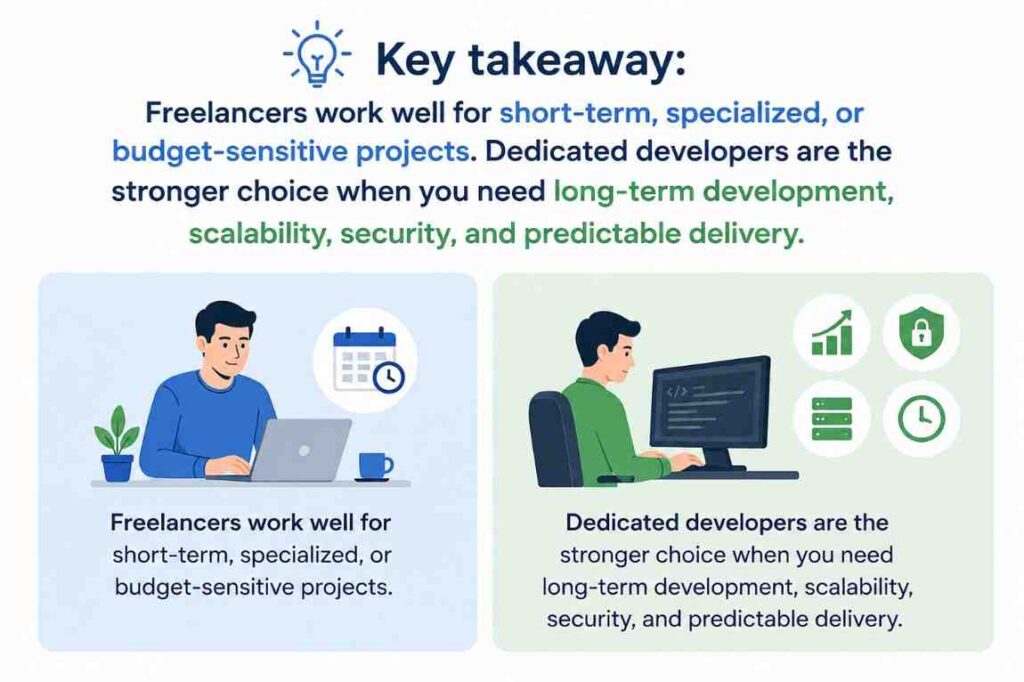
key takeaway

Understanding the Dedicated Developer Model

What Is a Dedicated Developer?

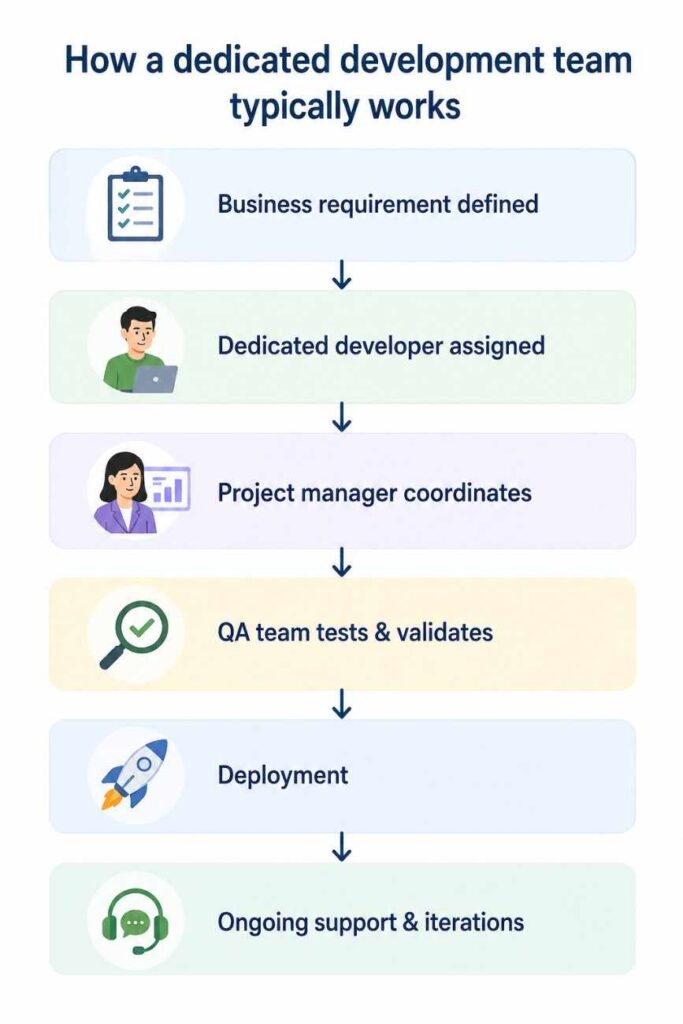
A dedicated developer is a skilled professional or team who works exclusively on your project for the duration of an engagement. They’re not splitting attention between five other clients. They’re ingrained in your workflows, aligned with your goals, and operate like an extension of your internal team.

Dedicated developers are typically sourced through a mobile app development company or a software development firm. That backing matters: it means you get project management, QA, and ongoing support built in, not bolted on.

Key Characteristics:

  • Works exclusively on your project
  • Integrates into your existing tools and workflows
  • Long-term engagement, usually 6 months or more
  • Backed by a development company’s support structure
  • Acts as an extension of your internal engineering team
how dedicated development team works

Understanding the Freelancer Model

What Is a Freelancer?

A freelancer is an independent professional who takes on contract-based work. They’re typically hired on a per-project or per-hour basis, and they usually manage several clients simultaneously. Freelancers range from solo generalists to highly specialized experts in niche technologies.

The key difference is that a freelancer’s time and attention are not exclusive to your project.

Common Freelancer Engagement Models

ModelHow it worksBest for 
Hourly Pay per hour worked Undefined scope, ongoing tweaks 
Fixed cost One-time fee for a defined deliverable Small, well-scoped projects 
Retainer Monthly engagement for recurring work Ongoing but limited support 
Milestone-based Payment released after defined deliverables Phased development work 

Detailed Comparison: 7 Factors That Matter Most

(1) Cost 

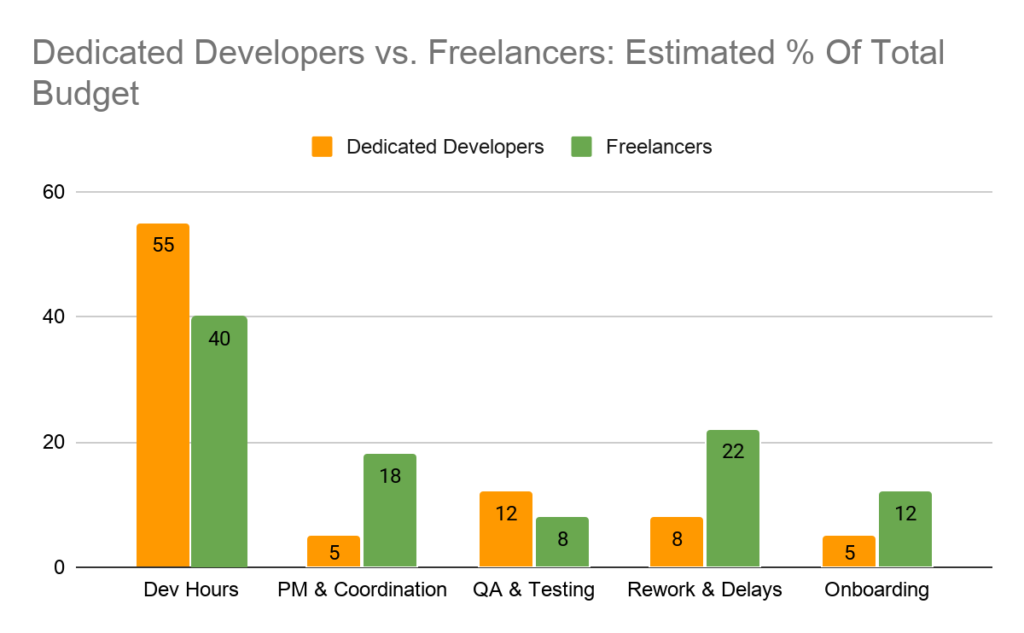
Freelancer rates vary significantly. In 2026, freelance developer rates in Canada range from $80 to $150/hr for general software engineers. AI/ML specialists command $180 to $300/hr. Dedicated development teams from a mobile app development company have a higher upfront engagement cost, but that number includes project management, QA, and support infrastructure costs freelancers don’t include in their quoted rate.

dedicated vs freelance budget

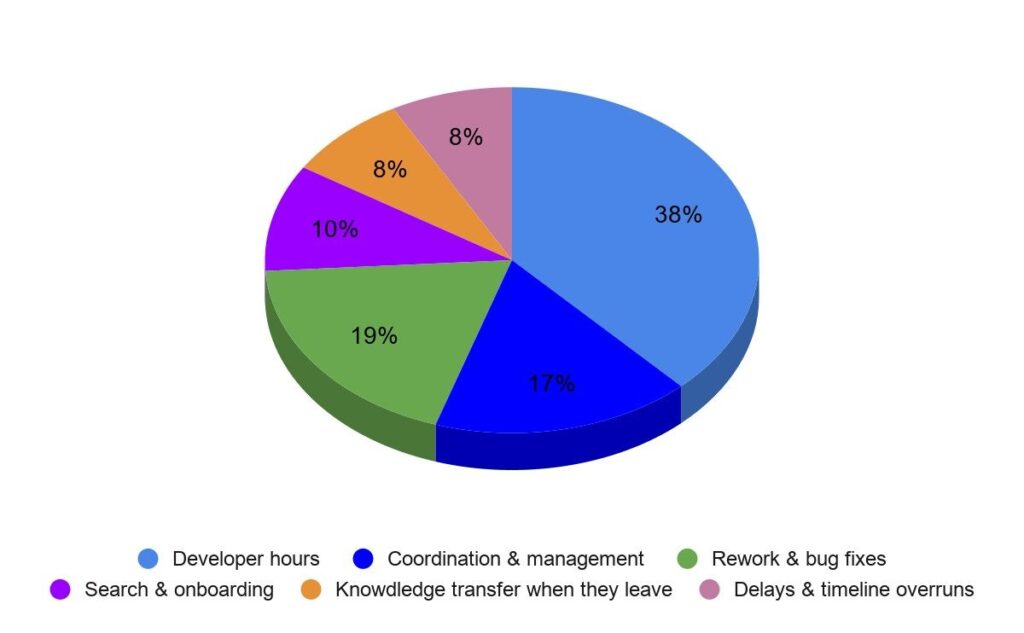
Hidden costs with freelancers are often ignored: hiring search time, coordination overhead, rework when freelancers leave mid-project, knowledge transfer when you hire the next one, and inconsistent code standards that create technical debt.

(2) Availability and Commitment

CriteriaDedicated DevelopersFreelancers
Full-time focus on your project Yes Usually no 
Working with multiple clients simultaneously No Yes
Consistent response time Yes Varies 
Sprint participation Yes Sometimes 
Available if scope expands Yes Not guaranteed 

(3) Quality and Consistency 

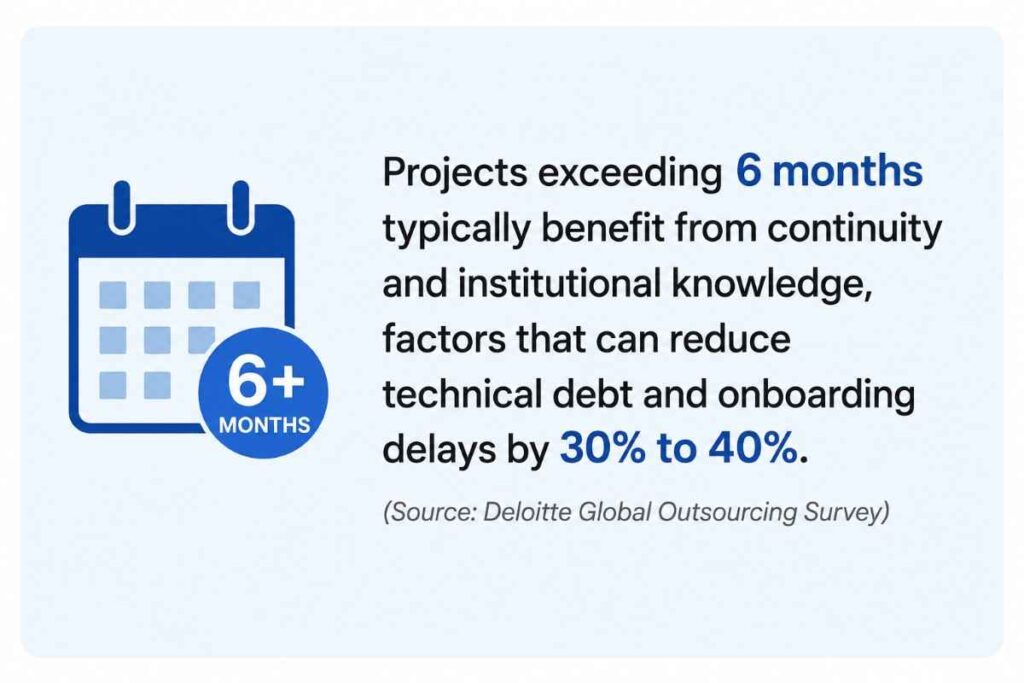
Quality in software development is not just about writing clean code on day one. It’s about maintaining standards. Dedicated developers working through a structured company follow shared coding standards, documentation practices, and code review processes. When a dedicated team member leaves, the next person onboards to existing documentation, not a blank slate. 

With freelancers, quality depends entirely on who you hired. Some are excellent. Many operate without documentation habits or peer review. When they exit the project, institutional knowledge exists with them.

deloitte survey

(4) Communication and Collaboration

AreaDedicated DevelopersFreelancers
Daily standups ✅Optional 
Slack/Teams integration ✅Depends 
Jira/project tracking ✅Depends
Team meetings & planning ✅Limited 
Structured reporting ✅ Regular Varies 
Escalation channel if issues arise ✅ Company-backed Individual only 

(5) Scalability 

Picture this: your app launches with 10,000 users. Three months later, you have 100,000; can your development resources keep pace? 

What you need to scaleDedicated TeamFreelancers
Add more developers ✅ Easy ❌ Difficult 
Add QA resources ✅ Easy ❌ Difficult 
Add DevOps support ✅ Easy ❌ Difficult 
Add project management ✅ Easy ❌ You manage it 
Maintain velocity during scale ✅ Easy ❌ Usually no 

This is where the model difference becomes most visible. When you need to move fast, a dedicated team backed by a mobile app development company lets you scale without starting your hiring process from scratch.

(6) Security and IP Protection 

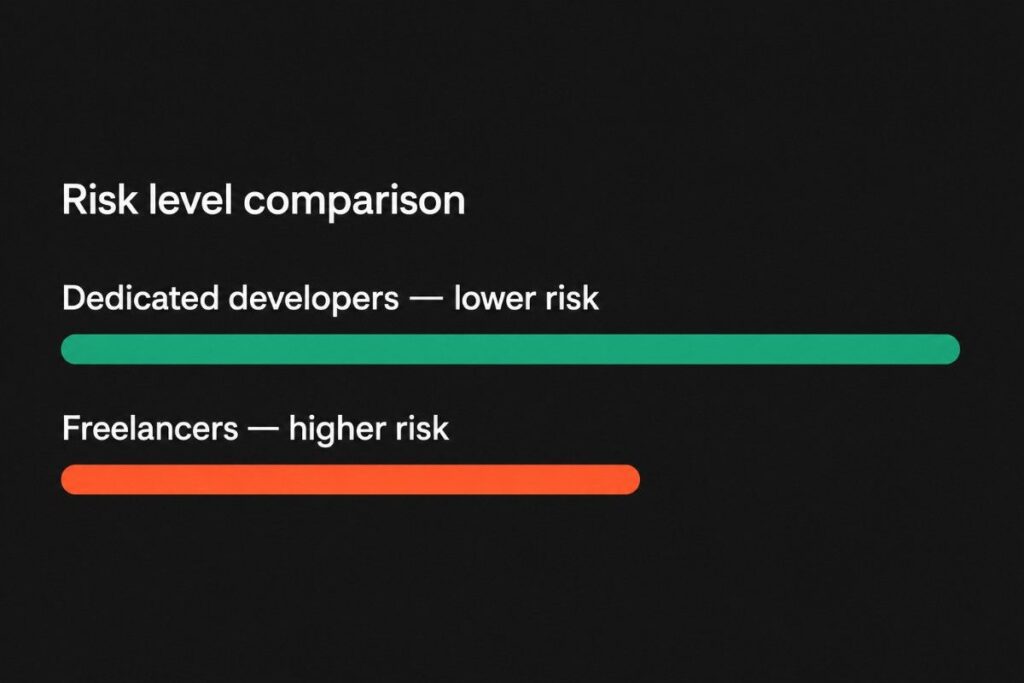
This matters especially for Canadian enterprises, where PIPEDA compliance and data control are real concerns. Dedicated development companies have formal NDA processes, structured access management, and clear IP ownership clauses built into contracts. Data doesn’t leave through informal channels. 

With freelancers, the responsibility falls on you. A freelancer working on three other projects may not have the same data hygiene practices, and enforcing an NDA with an individual across borders is genuinely difficult.

freelance vs dedicated risk level comparison

(7) Accountability and reliability

A dedicated development company has contractual obligations, replacement clauses, increasing channels, and a reputation to protect. If a developer leaves, they handle replacement; your project keeps moving. With a freelancer, if they disappear on week six of a twelve-week project, you’re starting a new search while your deadline doesn’t move.

Pros & Cons of Hiring Dedicated Developers

ProsCons
Long-term commitment to your project Higher upfront investment 
Better team collaboration Longer initial onboarding 
High scalability as you growBetter suited for ongoing, not one-off projects 
Strong accountability and support 
Enhanced IP and data security 
Faster project continuity 
Structured communication 

Pros & Cons of Hiring Freelancers

ProsCons
Lower cost Availability is never guaranteed 
Fast to hire Limited scalability 
Flexible, short-term contracts Knowledge loss when they leave 
Variable quality standards 
Communication challenges 
IP and security risk 

But Which Model Fits For Your Situation?

Your SituationRecommended Model
Quick website fix or bug patch Freelancers 
One-time design or content task Freelancers 
MVP validation with narrow scope Freelancers or small dedicated team 
SaaS platform development Dedicated developers 
Enterprise software/app build Dedicated developers 
React Native mobile app (including post-launch support) Hire React Native app developers (dedicated team)
Flutter cross-platform mobile app (including post-launch support) Hire Flutter app developers (dedicated team) 
AI/ML app/model development Dedicated developers 
Scaling an existing app/software Dedicated developers 
Long-term support and feature releases Dedicated developers 

The Actual Cost of Hiring

Most companies compare freelancer hourly rates against agency engagement costs and assume freelancers are cheaper. The actual math is more complicated.

actual cost of hiring

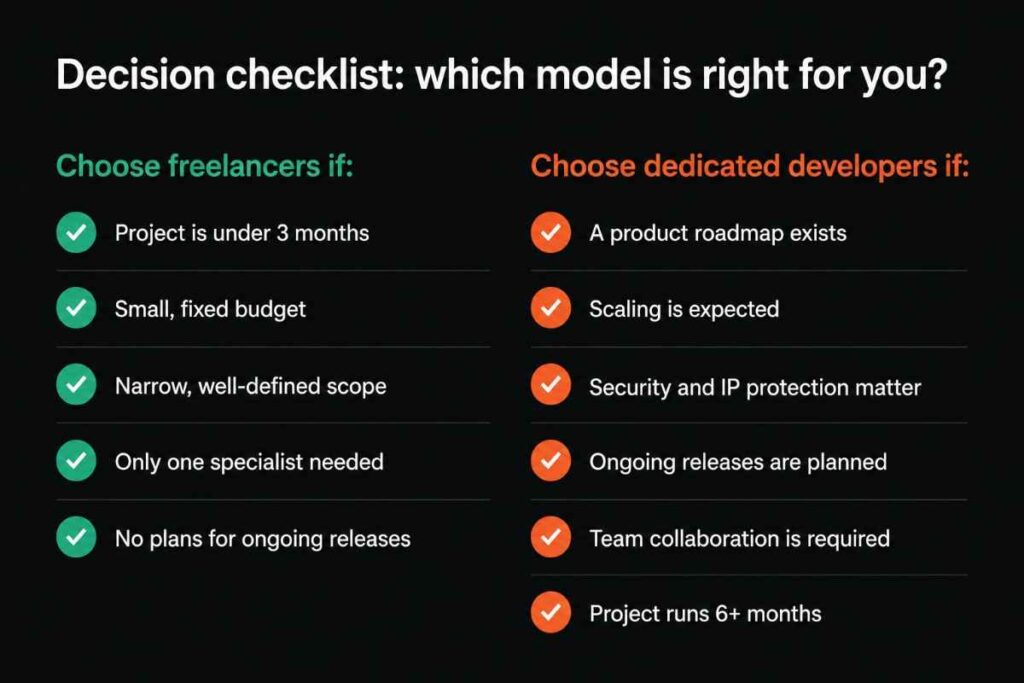
The following is the decision-making checklist that you can follow:

which model is right for you

In simple terms, freelancers help you complete tasks. Dedicated developers help you build and grow products.

Why More Canadian Businesses Are Choosing Dedicated Development Teams

Canadian businesses are investing more heavily in digital transformation than ever before. Whether it’s AI-powered applications, customer-facing mobile platforms, SaaS products, or enterprise modernization initiatives, software has become a long-term business asset rather than a one-time project.

That shift changes hiring priorities.

When software becomes central to business growth, decision-makers need development resources that can provide continuity, scalability, and accountability. A dedicated team offers all three.

Instead of repeatedly sourcing individual freelancers for different phases of a project, businesses gain access to a stable team that understands the product, retains institutional knowledge, and can adapt as requirements change.

This is particularly important for organizations building:

  • SaaS products
  • Enterprise software
  • Customer-facing mobile applications
  • AI-powered platforms
  • Digital transformation initiatives
  • Multi-year software roadmaps

As products become more complex, continuity often becomes more valuable than short-term cost savings.

How to Successfully Hire Dedicated Developers

Not all dedicated development teams deliver the same experience. Before making a hiring decision, evaluate providers against the factors that have the greatest impact on project success.

(1) Technical Expertise

Review their experience with the technologies your project requires. If you’re planning a mobile application, assess whether the team has proven experience building and maintaining similar products.

For example:

(2) Industry Experience

Developers who understand your industry require less ramp-up time and can often identify challenges before they become problems.

Ask for examples of projects completed in:

(3) Communication Processes

Strong communication reduces delays and keeps projects moving.

Look for:

  • Regular standups
  • Sprint planning sessions
  • Transparent reporting
  • Defined escalation channels
  • Shared collaboration tools

(4) Security Practices

Ensure the provider follows structured security processes, including:

  • NDAs
  • Role-based access controls
  • Secure code repositories
  • IP ownership agreements
  • Compliance-ready development practices
  • Scalability

Business requirements change. Your development partner should be capable of scaling resources up or down without disrupting delivery timelines.

(5) Client References and Portfolio

A strong portfolio provides evidence. Client references provide confidence.

Review both before making a final decision.

Looking for Dedicated Developers for Your Next Project?

Choosing between freelancers and dedicated developers ultimately comes down to your business goals.

If you’re building a long-term digital product, scaling an existing application, or planning a new mobile platform, working with a dedicated team can provide the consistency and technical depth required to support growth.

We help businesses extend their internal capabilities with experienced, dedicated developers; mobile engineers; designers; QA specialists; and DevOps professionals. Whether you need to hire dedicated developers for a full-scale software initiative or expand your existing team with specialized expertise, our flexible engagement models allow you to scale according to your business requirements.

From custom software and enterprise applications to React Native and Flutter development, our teams work as a seamless extension of your organization while maintaining complete transparency throughout the development lifecycle.

Conclusion

There is no universal winner in the dedicated developers vs. freelancers debate.

Freelancers remain an excellent option for short-term projects, specialized assignments, and businesses with limited development needs. Dedicated developers, however, often provide greater long-term value when projects require collaboration, continuity, scalability, and accountability.

Before making a hiring decision, evaluate the scope of your project, your growth plans, security requirements, and the level of involvement you expect from your development resources.

The right choice isn’t the one with the lowest hourly rate. It’s the one that gives your business the best chance of delivering a successful product today while supporting growth tomorrow.

Frequently Asked Questions

The answer depends on your project goals. Freelancers are often suitable for short-term or highly specialized tasks, while dedicated developers are generally better for long-term projects that require ongoing development, collaboration, and scalability.

You should hire dedicated developers when your project requires continuous development, strong security practices, team collaboration, and long-term support.

Dedicated developers typically have a higher upfront cost, but they often reduce hidden expenses associated with project delays, onboarding new resources, rework, and knowledge transfer.

Yes. Dedicated developers are specifically hired to integrate into your existing workflows, communication channels, and project management processes.

The right choice depends on your business requirements. React Native is often preferred for mature ecosystems and code reuse, while Flutter is popular for highly consistent cross-platform UI experiences.

Common challenges include availability issues, inconsistent communication, limited scalability, project continuity risks, and varying quality standards.

Yes. Most established mobile app development companies offer dedicated developer engagement models, allowing businesses to access developers, QA engineers, designers, and project managers as needed.

React vs React Native: Features, Benefits, and Use Cases

You need a digital product. Your team says, “Let’s build it in React,” but your developers say, “We should use React Native.” Now you’re just Googling the difference, right before a budget meeting. Don’t worry, this guide is for you.

Most companies today need both a web presence and a mobile app. But the challenge? Choosing the wrong technology early can cost you months of rework and tens of thousands of dollars. Canadian businesses, from SaaS startups to worldwide logistics chains, are making this exact decision every day.

This blog breaks down React vs. React Native, including what each does, who should use which, what it costs, and how to avoid the most expensive mistake teams make when picking a tech stack.

what is React vs React Native

What is React? 

React is an open-source JavaScript library, created by Facebook in 2013, for building fast, interactive web interfaces. It runs in a browser. When you visit a web application, and it feels smooth, updating parts of the page without full reloads, that is almost certainly React (or something like it) at work. 

Key Features of React

  • Component-based Architecture: The UI is broken into small, reusable pieces. Change one component, and every page that uses it updates automatically. 
  • Virtual DOM: React updates only what changed on screen, not the entire page. This makes web apps feel quick and responsive. 
  • SEO-friendly Rendering: With server-side rendering (Next.js), React pages are readable by Google, which is critical for marketing sites and SaaS platforms. 
  • Massive Ecosystem: Over 4 million npm packages. Whatever your product needs, someone has likely built a plug-in for it. 
  • Fast Front-end Rendering: Complex dashboards, real-time data tables, and filtering UIs all feel instant. 
  • Large Global Talent Pool: Easier to hire React.js developers than almost any other front-end specialists.

Best use cases for React

  • Web-first Products: SaaS platforms, Admin dashboards, CRM systems, and Enterprise portals
  • Content & Commerce: eCommerce websites, Progressive web apps, Marketing sites with SEO, and Customer-facing portals

What is React Native?

React Native is a framework, also created by Facebook, that lets developers write JavaScript code that compiles into real, native iOS and Android apps. Not a web app wrapped in a mobile shell. Actual native components that feel like they belong on your phone. 

Think of it this way: React builds what you see in Chrome or Safari. React Native app development builds what you download from the App Store or Google Play.

Key Features of React Native

  • Cross-platform Development: One codebase runs on both iOS and Android. Build once, deliver once. 
  • Near-native Performance: The UI renders using real platform components (not web views), so apps feel fast and familiar to mobile users. 
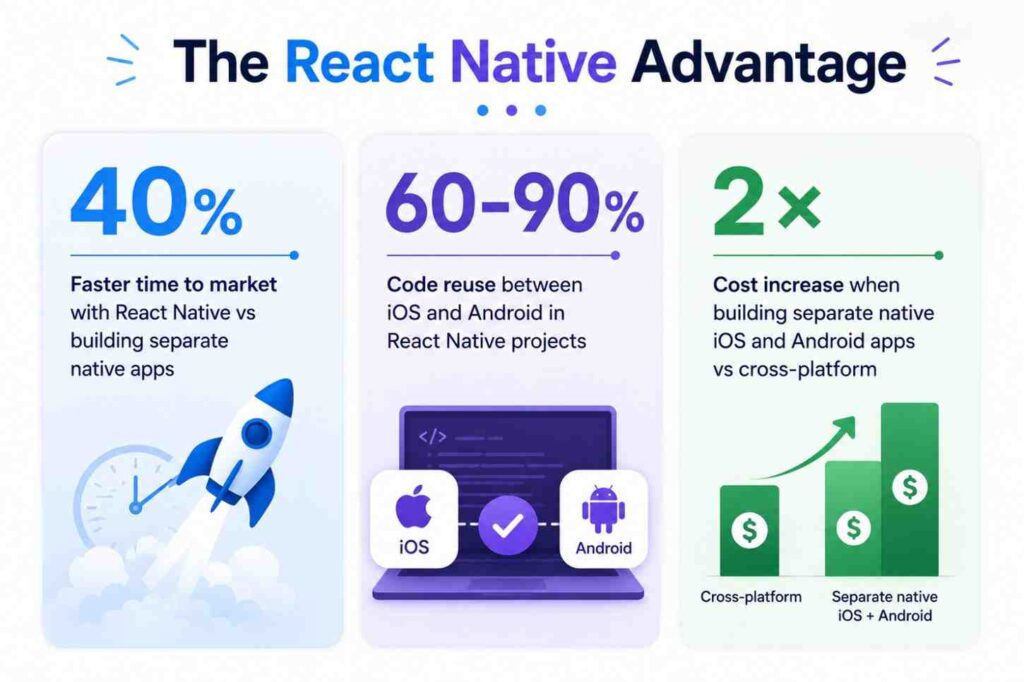
  • Shared Codebase (60% to 90%): Logic, API calls, and state management are shared. Only platform-specific UI elements differ. 
  • Faster MVP Launches: Deliver to both app stores simultaneously, cutting time-to-market by up to 40%.
  • Live Reload / Hot Reload: Developers see changes instantly without rebuilding the entire app. 
  • Access to Device APIs: Camera, GPS, push notifications, and biometrics are all accessible through native modules.

Best use cases for React Native

  • Consumer Apps: Startup MVPs, Delivery & logistics apps, Fitness & wellness apps, and Social networking apps
  • Business Apps: Fintech & payments, On-demand platforms, Booking & marketplace apps, and Field-service tools

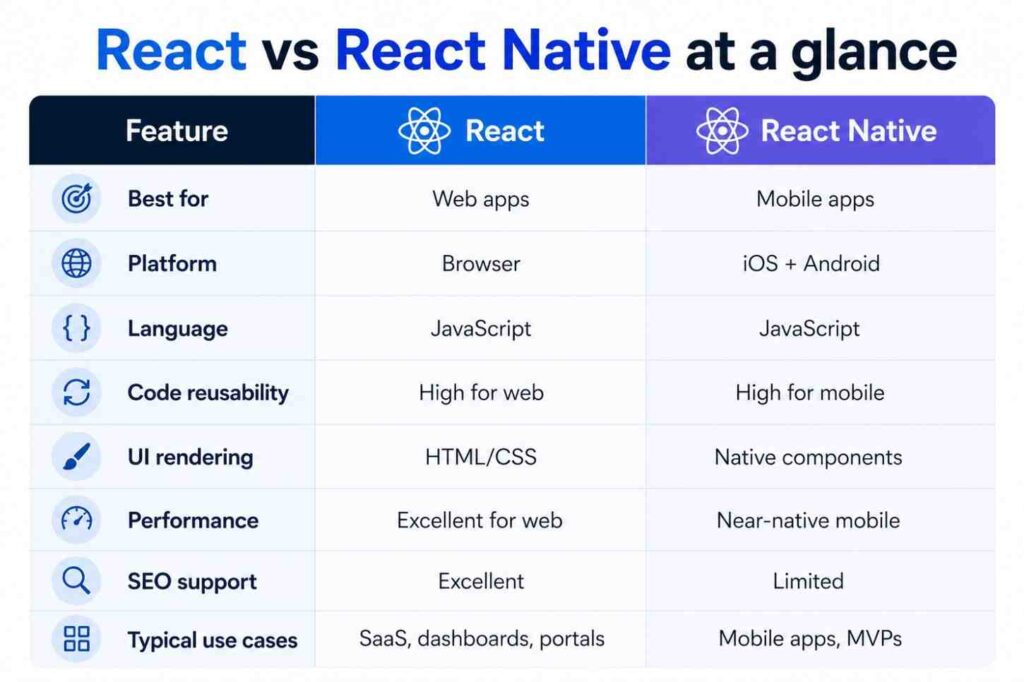
React vs React Native: Key Differences

Parameter React React Native
Platform Built for web applications that run inside browsers like Chrome, Safari, and Edge. Best suited for websites, SaaS platforms, dashboards, portals, and browser-based enterprise systems. Built specifically for mobile applications running on iOS and Android devices. Ideal for businesses targeting mobile-first audiences. 
Rendering Uses HTML and CSS to render UI elements inside the browser’s DOM (Document Object Model). Use native APIs and render actual native mobile UI components instead of web elements. 
Performance Optimized for browser performance and delivers fast rendering for dynamic web applications. Excellent for interactive websites and SaaS platforms.Optimized for mobile devices and delivers near-native app performance with smoother mobile interactions and gestures. 
Learning Curve Moderate learning curve for developers familiar with JavaScript and front-end development concepts. Moderate learning curve, but needs additional understanding of mobile concepts like navigation, device permissions, and platform-specific behaviors. 
SEO support Excellent SEO capabilities, especially with frameworks like Next.js that support server-side rendering (SSR) and static generation. Traditional SEO does not apply because apps are distributed through app stores instead of search engines. 
UI Components Users use web-based components such as div, span, button, and CSS styling. Uses native mobile components like view, text, image, and scrollView for platform-specific UI experiences.
Development Speed Enables fast development for cutting-edge web applications using reusable components and a large ecosystem of support. Faster mobile app development because one shared codebase can support both Android and iOS platforms. 
Code Sharing Primarily limited to web application development only. Allows businesses to share around 60% to 90% of the codebase across Android and iOS apps. 
Best ForBest for SaaS platforms, enterprise portals, admin dashboards, CRM systems, eCommerce websites, and progressive web apps. Best for mobile apps, startup MVPs, delivery apps, booking platforms, fintech apps, healthcare apps, and social applications. 
Maintenance Cost Moderate maintenance cost due to ongoing front-end updates, browser compatibility, and scalability improvements. Lower maintenance cost for multi-platform mobile apps because businesses maintain a single shared codebase instead of separate native apps. 
App Store Deployment No app store deployment is needed since applications are accessed directly through browsers. Requires deployment and approval through the Apple App Store and Google Play Store. 

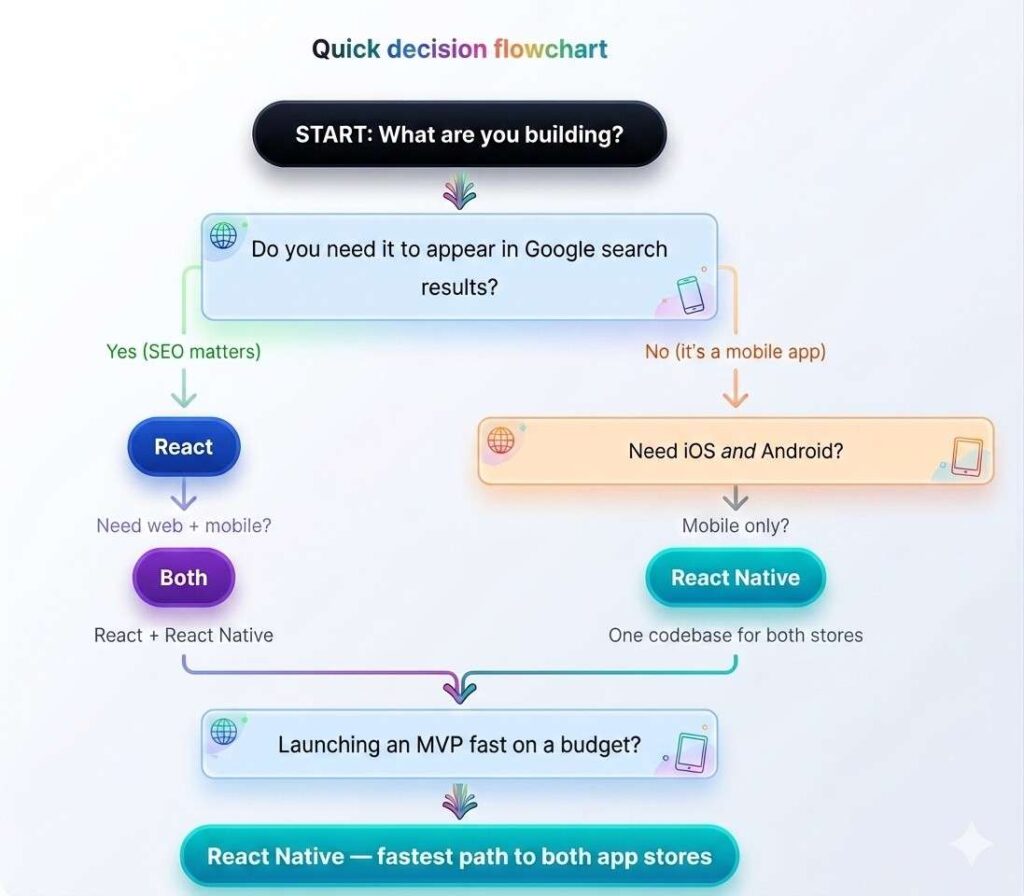
Should You Choose React or React Native?

The following flowchart helps you to make a very clear distinction between React and React Native.

Should You Choose React or React Native

React vs. React Native: Business Benefits

React for Business React Native for Business
Better SEO visibility → more organic traffic One codebase → lower dev cost vs 2 native apps 
Faster browser-side performance Up to 40% faster to market 
Easier web scalability for SaaS A single team manages iOS + Android 
Wide professional talent pool → Hire fast Easier long-term maintenance 
Ideal for complex dashboards & portalsConsistent UX across platforms 
Server-side rendering for data-heavy apps Strong for MVP validation before full build 
React vs. React Native Business Benefits

When Should Your Business Choose React?

Choose React if your product lives in a browser. If users will access it on a laptop or desktop, if you care about Google rankings, or if you’re building internal tools for employees, React is the right call.

Choose React If You Need to…

  • Rank on Google (SEO is a core growth channel) 
  • Build a browser-first product; no app store needed
  • Create SaaS software with complex dashboards or workflows 
  • Power internal tools, admin panels, or CRM systems 
  • Prioritize web scalability as your user base grows

Actual Business Examples

(1) Healthcare: Patient portals and booking systems where users log in from a web browser, and data privacy + SEO traffic matter.

(2) Logistics: Fleet management dashboards and dispatch tools that operations teams use on desktop computers all day. 

(3) B2B SaaS: Reporting tools, analytics platforms, and workflow automation software sold to other businesses. 

(4) E-commerce: Online stores and product catalogs where organic search traffic directly drives revenue. 

Working with a React JS development company that understands your industry is key. The framework is only as good as the team building with it. 

When Should Your Business Choose React Native?

Choose React Native if your users will be on their phones. If you are building something people download from an app store, whether it’s a delivery app, a booking tool, or a startup MVP, React Native saves you from paying for two separate native development teams.

Choose React Native If You Need to…

  • Launch a mobile app on both iOS and Android simultaneously 
  • Validate an MVP quickly without a large budget 
  • Keep one development team (not two separate native teams) 
  • Reduce long-term maintenance costs 
  • Push faster updates to both platforms at once

Actual Business Examples

(1) Startups: An MVP that needs to reach both iPhone and Android users by demo day, without hiring two engineering teams.

(2) Delivery & On-demand: Booking, delivery tracking, and marketplace apps where the mobile experience is the entire product.

(3) Fitness & Wellness: Apps using device sensors, GPS tracking, push notifications, and camera, all natively accessible in React Native.

(4) Fintech: Payments, wallets, and banking apps where performance and biometric security (Face ID, fingerprint) matter.

To move fast here, you will want to hire React Native developers who have delivered actual apps, not just engineers who know the framework theoretically.

Development Timeline Comparison: React vs. React Native

Project Stage ReactReact Native
UI development Medium – browser components Fast – component library built-in 
iOS + Android deployment Requires separate effort Unified – single build process 
MVP Launch Moderate (4 to 8 weeks typically) Faster (3 to 6 weeks for both stores) 
Feature Updates Instant (web deploy) Fast (OTA updates via Expo.) 
Ongoing maintenance Moderate Easier – one codebase to maintain 

Can React and React Native Work Together?

Yes, and many successful Canadian companies do exactly this. React handles the web experience. React Native handles mobile. The same backend APIs and business logic power both.

The combined approach gives you a single technology stack, a team that can switch between web and mobile, shared design systems, and far less hiring complexity than maintaining two completely separate codebases.

What is shared across both

  • Business logic and API integrations 
  • Authentication and state management 
  • Design tokens, colors, typography 
  • Developer knowledge (same language: JavaScript)

This setup is common at the scale-up stage, when a company has validated their mobile MVP and wants to add a web portal for enterprise buyers or operations teams. A good software development company will plan this architecture from day one to avoid rework later.

Can React and React Native Work Together

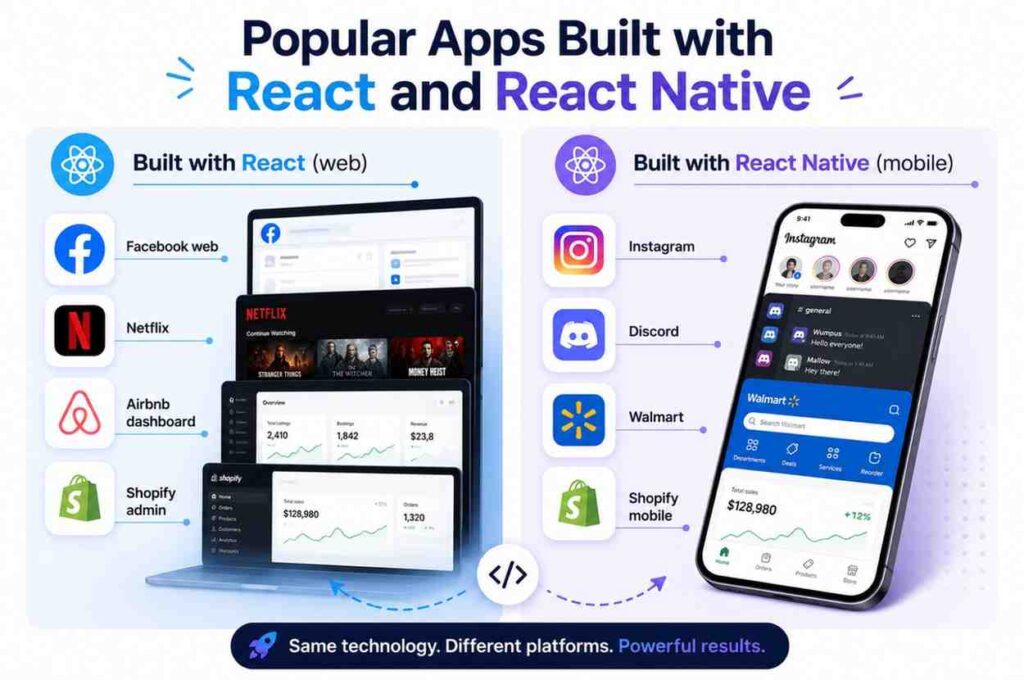
These aren’t niche tools; they’re category-leading products used by millions. Both technologies are proven at massive scale, which matters when you’re evaluating reliability for a business-critical application.

React vs React Native: Which Is Better for Startups?

React vs React Native Which Is Better for Startups
Startup GoalRecommended Technology
Build a SaaS platformReact
Launch a mobile MVP fastReact Native
Need SEO / organic trafficReact
Reduce app development costReact Native
Build a web + mobile ecosystemBoth
Validate a product idea quicklyReact Native

Startups that want to hire React Native developers for an MVP are making a smart financial decision: one team, one codebase, two app stores. Then they can layer in a React web app once the mobile product is validated.

Challenges to Know Before You Choose

No technology is perfect. Here’s what experienced teams run into so you are not unprepared after contracts are signed.

React – Known ChallengesReact Native – Known Challenges
Front-end only, you still need a separate back-endSome features require native modules (Java/Swift code)
SEO setup requires extra configuration (Next.js)Performance can lag in graphically intensive apps
Frequent ecosystem updates can require developer attentionDevice testing on multiple OS versions adds QA time
Opinionated choices around state management vary by teamApp store approval adds 1–3 days per release cycle

None of these are significant issues; they are manageable with the right team. But knowing them upfront helps you budget accurately and set realistic timelines.

The Future of React and React Native in 2026

Both technologies are advancing, not slowing down. Here’s what’s shaping the market conditions for Canadian businesses right now:

  • AI-powered Interfaces: React’s component model makes it the leading framework for integrating AI chat, suggestions, and real-time data into web UIs.
  • Cross-platform Dominance: Demand for React Native is surging as companies realize separate native teams are expensive and slow.
  • Mobile-first Development: With over 60% of global web traffic now on mobile, companies that don’t have a strong mobile app lose to those that do.
  • React Server Components: A major architectural shift (now stable in Next.js) that dramatically improves performance for complex web apps.
  • New React Native Architecture: The JSI (JavaScript Interface) rewrite delivers near-native performance, closing the gap with fully native development.

Businesses that choose React or React Native today are investing in technologies that will remain dominant for the next 5 to 7 years, not experimenting with something that might be deprecated tomorrow.

How to Choose the Right Development Partner

The framework matters less than the team building with it. Here is what to look for when evaluating a React Native app development company or a React JS development company for your project:

  • Cross-platform expertise: Can they build React web and React Native mobile? Fewer handoffs mean faster delivery.
  • Proven portfolio: Ask for live apps you can download or websites you can visit. Demos are nice; real production products are better.
  • Dedicated React developers: Not generalists who “also do React.” Specialists ship faster and make fewer expensive mistakes.
  • Agile delivery model: You should see working software every 2 weeks, not wait 3 months for a reveal.
  • Post-launch support: Apps need maintenance, OS updates, and bug fixes. Confirm this is included or available.
  • Canadian business understanding: Timezone alignment and familiarity with Canadian compliance requirements (PIPEDA, Quebec Law 25) reduce friction significantly.

Not sure where to start? A good development partner will help you define which technology is right for your business before any code is written. That conversation alone can save you months.

Build Scalable Web and Mobile Apps with iQlance Solutions

iQlance is a mobile app & software development company in Canada working with startups and enterprises across Canada (HQ: Toronto, Ontario). We specialize in React development, React Native app development, MVP launches, and scalable SaaS platforms, with an agile delivery model built for North American businesses. Book a free consultation or share your app idea with our React and React Native experts now!

Frequently Asked Questions

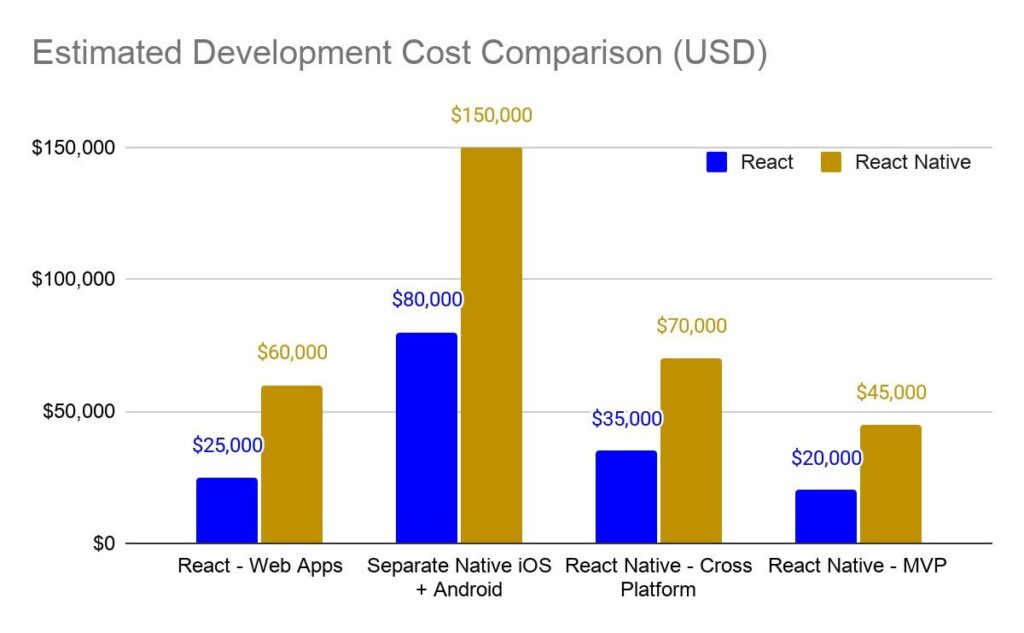
Building separate native iOS and Android apps can cost $80,000 to $150,000+ for a mid-complexity project. A React Native cross-platform app delivering the same functionality typically costs $35,000 to $70,000, roughly 40–50% less, because you have one codebase and one team.

Not natively. React builds web applications. You can make a React web app “mobile-friendly” with a responsive design, but it will not appear in the App Store or Google Play. For actual mobile apps, you need React Native (or another mobile framework).

React (especially with Next.js for server-side rendering) is excellent for SEO. Mobile apps built with React Native do not appear in Google search results; they are downloaded from app stores. If organic search traffic is a priority, React for the web is the right choice.

You can hire developers by engaging a software development company in Canada, like iQlance, that already has vetted, experienced React and React Native teams. For most businesses, working with an established company is faster and lower-risk than hiring individually.

How to Create an App in Canada: The Complete 2026 Guide

Think about the last time you called a company to book an appointment, check a balance, or place an order. You probably didn’t; you tapped an app instead. That shift in customer behavior is exactly why mobile app development companies in Canada are building mobile apps.

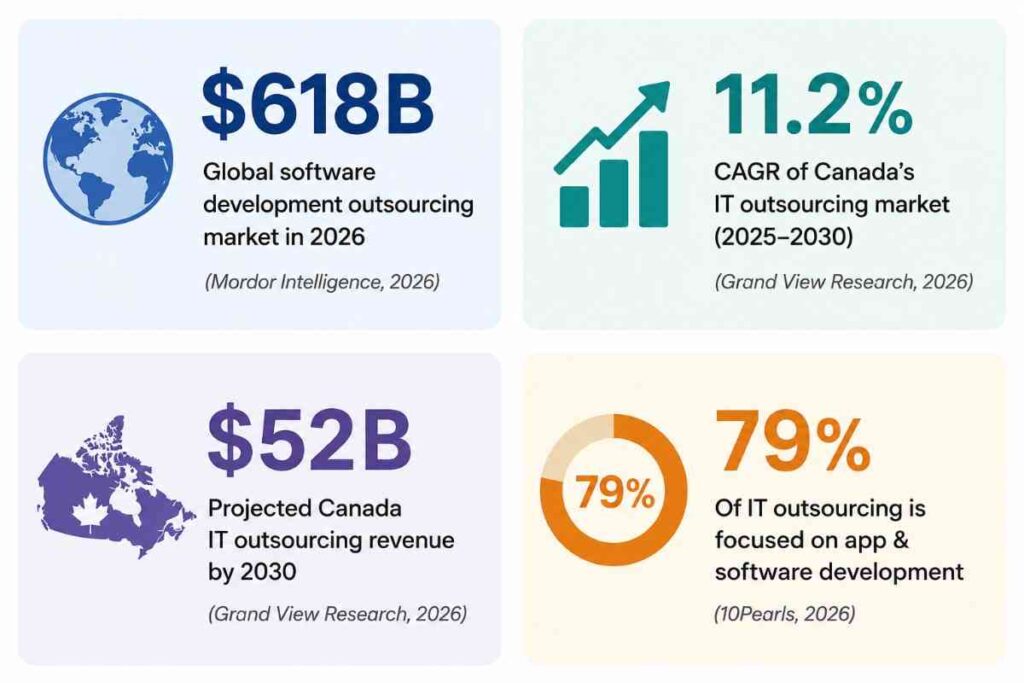
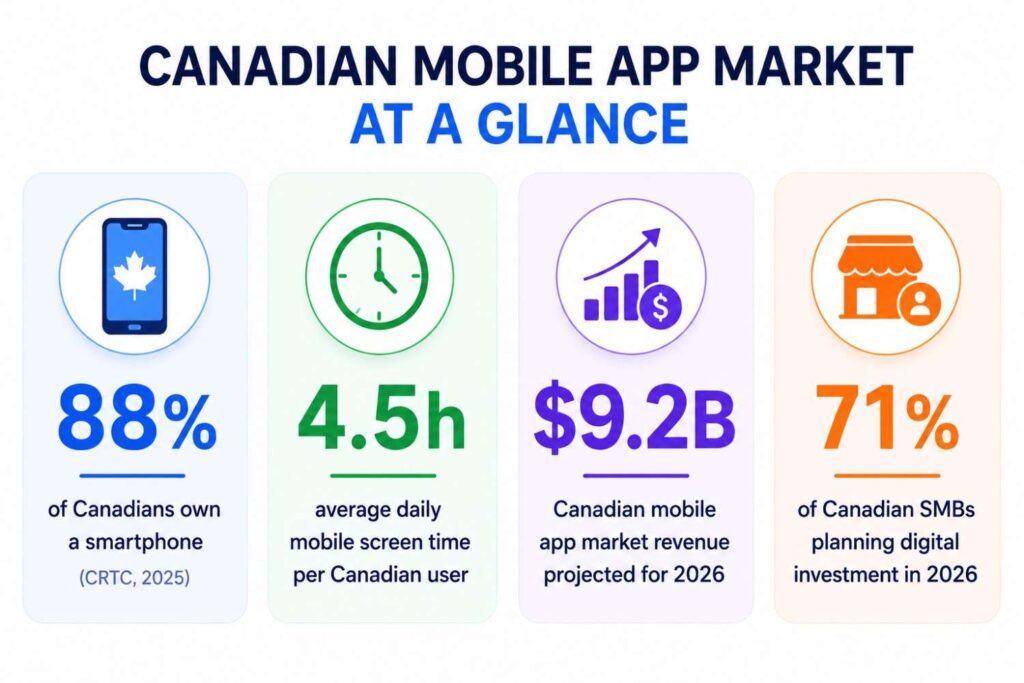
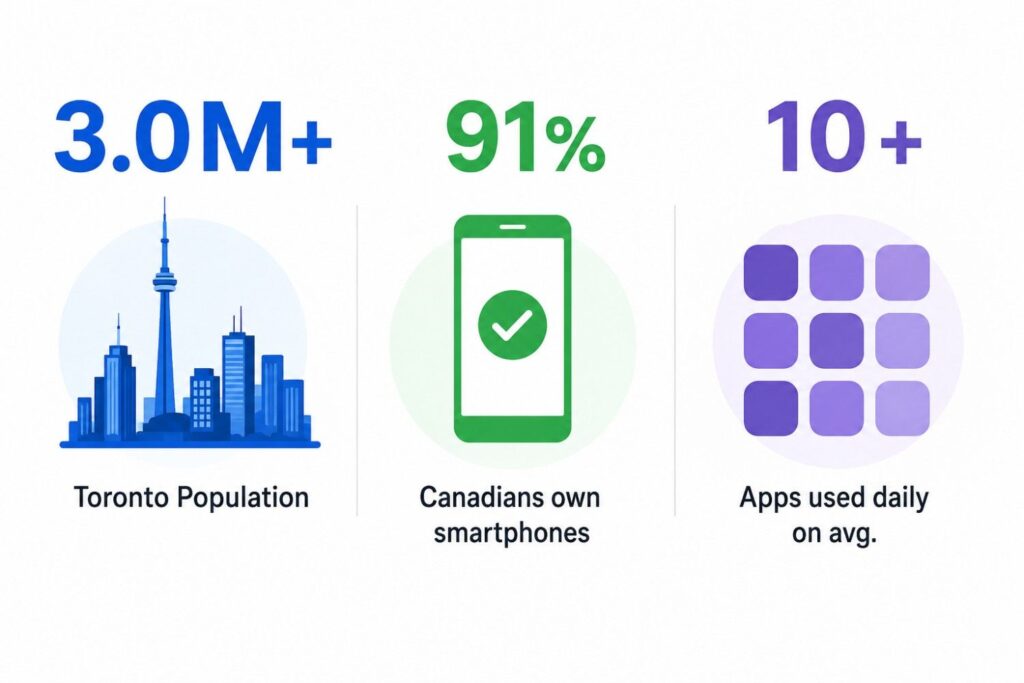
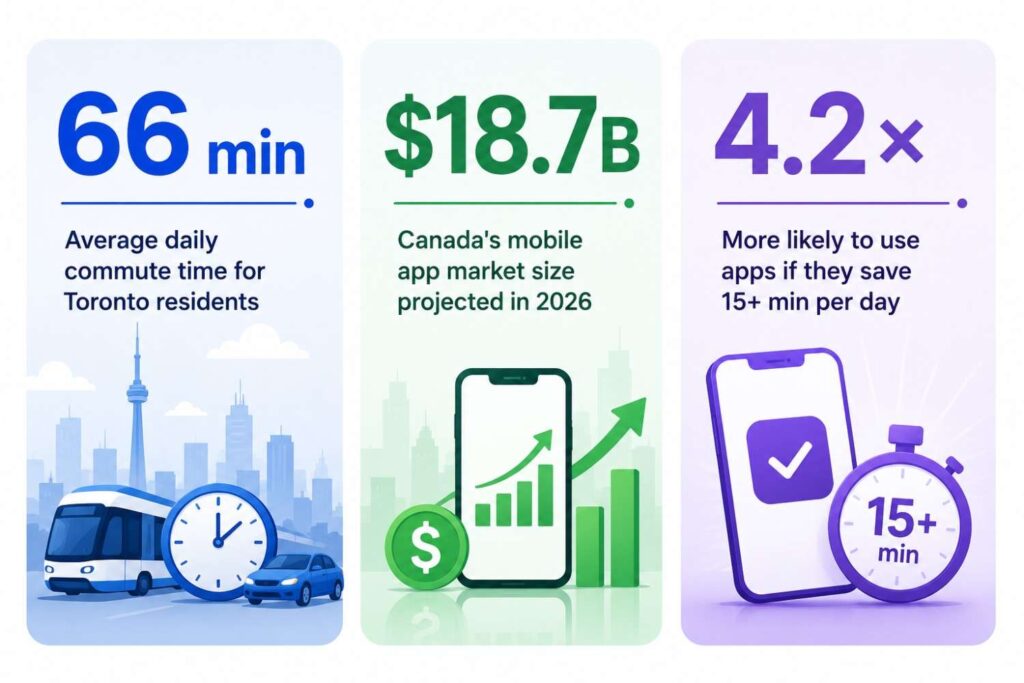
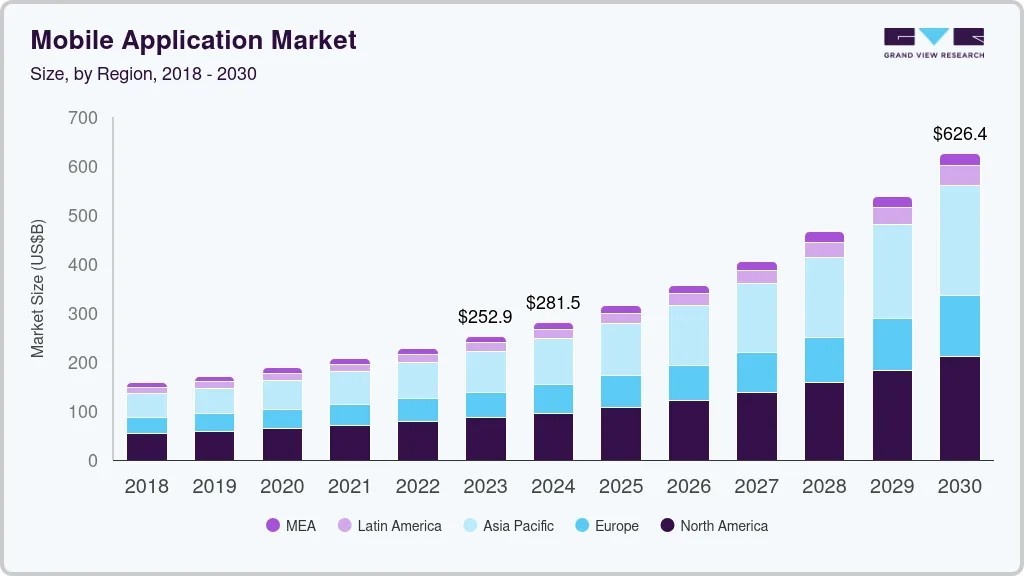
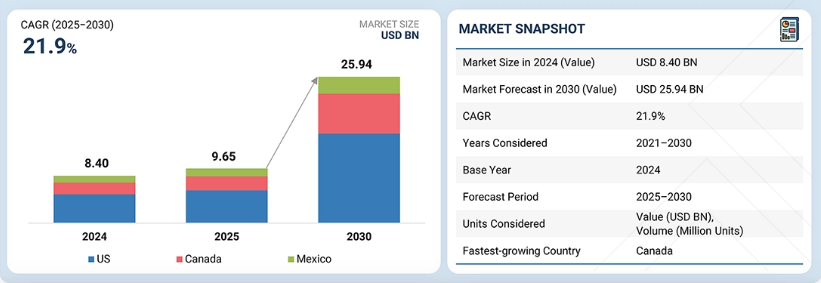
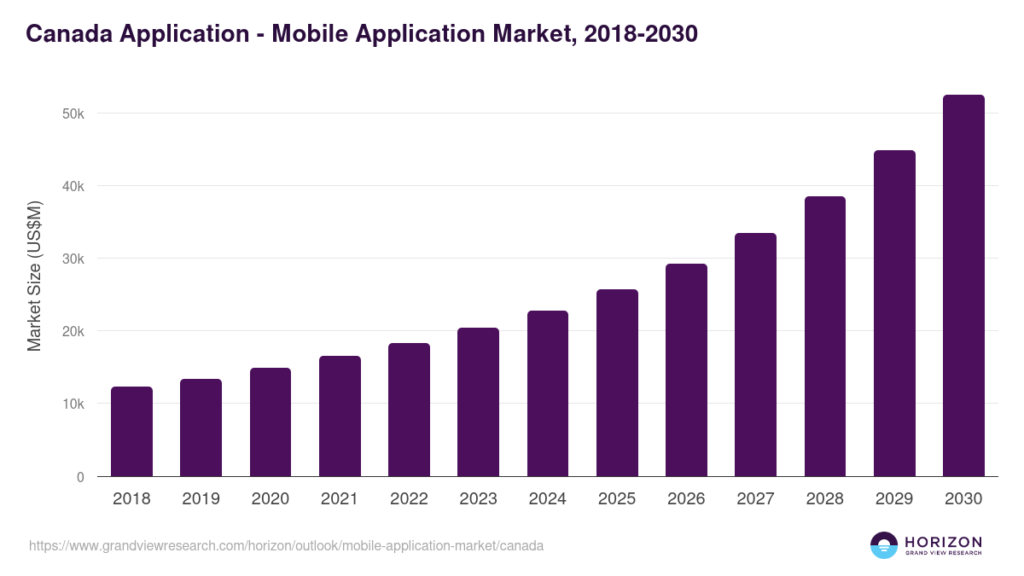
Canada’s digital economy is no longer a ‘future trend.’ It’s the operating reality. And businesses that don’t meet customers where they are, on their phones, are quietly falling behind those that do. The following states show the current scenario of the Canadian mobile app market.

building a mobile app in Canada

This guide is written for Canadian businesses that are thinking seriously about building an app but are not yet sure where to start, what it costs, or how to avoid expensive mistakes. No fluff, just a clear, step-by-step picture of what building a mobile app in Canada actually looks like in 2026.

Why Mobile Apps Are Becoming Essential for Canadian Businesses

A mobile app isn’t a fancy project. For businesses that do it right, it becomes the single most important customer touchpoint they own. Here is why Canadian companies across every industry are investing:

Sr. No.Business GoalHow an App HelpsIndustry Example (Just for reference)
1Customer RetentionPush notifications, loyalty programs, and personalized offersRetail, e-commerce
2Operational AutomationBooking, scheduling, and inventory are handled in-app without staffLogistics, healthcare
3AI-Powered CXChatbots, smart recommendations, predictive featuresFintech, SaaS
4Competitive AdvantageBe the first in your niche with a native mobile experienceReal estate, insurance
5Omnichannel CommerceSeamless web + mobile + in-store experienceRetail, hospitality

Whether you are a clinic managing patient appointments, a logistics startup optimizing delivery routes, or a SaaS company building tools for enterprise clients, a mobile app is increasingly the most direct path between your business and your customer.

What Type of App Should You Build?

Before you hire anyone or set a budget, the first actual decision is understanding which type of app fits your goals. This affects cost, timeline, and technology choices more than almost anything else.

App Type Best For Cost Range Performance Scalability 
Native iOS/Android Enterprise, complex features High Excellent Excellent 
Flutter Startups, fast cross-platform builds Medium Very Good High 
React NativeSMBs, existing web teams Medium Good High 
Progressive Web App (PWA) Budget-first businesses Low Moderate Moderate 
AI-Powered AppData-driven, personalization-heavy products HighExcellent Excellent 
SaaS Platform B2B software, subscription products High Very Good Excellent 

For most Canadian startups and SMBs, Flutter or React Native hits the sweet spot: strong performance, cross-platform reach (iOS + Android at once), and a significantly lower cost than building two separate native apps.

Step-by-step Guide to Building an App in Canada

(1) Define the Business Problem 

A successful app solves a real, specific problem, not a vague one. Before development begins, validate your idea against the market. Question to ask before you build:

  • What exact problem does this app solve, and for whom?
  • Who are your top 3 competitors, and what do they get wrong? 
  • Would your target customer pay for this or just use it for free? 
  • Can you describe the app’s core use in one sentence? 
  • Have you spoken to at least 10 potential users before building?

(2) Choose the Right App Features 

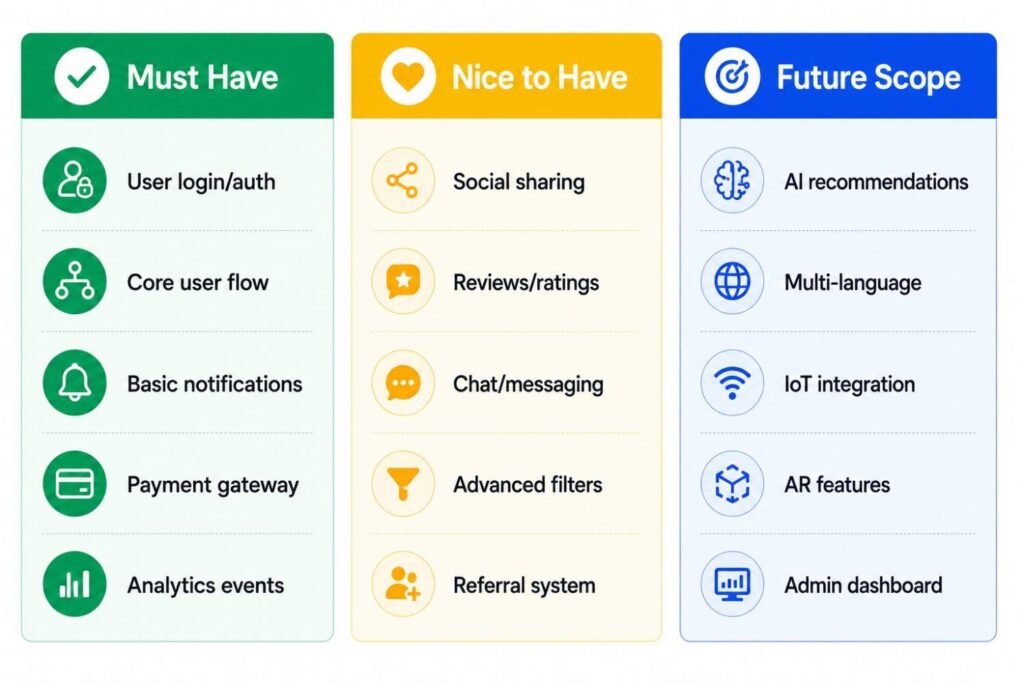
One of the biggest budget-killers is trying to build everything at once. Use a feature prioritization matrix to stay focused:

(3) Decide Your Budget 

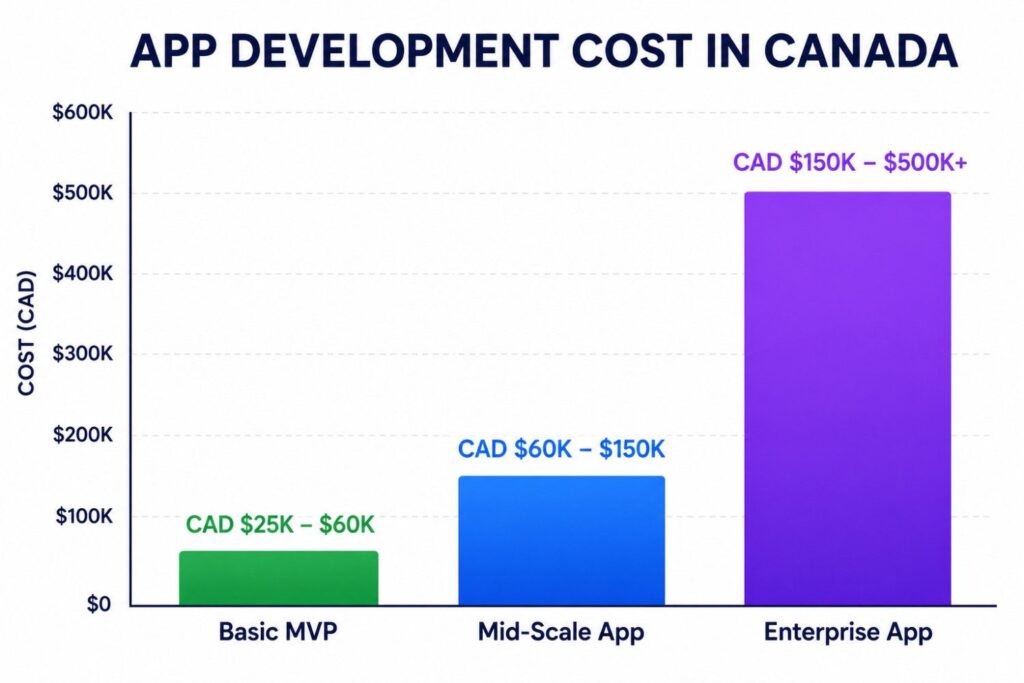
Most businesses underestimate what app development actually costs, not because they are deceived, but because no one explains what drives the numbers. Understanding mobile app development cost in Canada means looking beyond just ‘development.’ The following are some hidden costs most businesses forget to count:

  • App store fees: Apple: CAD $129/year; Google: USD $25 one-time
  • Cloud hosting: CAD $200 to $2000+ per month, depending on scale 
  • Third-party APIs (maps, payments, AI, SMS): CAD $500 to $5000 per month 
  • Post-launch maintenance: Typically 15-20% of development cost annually 
  • UI/UX design: Often a separate line thing from development

(4) Choose the Right Technology Stack

Layer Recommended Technologies (2026) 
Frontend / Mobile Flutter, React Native 
Backend Node.js, Python (FastAPI) 
Database PostgreSQL, MongoDB, Supabase 
Cloud AWS, Azure, Google Cloud 
AI Integration OpenAI APIs, Google Vertex AI 
DevOps / CI-CDGitHub Actions, Docker, Kubernetes 

(5) Hire an App Development Company or Team 

This is the single decision that will make or break your project. Here is how the key options compare:

Option Best ForAverage Cost Risk Level 
Freelancers Small, remote tasks Lowest High 
In-house Team Ongoing, large-scale productHighest Low 
Canadian Agency Accountability + local understanding Medium to high Low 
Offshore Agency Budget-conscious projects Low to medium Medium 

When you hire dedicated developers, you get a team fully focused on your product, with no context switching and no divided attention. For most Canadian businesses building their first serious product, partnering with a trusted mobile app development company in Canada delivers the best balance of cost, accountability, and quality.

(6) UI/UX Design Process 

Good design is not just visual appeal; it’s the difference between an app users love and one they delete after the first session. The process typically involves wireframes (low-fi layouts), interactive prototypes, user journey mapping, accessibility testing, and design system creation. In 2026, dark mode support and AI-driven UX personalization are expected to be increasingly available, not optional.

(7) Development Phase 

Professional development teamwork in Agile sprints, typically 2-week cycles, where features are built, reviewed, and tested continuously. This avoids the nightmare of a 6-month ‘big reveal’ that turns out to need major rework. Key practices include sprint planning, QA cycles within each sprint, DevOps automation, and CI/CD pipelines that push updates without downtime.

(8) Testing & Compliance 

Canadian businesses have specific legal obligations that don’t apply everywhere:

  • PIPEDA  Compliance: Canada’s federal privacy law governs how you collect and use personal data 
  • GDPR: Required if you serve users in the EU at any point 
  • WCAG 2.1 Accessibility: Increasingly mandated for public-facing Canadian apps
  • App Store Review Guidelines: Apple and Google both enforce strict content and privacy rules

(9) Launch Your App 

A launch without a plan is just publishing. Smart launches involve a beta release to a small user group, App Store Optimization (ASO) to improve discoverability, launch analytics set up before go-live, and a coordinated marketing push across email, social, and paid channels.

(10) Post-launch Maintenance 

An app is never ‘done.’ OS updates, new devices, user feedback, and competitive pressure mean you’ll be iterating continuously. Budget for ongoing monitoring, regular feature releases, security patches, and, increasingly in 2026, AI model updates that keep personalization features accurate and relevant.

How Much Does It Cost to Create an App in Canada? 

Understanding the mobile app development cost in Canada starts by separating what drives price from what’s just making fluff. Here is a factual breakdown:

How Much Does It Cost to Create an App in Canada
Cost Factor Why IT Matters Typical Impact on Budget 
Number of Features Each feature = design + dev + QA time Very high 
Third-party Integrations Payment gateways, CRMs, maps, and AI APIs High
AI Features Custom model training adds high cost High 
UI/UX Complexity Custom animations and design = more hours Medium to High 
Security Requirements FinTech and Health apps need extra layers Medium 
Team Location Canadian rates vs. offshore significantly differ Very High 
app development cost planning tips canada

App Development Timeline in Canada

App Development Timeline in Canada

Common Challenges While Building an App 

Most app projects that go sideways don’t fail because of bad ideas. They fail because of avoidable process mistakes. Here is what to watch for and how to avoid it:

Challenge What It Looks Like How to Avoid It 
Scope Creep “Can we just add more features?” – repeatedly Lock the MVP scope before development begins; use a change order process 
Budget OverrunsRunning out of money with 30% left to build Phase-based releases; keep 20% contingency budget
Poor UX Users can’t figure out how to use the core flow User test with real people before final development 
Wrong Agency Missed deadlines, no accountability, poor communication Check references; review live past work, not just screenshots 
Scalability Issues The app crashes when traffic spikes Design for scale from day one: use cloud-native architecture 
AI Integration Confusion Adding AI without a clear use case or budget Define exactly what AI feature solves for the user before building 

Why Most Canadian Businesses Start with an MVP

An MVP (minimum viable product) is not a cheap and half-developed version of your app. It’s the least expensive version that delivers real value and lets you learn from actual users before investing in the full build.

Factor MVP Approach Full Product Build 
Time to Market 2 to 4 months 6 to 14 months 
Upfront Investment Lower Much Higher 
Investor Validation Easier with live data Harder pre-launch 
User Feedback Built into the process Comes late 
Risk level Lower Higher 

Many Canadian startups choose MVP development first to validate product-market fit before committing to full-scale investment. The goal is not to build less; it is to learn faster. iQlance helps Canada-based businesses define and build strategic MVPs that generate real traction.

How to Choose the Right App Development Company in Canada

This is where the biggest mistakes happen. Choosing the wrong partner costs time, money, and sometimes the entire project. Whether you are looking at app development Toronto companies or coast-to-coast Canadian agencies, use the following checklist:

Green Flags to Watch For 

✔️ They sign an NDA and provide clear IP ownership from day one

✔️ They have a portfolio with live, downloadable apps, not just mockups

✔️ They have worked in your industry or a closely related one

✔️ They have experience with AI-ready architecture in past projects

✔️ They use Agile methodology with sprint-based reporting

✔️ They offer post-launch support and maintenance, not just “build and goodbye.”

✔️ They understand Canadian-specific compliance (PIPEDA, AODA, provincial privacy laws)

✔️ They ensure 100% IP-ownership transfer after compilation of the project

Red Flags to Watch For

❌ Unrealistically low pricing (often signals offshore subcontracting without disclosure)

❌ No post-launch support plan

❌ Vague about who actually owns the code after delivery

❌ No NDA or data security process

❌ Showing mockups for “past projects,” they can’t reveal live

When you decide to hire dedicated developers, the right team will feel less like a development company and more like a technology partner, invested in your outcome, not just billing hours.
Looking for anapp development Toronto option? iQlance works with startups, SMBs, and enterprises across Canada with full-cycle delivery, from discovery to post-launch support.

Future of Mobile App Development in Canada (2026-2027)

The businesses building apps today are making architectural decisions that will either put them ahead or force expensive rebuilds in 2027. Here is what is shaping the standards:

  • AI-powered apps with built-in personalization
  • Voice interfaces (Siri, Google, custom NLU)
  • Hyper-personalization at the user level
  • Super apps (one app, multiple services)
  • IoT integration for hardware-connected products
  • Low-code acceleration for internal tools
  • AI copilots embedded inside apps
  • On-device AI (reduced cloud dependency)

The trend that matters most: AI is no longer a premium add-on. Users in 2026 increasingly expect apps to anticipate their needs, not just respond to them. If your app does not have a clear AI roadmap, your product planning should start there.

Frequently Asked Questions

Yes, iQlance signs a Non-Disclosure Agreement (NDA) before discussing your app idea or business requirements. We ensure complete confidentiality, data security, and intellectual property protection throughout the development process.

Yes. iQlance is a legally registered Canadian app development company headquartered in Toronto. We are available for both virtual and in-person meetings to discuss your project requirements, strategy, and development roadmap.

Yes. iQlance has experienced and certified app developers, designers, and technology consultants working with Canadian businesses across multiple industries. Our team specializes in mobile app development, AI integration, SaaS platforms, and custom software solutions.

The cost of building an app in Canada typically ranges from CAD 25,000 to CAD 150,000+, depending on the app’s complexity, features, platform, UI/UX requirements, integrations, and development timeline. MVP apps generally cost less compared to enterprise-grade applications.

Most mobile apps take around 2 to 6 months to develop. A basic MVP can be completed within 6-8 weeks, while larger enterprise applications with advanced features and AI integrations may require several months.

Yes. iQlance provides ongoing post-launch support, including app maintenance, performance monitoring, security updates, bug fixes, feature enhancements, and scalability support to ensure long-term app success.

Once the project is completed and all payments are cleared, the complete intellectual property (IP), source code, and project ownership rights are transferred to the client. iQlance maintains full transparency regarding ownership and legal agreements.

The Ultimate List of 10 Best Mobile Apps for Toronto Residents (in 2026)

Living in Toronto means managing transit, payments, food, and city services, often across a dozen different screens. Here is the shortlist that actually makes life easier.

Mobile Apps for Toronto Resident

Think about a regular Monday in Toronto. You need to catch the TTC, find a parking-free launch spot near King Street, send a quick invoice, and maybe meet someone after work. Those are at least four major decisions you have to make, and in 2026, there is a smarter app for each one.

Smartphone usage in Canada has crossed the 91% mark, and Toronto residents are among the most digitally active in the country. It’s no coincidence that app development Canada-wide has become one of the fastest-growing tech sectors. The demand is right here, on every streetcar and every lunch break. But more apps don’t mean better ones.

The city’s unique mix of multi-modal transit, dense neighborhoods, and a fast-paced professional culture means residents don’t need a hundred apps; they just need the best 10. This guide breaks down exactly that, organized by category, ranked by actual utility, and written for people who actually live and work here.

best mobile apps for toronto resident

Why App Choice Actually Matters in a City Like Toronto

Toronto isn’t a one-speed city. A commuter in Scarborough has different needs from a startup founder in the Financial District. A student near UofT looks for different tools than a restaurant owner on Queen West. The apps you choose quietly shape how much friction or flow you experience every single day. And as app development Toronto continues to accelerate, the tools available to residents are only getting sharper.

Why App Choice Actually Matters in a City Like Toronto

The city’s public transit network, TTC, GO, UP Express, etc., is expensive but not always predictable. That alone creates a need for real-time data apps. Add the food scene (Toronto has over 9000 restaurants), a co-working boom post-pandemic, and one of Canada’s most active social calendars, and you start to see why the average Torontonian reaches for their phone more than 80 times a day.

most used mobile apps in toronto

The Best 10 Mobile Apps for Toronto Residents in 2026

The following are the apps broken down by what it does, who it’s for, and why it earns its place on your phone.

(1) Uber 

(⭐ 4.8 in App Store)

Uber in Toronto is more than a ride. It is a transit fallback when the TTC is delayed, a food delivery platform via Uber Eats, and for businesses, a reliable way to move clients across the city without dealing with parking. The integration between rides, food, and Uber for business makes it the single highest utility app on this list. The best features of this app are ridesharing, parcel delivery, business billing, and real-time tracking.

(2) Transit App 

(⭐ 4.7 in App Store)

Think of this as your personal TTC dispatcher. The Transit app pulls live data from TTC buses, subway lines, GO Transit, and even Uber, displaying everything on one map. It shows you exactly how many minutes until your bus arrives (not the scheduled time, the actual time) for daily commuters. This is arguably the most important app in Toronto. The best features of this app are TTC live data, GO Transit, multi-model routing, and trip planning.

(3) Ride the City 

(⭐ 4.3 in App Store)

Toronto’s cycling infrastructure has expanded significantly, and Ride the City maps it all. The app recommends the safest, most bike-friendly routes through the city. Avoid high-traffic roads and highlight protected lanes. If you are part of the growing crowd using Bike Share Toronto or your own wheels, this app removes the guesswork from cycling in the city. The app offers cycling routes, Bike Share Toronto, safety-first navigation, etc., features.

(4) Just Eat 

(⭐ 4.4 in App Store)

Just Eat holds a unique edge over competitors in Toronto: it includes smaller independent restaurants that aren’t on Uber Eats or DoorDash. If you want to support a local Kensington Market shawarma spot or a family-run Vietnamese restaurant in Scarborough, Just Eat is where you find them. Price transparency is also notably better; you see delivery fees upfront, not at checkout.

(5) Street Food Toronto 

(⭐ 4.1 on Google Play)

Toronto’s street food scene is underrated and largely invisible unless you know where to look. Street Food Toronto maps licensed food trucks and pop-up vendors across the city in real time. It is a niche app, but it fills a real gap: finding a great launch under $12 near you. Particularly useful during summer months around the waterfront and downtown core.

(6) Drink Owl 

(⭐ 4.2 in App Store)

Drink Owl is essentially a Yelp platform built specifically for Toronto’s bar culture. It curates cocktail bars, craft beer spots, wine bars, and rooftops with filters by neighborhood, vibe, price point, and even happy hour timing. For professionals entertaining clients or a team post-work outing, it saves the “where should we go?” back-and-forth entirely.

(7) GroceryGo 

(⭐ 4.5 in App Store)

GroceryGo does one thing extremely well: it compares grocery prices across Loblaws, Metro, Walmart, Costco, and No Frills in real time so you always know which store has the lowest price on the items you actually buy. In a city where the cost of living continues to climb, this is one of those apps that genuinely puts money back in your pocket, often $30 to $50 per week for a family of four.

(8) Tinder 

(⭐ 4.0 in App Store)

Toronto is one of North America’s most diverse cities, which makes Tinder’s user base here unusually rich. Beyond just dating, the app increasingly surfaces event-based connections and shared interests. In 2026, features like ‘Tinder Explore’ make it a social discovery tool as much as a dating one. For newcomers to the city, it’s also been widely cited as a genuine way to find community.

(9) SpotBuddy 

(⭐ 4.3 in App Store)

SpotBuddy is built for shared interests; find running partners, hiking groups, sports leagues, or hobby clubs near you in Toronto. Unlike Facebook Groups (which are chaotic) or Meetup (which feels stale), Spotbuddy focuses on spontaneous, location-based activity matching. It’s especially useful for professionals and newcomers who want to build a social life beyond the office.

(10) Breather 

(⭐ 4.5 in App Store)

Breather is an on-demand workspace booking app, and it was built in Canada, making it particularly well-suited for Toronto’s downtown core. Need a quiet room for a two-hour client call? A small meeting space for 4 people near Union Station? Book it on Breather in under a minute. It’s a practical solution for hybrid workers, freelancers, and growing teams that don’t want to commit to a full office lease.

AppCategoryBest ForFree?
UberTransitRides, food delivery, business travelFree (pay per use)
Transit AppTransitDaily TTC + Go commutersFree
Ride the CityTransitCyclists and bike-share usersFree
Just EatFoodSupporting local restaurantsFree (delivery fees) 
Street Food TorontoFoodFinding food trucks and pop-upsFree
Drink OwlFoodBar & nightlife discoveryFree
GroceryGoUtilitySaving on weekly groceriesFree
TinderSocialDating, social discovery, eventsFreemium
SpotBuddySocialActivity groups + communityFree
BreatherWorkOn-demand meetings + workspacePay per booking

How to Choose the Right App Stack for Your Situation

Not everyone needs all the above-mentioned apps. Here is a simple framework based on how you actually use the city, so you are not downloading apps you will ignore.

(1) If You Commute Daily

  • Transit App (real-time TTC data) 
  • Uber (backup when transit fails) 
  • Ride the City (if you cycle) 
  • Breather (for flexible work hours)

(2) If You Run a Business

  • Uber for business (client travel) 
  • Breather (Team meeting spaces) 
  • Transit App (know your team’s routes) 
  • Drink Owl (client entertaining)

(3) If You Are New to Toronto

  • Transit App (learn the city’s routes) 
  • SpotBuddy (build a social circle) 
  • GroceryGo (learn local price benchmarks) 
  • Street Food Toronto (explore affordably)

(4) If You Are Watching Costs

  • GrocerGo (save on groceries) 
  • Just Eat (transparent delivery fees) 
  • Transit App (avoid costly Uber habit) 
  • Street Food Toronto (cheap-quality meals)

Top 4 App Trends Reshaping How Toronto Operates in 2026

The apps we have discussed are all used to solve users’ pain points. But modern tools are changing how the entire city thinks about mobility, services, and productivity. These trends matter if you are a business leader thinking about where digital products are running.

(1) AI-powered Civic Apps

Tools like SolveTO are using AI to help residents report city issues, navigate permits, and access government services in simple language, ensuring no bureaucratic jargon is needed.

(2) Super Apps + Ecosystem Bundling

Rather than 10 separate apps, platforms are building transit, payments, food, and services into one, following the WeChat model. Toronto is early, but the direction is clear.

(3) Real-time + Predictive Mobility

Apps are moving from ‘where is my bus now’ to ‘you should leave in 4 minutes based on your meeting, route congestion, and weather.’ Predictive intelligence is the new real-time.

(4) Contactless-first Economy

Cash is nearly irrelevant in Toronto’s core. From transit fares to street food, the entire urban experience is moving toward tap-to-pay and in-app payments by default.

mobile app growth in toronto
(The base year here is 2022.)

What This Tells Us About Where Businesses Need to Invest

Every app on this list started as someone’s answer to a problem that wasn’t being solved well enough. Businesses across Canada, from startups to enterprises, are increasingly recognizing that a well-built mobile app isn’t a nice-to-have; it’s a competitive channel.

Whether it’s a retail brand needing a loyalty and commerce app, a logistics company wanting real-time fleet visibility, or a healthcare provider building a patient engagement tool, the underlying challenge is always the same: turning an idea into a reliable, well-designed product that people actually use.

That’s where a trusted mobile app development company comes in. The most successful mobile products in 2026 share a few traits: they solve one problem extremely well, they’re built with a mobile-first mindset, and they’re maintained iteratively based on real user feedback.

Building a mobile app for the Canadian market?

iQlance helps Canadian businesses design, develop, and launch mobile apps from MVPs for startups to feature-rich apps for enterprises. Let’s talk about what you want to build. Contact us now, or explore our portfolio to know more about us.

Conclusion

Apps Are Infrastructure… and Toronto Proves It

A decade ago, “Which apps do you use?” was a casual conversation. In 2026, it’s closer to asking someone how they get around, eat, work, and connect with people. The ten apps in this list aren’t unique; they’re part of how Toronto actually functions.

The real message is not just which apps to download. It’s that every one of these products was built to solve a specific, real problem for a specific group of people. That clarity of purpose is what separates apps people actually use from the 80% that get deleted within a week.

For businesses, the lesson is equally clear: mobile is not a feature your product might eventually need; it’s often the primary way your customers, employees, or partners will interact with you. The companies investing in thoughtful app development Canada-wide today are building the infrastructure their businesses will run on tomorrow. Whether you choose to work with a mobile app development company or hire dedicated developers to work directly within your team, the important thing is starting with clarity: who is this app for, what problem does it solve, and what does success look like in 90 days?

If you’re at the stage of thinking about what it would take to build something for the Canadian market, whether that’s a customer-facing app, an internal tool, or a full product, the smartest first step is talking to a team that’s done it before. Learn how iQlance approaches mobile app development in Canada.

How Much Does Software Development Cost in Canada? Detailed Breakdown for 2026

Software development in Canada costs between CAD 55,000 to over CAD 550,000, yet most businesses still walk into any random software development company’s conversations without a realistic budget. The result? Blown timelines, surprise invoices, and scope creep that eat into ROI before the product launches.

If you are figuring out what it actually costs to build software in Canada, then this guide is for you. No tech jargon, no vague ranges, just a clear breakdown of what drives the cost, where the money actually goes, and how to plan a budget before consulting any software development company in Canada.

Quick Snapshot of Software Development Costs in Canada (2026) 

The following table shows the average cost Canadian businesses are spending on software projects in 2026, broken down by the complexity of the software:

Average software development cost in Canada, 2026
Project TypeEstimated Cost (CAD)Approximate TimelineExample
MVP / Basic Software Solution$55,000 to $100,0003 to 6 monthsSimple web app, internal tools
Mid-level Software Solution$100,000 to $330,0006 to 12 monthsSaaS product, customer portal
Enterprise-grade Software Solution$330,000 to $550,00012 to 24 monthsERP, feature-rich platform integrated with cutting-edge technologies

No one tells you the exact cost of the custom software development. Coding is only about 35% to 40% of the total software project cost. The rest goes to design, testing, infrastructure, and project management, which are the areas that most businesses forget to consider while deciding on a budget for software development.

What Actually Drives Software Development Cost? 

(1) Project Scope and Complexity 

Each feature you add will cost more time, and every hour costs you more money (because Canadian professionals charge on an hourly basis). That is a simple calculation that you have to understand first. The following table shows how features break down by complexity:

ComplexityFeature InclusionRelative Cost Impact
Basic Software SolutionForms, data lists, user profiles, simple CRUDLow
Medium Software SolutionLogin or authentication, dashboards, notifications, search, and moreModerate
Advanced Software SolutionAI features, real-time data, payments, multi-tenancy, and moreHigh

(2) Team Structure and Location (Canada vs. Offshore) 

Where your developers sit has a massive impact on what you pay per hour. The following graph shows the current rate scenario.

Team Structure and Location (Canada vs. Offshore)

The offshore team can reduce costs by 30% to 70%. But this comes with trade-offs: zone gaps, communication overhead, and regulatory risks. Many Canadian companies today use a hybrid model, a local tech lead paired with offshore developers, for the best of both parties.

(3) Technology Stack and Architecture 

Building a monolith (one big system) is faster and cheaper. Microservices (separate, independent components) cost more to build but scale much better. Choosing the wrong architecture early can mean expensive rebuilds down the road.

  • Cloud-native software solutions cost more initially, but reduce long-term infrastructure overhead
  • React, Node.js, and Python are widely available and cheaper to hire 
  • Niche stacks (COBOL, legacy enterprise) significantly increase the costs and risks

(4) Integration and 3rd-party Dependencies 

Every time your software needs to ‘talk’ to another system, a payment gateway, a CRM, a logistics API, or anything, it’s the integrations. And each integration adds development time, testing time, and potential ongoing maintenance costs.

Integration TypeAdded Cost Estimate (CAD)
Payment Gateway (Stripe, Square)$3,000 to $8,000
CRM (Salesforce, HubSpot)$5,000 to $15,000
ERP (SAP, Oracle)$15,000 to $40,000 or more
Custom API integration$4,000 to $20,000

(5) Security and Compliance

If your business operates in a regulated industry, then compliance is a must; it’s built into the total cost of development. Canadian businesses often need to meet the following:

  • PIPEDA – Canada’s federal privacy law for private-sector organizations
  • PHIPA – Health information privacy law for Ontario-based health companies 
  • PCI DSS – Required for any software handling card payments 
  • SOC 2 – Common need for SaaS companies serving enterprise clients

Compliance-ready development can add 20% to 35% to your total project cost. But it is far cheaper to build it in from the start than to retrofit it later.

Software Development Cost Breakdown

(1) Cost by Development Phase

The following is something most cost guides skip, where the budget actually goes to a software project. Coding is just a single phase of the end-to-end process of development.

Development PhaseShare of Total BudgetWhat It Covers
Development (Coding)~38%Building features, APIs, backend logic, data models, and more
UI/UX Design~17%Wireframes, prototypes, visual design, user testing, and more
QA and Testing~17%Manual testing, automated tests, performance and security testing, and more
Project Management~13%Sprint planning, stakeholder updates, risk management, and more
DevOps / Infrastructure~8%Cloud setup, CI/CD pipelines, monitoring deployments, and more

The most common budget mistake is planning only for the development (coding) part, which is just ~38% of the final budget, and forgetting about QA, design, and infrastructure, which make up the other ~62% of costs. This is where it went over budget.

(2) Cost by Software Type

Software TypeSimpleMid-levelComplex
Web Application$25k to $60k$60k to $120k$120k to $300k or more
Mobile Software Solution 
(iOS or Android)
$40k to $80k$80k to $160k$160k to $350k or more
SaaS platform$80k to $150k$150k to $250k$250k to $500k or more
Enterprise ERP/CRM$150k to $250k$250k to $400k$400k to $550k or more

(3) Cost by Business Size

Business TypeTypical Budget Range (CAD)Focus Area
Startup / Early Stage$55,000 to $120,000Lean MVP, 3 to 5 core features, validate the idea first
SMB (Small-Medium Business)$100,000 to $280,000Scalable systems, integrations, automation
Enterprise$300,000 to $550,000 or moreCompliance-heavy, multi-region, legacy integrations

(4) Hidden Costs

The following table shows the costs at which projects quietly go over budget. These are predictable, yet most cost estimates omit them.

Hidden CostTypical ImpactNotes
Annual Maintenance+15-20% of build cost per yearBug fixes, security patches, updates
Scope Creep+20-40% to project totalEvery small addition compounds
3rd-party tools and APIs$500 to $2000/month ongoingCloud, analytics, and communications
Technical debtSlows future development opportunities by 30-50%Shortcuts today = higher costs later
Staff training (if needed)$5000 to $20,000 (one-time cost)Often overlooked in enterprise builds

How to Estimate The Software Development Cost

You don’t need a technical background to build a perfect estimate. Follow the following five-step framework:

StepsActionDetail
Step 1Define your featuresList the feature you want; don’t filter yet, just note down everything
Step 2Categorise complexitySort each feature into basic, medium, or advanced using the complexity table above
Step 3Estimate hours per feature.• Basic features – 20 to 50 hours 
• Medium features – 50 to 150 hours 
• Advanced features – 150 to 400 hours
Step 4Multiply by the rateUser CAD $90 to $120/hour for hybrid teams; multiply total hours by this blended rate
Step 5Add 20% buffetEvery project has hidden costs. Keep 20% contingency before finalizing your budget.

How to Reduce Software Development Cost Without Cutting Corners

(1) Start with an MVP: Launch the core product, gather actual feedback, and then build a complete, feature-rich software.

(2) Choose a hybrid team model: Canadian oversight with global delivery efficiency.

(3) Prioritize must-have features: Defer nice-to-have features for version 1 and version 2 of your software.

(4) Invest in proper discovery upfront: A $10k scoping phase prevents a $50k rework later.

(5) Avoid switching vendors mid-project: Onboarding a new team resets weeks of context.

Build vs. Buy vs. Outsource: Which Makes Sense for You?

ApproachBest ForCost ProfileControl
Build in-houseCore IP, long-term product roadmapHigh upfront + ongoing salariesFull
OutsourceSpeed, budget-conscious projectsProject-based, predictableModerate
Buy (off-the-shelf)Standard needs, fast deploymentLow build, ongoing licensingLow
Hybrid ModelScale and IT protectionBalance, best overall ROIHigh

For most Canadian mid-size businesses, outsourcing to a local software development company in Canada or working with a hybrid team delivers the best cost-to-quality ratio. You get experienced developers without the overhead of full-time hires and a local partner who understands Canadian compliance requirements.

Why Canadian Businesses Are Choosing iQlance Solutions

As a leading software development company with Canadian roots and a distributed delivery model, we work with startups, SMBs, and enterprise clients across the country. Here’s what makes the difference when you hire software developers through iQlance:

  • Local presence across Canada, and in-person meetings available in major cities
  • Deep experience in regulated industries like healthcare, fintech, and logistics
  • The hybrid team model, along with Canadian oversight, has global delivery efficiency
  • Transparent project pricing with fixed-cost milestone options
  • End-to-end capability including discovery, design, development, QA, DevOps, and maintenance

Frequently Asked Questions

Timelines vary from 3 months for a simple MVP to 18-24 months for an enterprise-grade system. Most mid-level projects land between 6-12 months, including design, development, and QA phases.

Offshore developers are 30-70% less expensive hourly, but this doesn’t account for project management overhead, communication delays, and time zone friction. A hybrid model, where a Canadian company manages offshore execution, often delivers the best value.

  • Junior developers: CAD $70-$90/hr.
  • Mid-level developers: CAD $100-$130/hr.
  • Senior developers: CAD $140-$160/hr.
Rates vary by city, specialty, and experience. Toronto and Vancouver tend to be on the higher end.

Fixed-price works well when the scope is clearly defined upfront. Time-and-materials is better for growing products where requirements change. Most agile projects use a blended approach: fixed milestones with flexible scope.

Realistically, CAD $55,000 is the floor for a production-ready MVP. Anything less typically means missing critical components like QA, security, or proper infrastructure setup.

Look for transparent pricing, experience in your industry, references from similar projects, clear communication processes, and post-launch support options. A first conversation should feel like problem-solving, not a sales pitch.

Mobile App Development Trends Businesses Must Know 2026

If you think having an app is enough to build an online presence, I am sorry to say you’re headed in the wrong direction. Because it needs the right app, flawless software that fits your targeted niche, and a leading mobile app development company that understands your business goals. The business’s growth today depends on how well its app connects with target users, streamlines operations, and keeps things moving in a highly competitive market. 

According to Grand View Research, the global mobile application market was valued at USD 252.89 billion in 2023 and is projected to reach USD 626.39 billion by 2030, growing at a CAGR of 14.3% from 2024 to 2030. These numbers clearly show how deeply mobile experiences now shape how businesses operate and how people interact with brands every day.

Users raised the bar; they don’t want just an app; they want something that feels personal, quick, and smooth, using AI, AR/VR, 5G, and cloud technology to make each tap feel effortless. If you are planning to grow your digital presence, 2026 is the right time to execute your plans. In this blog, we will discuss the latest mobile app development trends for 2026 and how to choose the best one for your business. 

Top 12 Mobile Apps Development Trends in 2026 

The following is the comprehensive list of the top 12 mobile app development trends in 2026 that every business should know.

(1) AI Native and On-device Intelligence 

AI has moved from backend support to the core architecture of mobile apps. What is changing in 2026 is where AI operates on-device instead of purely cloud-based. This means apps can process data locally, making them faster, more secure, and highly responsive, even without internet connectivity. 

What this looks like in real life: 

  • Apps adapting layouts based on user habits
  • Auto-reply suggestions to messaging apps 
  • Real-time photo improvement without uploading raw images 
  • Voice assistants working offline 

💯 Fact Check 
Apps using on-device AI can reduce latency by up to 60% to 80% compared to cloud-dependent models.
User BenefitsEnterprise Benefits
Instant responses without lag, even in low connectivity areas.Reduced dependency on cloud infrastructure lowers long-term costs.
Stronger privacy since data stays on the device.Better compliance with strict data protection regulations.
Offline functionality for key features.Improved app reliability and uptime.
Personalized experience that grows in real time.Higher user engagement due to smarter interactions.

(2) 5G-enhanced Mobile Experiences

Here, 5G is not just showing high speed, but it is all about offering experiences that were previously not possible on mobile devices. Enabling ultra-low latency and high bandwidth, apps can now offer real-time and data-heavy interactions seamlessly. 

Where users feel the difference:

  • Buffer-free 4K and 8K video streaming 
  • Lag-free multiplayer gaming 
  • Real-time AR navigation 
  • Instant cloud sync
User BenefitsEnterprise Benefits
Lightning-fast app loading and smooth navigation.Ability to build high-performing and feature-rich apps.
Seamless streaming and gaming without interruptions.Increased user satisfaction and app ratings.
Real-time collaboration and communication.Better engagement metrics and session duration.
Improved AR/VR experiences.Opportunity to develop new ideas with comprehensive features

(3) Cross-platform & Low-code/No-code Development 

Speed is the topmost priority in apps nowadays. Cross-platform development ensures apps run on multiple OS (operating systems) using a single codebase, while low-code or no-code tools simplify the development process. This combination is making app development quick, more efficient, and scalable. 

Many businesses are now collaborating with an experienced app development company like iQlance Solutions to leverage these tools without compromising quality. 

Why is this trend growing?

  • Quicker prototyping and deployment 
  • Reduced development complexity 
  • Easier updates across platforms
User BenefitsEnterprise Benefits
Uniform experience across Android and iOS devicesSignificant reduction in development time
Faster feature updates and bug fixingLower development and maintenance costs
Stable and consistent performanceFaster go-to-market strategy
Better app reliabilityEasier scalability for future features

(4) Touchless UI 

The trend of touchless UI is growing rapidly, and users are widely expecting it in mobile apps. Because touchless interfaces are transforming how users interact with apps. Instead of tapping screens, users can now control apps using voice, gestures, or even facial recognition (the latest update). This trend is making apps more intuitive, accessible, and convenient. The following image shows the growth of touchless UI in the US, Canada, and Mexico.

💯 Fact Check  
Voice-based interactions are expected to power over 50% of mobile searches in the near future.
User BenefitsEnterprise Benefits
Interaction improves convenience in daily use because there is no need to use your handsExpands accessibility for differently-abled users 
Faster task completion without manual inputIncreased adoption across wider user segments 
Improved hygiene and safety in public environmentsHigher engagement due to ease of use
More natural and intuitive app navigationStronger brand perception as innovative 

(5) Hyper-personalization With AI Analytics 

Nowadays, users expect apps to feel ‘custom-made’ for them. Hyper-personalization uses AI and data analytics to customize every aspect of the app experience. This goes far beyond simple recommendations; it reshapes the entire user journey. 

How apps personalize experiences:

  • Dynamic content feeds 
  • Personalized notifications 
  • Behavior-based UI changes 
  • Predictive suggestions
User BenefitsEnterprise Benefits
Contact and features custom to individual preferencesHigher conversion rates and sales
Reduced time spent searching for relevant information Better understanding of user behavior
More meaningful and engaging interactions Increased retention and lifetime value
Personalized offers and recommendationsImproved ROI from marketing efforts
Future outlook: 

The global hyper-personalization market is projected to grow from US $25.73 billion in 2025 to US $58.34 billion by 2030. This reflects strong demand for intelligent personalization solutions.

(6) Apps For Foldable and Wearable Devices 

With the growing demand for foldable smartphones and wearable devices like smartwatches, apps must now adapt to multiple screen sizes and interaction styles. This trend is pushing developers to think beyond traditional layouts. Teams specializing in app development Toronto are already focusing on adaptive UI/UX for these emerging devices. 

What’s changing:

User BenefitsEnterprise Benefits
Smooth experience across various device typesAccess to new and growing device markets
Better multitasking capabilitiesOpportunities to innovate with unique app features
Improved usability on smaller screensIncreased user engagement across devices
Seamless device connectivityFuture-proof app development strategy

(7) Predictive Analytics 

Predictive analytics allow apps to think ahead. Instead of reacting to user actions, apps anticipate needs and provide proactive solutions. 

Actual applications:

  • Predict the next purchase 
  • Suggesting routes based on traffic patterns 
  • Recommending content before search
User BenefitsEnterprise Benefits
Reduced effort in searching or navigatingMore accurate targeting and recommendations
Faster decision-making with relevant suggestionsIncreased conversions and sales
Smarter and more intuitive app experienceData-driven product improvements
Time-saving interactionsStronger competitive positioning

(8) Extended Reality (XR) 

Extended Reality (AR, VR, and MR) is turning mobile apps into immersive environments where users can interact with digital content in real-world contexts. 

Where users see XR:

  • Virtual try-ons in shopping apps 
  • Interactive gaming experiences 
  • AR-based learning tools
  • Virtual tours and simulations
💯 Fact Check  
XR adoption in mobile apps is growing rapidly, with user engagement increasing by over 40% in comprehensive experiences.
User BenefitsEnterprise Benefits
Highly interactive and engaging experiencesStrong differentiation in crowded markets
Better visualization before making decisionsIncreased conversion rates
Improved learning and entertainmentImproved customer engagement
Real-world interaction with digital contentInnovative brand positioning

(9) Advanced Mobile Security and Privacy 

Security is not an option; it is a fundamental expectation. Users demand transparency and control over their data. Cutting-edge apps are implementing advanced security measures to protect sensitive information. 

Leading mobile app development companies in Canada use various cutting-edge technologies, including biometric authentication (fingerprint, face ID, or more), end-to-end encryption, secure APIs, and zero-trust architecture, to ensure high-tech security of the application.

💯 Fact Check  
Over 80% of users are more likely to trust apps that clearly communicate data protection practices.
User BenefitsEnterprise Benefits
Strong protection of personal and financial dataReduced risk of cyberattacks and breaches
Secure transactions and communicationCompliance with global regulations
Greater control over privacy settingsIncreased user trust and loyalty
Compliance with data-protection law ensures data is safe while using appsStronger brand credibility

(10) Blockchain and IoT-Integrated Mobile Apps 

The combination of blockchain and IoT builds secure and connected mobile apps. Blockchain ensures transparency and data integrity, while IoT enables real-time communication between devices. 

Smart home automation, secure financial transactions, supply chain tracking, connected healthcare devices, etc., are some use cases of blockchain and IoT-integrated mobile apps.

User BenefitsEnterprise Benefits
Transparent and tamper-proof transactionsReduced fraud and data manipulation risks
Seamless connectivity between devicesImproved operational efficiency
Real-time updates and monitoringBetter data accuracy and tracking
Improved trust in digital interactionsAutomation of complex processes

(11) Instant Apps (Try-Before-Install Experiences) 

Instant apps allow users to use apps without downloading them. Users can get access to all app features instantly. Instant apps or try-before-install experiences reduce friction and improve user onboarding. 

These apps don’t need storage; users can get instant access, and they can make quick decisions whether they want to download or not. These are some advantages of the Instant apps for which this model is trending in 2026. Moreover, the apps that give instant experiences can improve conversion rate by 20% to 30%, as per the study; hence, businesses are widely adopting this approach.

User BenefitsEnterprise Benefits
No need to install full appsIncreased user acquisition rates
Saves mobile storage spaceReduced drop-offs during onboarding
Get immediate access to featuresHigher conversion from trial to install
Faster and smoother interactionsBetter first impression

(12) Sustainable or Green App Development 

Sustainability is becoming the first priority for businesses, which is why businesses nowadays widely shift to green app development. These are the apps that focus on lowering energy consumption and optimizing performance. 

These apps include writing efficient code, minimizing server usage, and optimizing app performance. The MVP app development approach supports sustainability by building only essential features first, avoiding unnecessary resource usage. 

Sustainable practices include the following:

  • Lightweight app design 
  • Energy-efficient coding 
  • Reduced background processes 
  • Optimized data usage
User BenefitsEnterprise Benefits
Longer battery life and better device performanceLower infrastructure and energy costs
Reduced data consumptionPositive environmental impact
Smooth and efficient app performanceStronger brand reputation
Eco-friendly digital usageAlignment with sustainability goals

Steps To Follow While Choosing Mobile App Trends for Your Business in 2026

The following are the steps you must follow while deciding on the mobile app development trend that suits your business.

(1) Business Impact & Revenue Alignment 

Firstly, understand how a trend will improve revenue generation, customer retention, operational efficiency, and competitive differentiation. If you don’t get a clear answer, skip that particular trend. Hire dedicated developers and follow a particular trend only when they support measurable business outcomes. 

(2) Relevant to User Experience 

Implementation of the mobile app development trend demands significant time and cost investment. So, you have to ensure that the end users get something valuable from it. Here, you have to evaluate whether the trend improves usability, personalization, performance, or engagement for your end users. Partner with a leading mobile app development company to ensure the trend you are following is solving real user pain points. 

(3) Scalability and Architectural Fit 

You have to check whether the existing infrastructure is able to support the trend you want to implement or not. Here, the app development company you partner with will guide you further if the trend needs to be replaced or the infrastructure needs to be changed. 

(4) Regulatory and Security Implications 

Analyze compliance requirements, data governance impact, and risk exposure. Partnering with iQlance Solutions, a leading app development Toronto company, helps you to understand all the legal implications and security needs your app requires. 

(5) Long-term Sustainability and ROI 

While implementing an emerging mobile app development trend, one must consider all factors, including implementation cost, maintenance complexity, talent availability, and future adaptability. The right trend balances long-term sustainability and ROI.

Take the Next Step With iQlance Solutions

Building a successful mobile app in 2026 is not just about following the development trends; it is all about choosing the right approach, the right technology, and the right team to bring your idea to reality. Whether you are planning for a new app or upgrading an existing one, having the right development partner can make all the difference. 

iQlance Solutions focuses on turning ideas into meaningful digital experiences that users actually enjoy. As a trusted mobile app development company, our approach is centered around understanding user behavior, designing intuitive interfaces, and building scalable, future-ready applications. The following is how we help you move forward with confidence: 

We offer end-to-end mobile app development services in Canada, from planning to deployment and post-deployment support too. Our approach ensures transparency, efficiency, and quality while helping you clearly understand and optimize the app development cost in Canada. 

Whether you want to build the app from scratch or want to improve an existing app, iQlance Solutions provides the expertise and support you need to move forward with confidence and build something truly impactful.

Frequently Asked Questions

AI is making apps smarter by enabling real-time personalization, predictive recommendations, and on-device processing for a faster and more secure user experience.

It allows developers to build apps for multiple platforms using a single codebase, reducing development time & cost, and ensuring a consistent UX. iQlance Solutions has hands-on experience building cross-platform apps. Connect with us to know more.

With increasing cyber threats, users expect strong data protection through encryption, biometrics, and secure authentication methods.

These trends make apps faster, more personalized, secure, and immersive, significantly improving overall user satisfaction.

Key factors include target audience, scalability, security, performance, and alignment with the latest technology trends.

How Much Does It Cost to Build a Mobile App in Canada?

The Canadian mobile application market generated a revenue of USD 22,823.4 million in 2024 and is expected to reach USD 52,473.4 million by 2030. The following chart shows how the Canadian mobile app market has grown since 2018.

The app development market in Canada grows at a CAGR of 15.3% from 2025 to 2030, with users spending more than 4.5 hours on apps per day. These created the best opportunities for app developers Canada. But app development demands significant investment, and hence, each business’s first question is about the development cost. 

The answer is simple: the app development cost in Canada varies with several factors, including complexity, features & functions, and development time. But on average, we can classify the cost of the development as follows: 

Types of appsDevelopment Cost
Simple app with basic features $40,000 ($54,000 CAD) 
Complex app with advanced features $400,000 ($540,000 CAD) or more
Enterprise-grade or large-scale global brands$700,000 ($945,000 CAD) or more

Let’s break down the development cost in detail, along with its hidden expenses, optimization strategies, and actual insights, which help businesses to decide their budget effectively for their mobile app project.

80% of businesses are adopting mobile apps for their business strategy in 2026, and you are still thinking! Discuss your project idea more precisely with us and get a free development cost quote.

How to Calculate an Estimate App Development Cost

Basically, to estimate the development cost, you need to consider the app’s features, design complexity, and the type of platform you choose (iOS, Android, or cross-platform). The following is a basic formula to estimate the cost: 

Cost Estimate = Developer’s hourly rate * Estimated hours  

For example, if the Canadian professional you choose is charging $60 USD ($81.47 CAD) and they will need 445 hours to complete the work, then the estimated cost will be (60 * 445) 26,700 USD and $36,250.59 CAD.

The App Development Cost in Canada: A Comprehensive Table

Type of AppsInclusionsEstimated Cost (in USD) Estimated Cost (in CAD) 
Simple apps Minimal features, straightforward UI, and no backend database $40,000 to $75,000$54,000 to $101,250
Medium-complexity apps More features than simple apps, user accounts, basic backend integration, APIs, and interactive UI. $75,000 to $150,000$101,250 to $202,500
Advanced apps Extensive features, intricate backend architecture, multiple 3rd-party integrations, real-time data synchronization, custom animations, and advanced security measures. $150,000 to $400,000 or more $202,500 to $540,000 or more 
Enterprise-grade apps A sophisticated app includes a custom app design, huge data management features, and integration with existing legacy systems, and prioritizes robust security, scalability, and specific business logic. $400,000 to $945,000 or more $540,000 to $1,283,002.88 or more

Factors Affecting Mobile App Development Cost in Canada

1.Complexity of Design

A friendly app design is non-negotiable in 2026. The basic UI, having a simple/generic design, costs less, while the mobile app development company in Canada that offers custom animations and comprehensive UX costs you more. Hence, we can consider the basic UI costs you $5,000 to $15,000 USD ($6,750 to $20,250 CAD), and custom UI/UX will cost you approximately $15,000 to $50,000 USD ($20,250 to $67,500 CAD).

2.Backend Development 

Backend infrastructure, APIs, servers, and databases are important for any app. Simple apps have minimal backend work, while complex apps considering real-time data or AI demand robust systems, which cost you more. 

Backend Type Cost Range (USD) Cost Range (CAD) Capabilities 
Basic Backend $10,000 to $25,000$13,500 to $33,750 Simple database and basic APIs
Standard Backend $25,000 to $60,000$33,750 to $81,000 Complex database and multiple APIs
Enterprise Backend $60,000 to $150,000$81,000 to $202,500Microservices and high availability 

3.Complexity of Features 

Feature complexity is the most important cost driver for each app developers Canada. Every small feature, including user registration to real-time chat, requires separate UI/UX design, development, and testing, which increases the cost. The following is an estimated cost of app development based on features.

Feature Complexity Cost Range (USD) Cost Range (CAD) 
Basic features $2,000 to $8,000 $2,700 to $10,800 
Intermediate features$8,000 to $25,000 $10,800 to $33,750 
Advanced features $25,000 to $80,000 $33,750 to $108,000
Enterprise features $80,000 to $200,000$108,000 to $270,000 

4.3rd-party App Integration 

3rd-party app integration, including payment gateways like PayPal, Stripe, Google Pay, debit/credit card, etc., social media logins, or GPS integration, costs you more. These integrations need individual development and testing. 

The basic integration, like social media login, will cost you $2,000 to $10,000 ($2,700 to $13,500 CAD). While the advanced integration, like payment gateways and GPS, will cost you $10,000 to $30,000 ($13,500 to $40,500 CAD). 

5.Technological Trends 

Integrating cutting-edge technologies like AI, ML, IoT, GenAI, AR/VR, etc., is complex, and hence, the mobile app development company in Canada costs you more. According to the prediction of Gartner, 33% of enterprise software apps will include agentic AI by 2028, which shows the importance, growth, and demand of the cutting-edge technologies in mobile app development. 

Technology Type Cost Range (USD) Cost Range (CAD) Applications 
AI/ML Integration $15,000 to $50,000$20,250 to $67,500Chatbots, recommendations, and analytics
AR/VR Features $20,000 to $80,000 $27,000 to $108,000Virtual try-ons and immersive experience 
IoT Connectivity $10,000 to $40,000 $13,500 to $54,000 Smart device integration and sensors 
Blockchain Integrations $25,000 to $100,000$33,750 to $135,000Cryptocurrency and smart contracts 

6.Security Measures 

Security measures are the topmost priority for each app owner to prevent any unnecessary app vulnerabilities. Integrating data encryption techniques, secure APIs, and compliance with GDPR or PIPEDA increases the overall app development cost. 

Security Level Cost Range (USD) Cost Range (CAD) Features 
Basic security $5,000 to $12,000 $6,750 to $16,200SSL, basic encryption 
Standard security $12,000 to $25,000 $16,200 to $33,750 Two-factor auth and data encryption 
Advanced security $25,000 to $50,000 $33,750 to $67,500 Advanced encryption and compliance 

7.Platform Selection 

You have to choose between iOS, Android, or cross-platform development, and your choice affects the costs. The cross-platform frameworks like Flutter or React Native can reduce the app development cost by up to 30%, as per the generic studies. 

Platform Strategy Cost Range (USD) Cost Range (CAD) Market Reach 
iOS $40,000 to $150,000 $54,000 to $202,500 60% Canadian Market (approximately) 
Android $35,000 to $140,000 $47,250 to $189,000 40% Canadian Market (approximately)
Cross-platform $50,000 to $200,000 $67,500 to $270,000 100% market coverage 

8.Compliance Measures 

Each app needs to handle sensitive data like personal information, financial information, health-related data, and more, which is why it is essential to comply with regulatory standards like HIPAA, GDPR, and PIPEDA in Canada. Compliance integration, audits, and legal reviews increase the development cost. 

Compliance Type Cost Range (USD) Cost Range (CAD) Requirements 
Basic PIPEDA $3,000 to $8,000 $4,050 to $10,800Privacy policy and consent mechanisms 
Industry Compliance $8,000 to $20,000 $10,800 to $27,000 Healthcare and finance regulations 
Enterprise Compliance $20,000 to $40,000 $27,000 to $54,000SOC 2 and ISO 27001 certifications 

The Hidden Development Cost That You Must Consider

The following are some overlooked expenses that demand 20% to 30% of your initial investment. You must consider the following costs while preparing a budget for app development.

1.App Maintenance

Precisely, the app maintenance cost will be 15% to 20% of the initial development cost per annum, which includes

  • Bug fixes and minor updates: $500 to $1500 CAD per month
  • Feature additions: $2000 to $8000 CAD per feature 
  • OS compatibility updates: $3,000 to $10,000 CAD annually 
  • Security cost: $1,000 to $3,000 CAD quarterly 
  • Performance optimization: $2,000 to $5,000 CAD quarterly

2.App Hosting

The cost of cloud hosting varies based on user base and data requirements. As the app grows, hosting expenses scale accordingly, requiring careful planning for sustainable growth. 

  • Basic hosting (up to 10k users): $100 to $500 CAD per month 
  • Scalable hosting (10k to 100k users): $500 to $2,000 CAD per month 
  • Enterprise hosting (100k+ users): $2,000 to $10,000 CAD per month 
  • Content Delivery Network (CDN): $200 to $1,000 CAD per month 
  • Database hosting: $300 to $1,500 CAD per month

3.App Promotion and Marketing

To launch the app successfully, the mobile app development company needs marketing investment too to reach the targeted users. 

  • App Store Optimization (ASO): $2,000 to $5,000 CAD 
  • Digital marketing campaigns: $5,000 to $20,000 CAD per month 
  • Partnership with influencers (not compulsory, but beneficial): $3,000 to $15,000 CAD per campaign 
  • PR and media outreach: $2,000 to $8,000 CAD per month 
  • Social media marketing: $1,500 to $6,000 CAD per month 
  • Paid ads (Google/Facebook): $3,000 to $15,000 CAD per month

4.Legal and Licensing Fees 

Canadian businesses must consider various legal needs and licensing costs to ensure compliance and protect intellectual property. 

  • Privacy policy and terms of service: $1,500 to $5,000 CAD 
  • Trademark registration: $1,000 to $3,000 CAD 
  • App store fees: $135 CAD (Apple) + $35 CAD (Google) per annum 
  • PIPEDA compliance consulting: $3,000 to $10,000 CAD 
  • Software licensing: $500 to $2,000 CAD annually 
  • Legal review and contracts: $2,000 to $8,000 CAD

Ready to turn your app idea into a powerful digital product? Discuss your vision and plan the right development strategy with iQlance app experts.

Partner with iQlance – A Leading Mobile App Development Company in Canada

Estimating app development cost in Canada can seem challenging. From idea discussion to getting a fully functional, market-ready app, each step carries important decisions that impact the overall budget and quality of the app, too. 

However, partnering with iQlance Solutions, a leading mobile app development company in Canada, helps you to estimate step-by-step costs and hidden costs too, which helps you to manage your investment accordingly. 

As trusted app developers Canada, we understand the nuances of the Canadian market and the global tech environment, ensuring your app is not just built, but built for success and overall business growth. We have delivered 1000+ successful projects across various industries, including logistics and supply chain, ride-sharing, taxi-booking, education, healthcare, health & fitness, finance, and more. Our professional app developers guide you through every phase of development, from initial cost calculation to post-launch maintenance and more. 

Hence, don’t let the biggest question on the cost deter your vision, and let’s discuss how we bring your app idea to a fully functional mobile app, ensuring a seamless development journey and growth in business ROI.

Frequently Asked Questions

App development timelines vary on the basis of various factors, including the complexity of the app, features, and platform requirements. However, the basic app takes 4 to 6 months, the complex app takes 6 to 9 months or more, and the enterprise-grade app takes 6 to 12 months or more to develop. This timeline includes discovery, design, prototyping, development, testing, and deployment.

Start by reviewing the company’s portfolio, expertise, client testimonials, communication & transparency, and post-launch support. Check whether the team has experience with cutting-edge technologies or not. A trusted company should offer an end-to-end app development process along with transparency and a strategic app development roadmap to build scalable apps.

Begin with a well-defined project scope and prioritize important features. Launching a Minimum Viable Product (MVP) can help you test the market before investing in advanced features. Choose the right platform strategy, avoid unnecessary complexities, and working with an experienced development team can also help you manage the app development cost effectively.

Yes, we sign a non-disclosure agreement (NDA) before discussing or starting any projects. The NDA ensures your business idea, project details, and sensitive information remain confidential and protected throughout the development process.

Yes, we integrate cutting-edge technologies, including AI, into your existing mobile apps. AI features like smart recommendations, chatbots, predictive analytics, and automation can improve user experience, improve engagement, and add advanced capabilities to your current app without rebuilding it from scratch.