React vs React Native: Features, Benefits, and Use Cases
You need a digital product. Your team says, “Let’s build it in React,” but your developers say, “We should use React Native.” Now you’re just Googling the difference, right before a budget meeting. Don’t worry, this guide is for you.
Most companies today need both a web presence and a mobile app. But the challenge? Choosing the wrong technology early can cost you months of rework and tens of thousands of dollars. Canadian businesses, from SaaS startups to worldwide logistics chains, are making this exact decision every day.
This blog breaks down React vs. React Native, including what each does, who should use which, what it costs, and how to avoid the most expensive mistake teams make when picking a tech stack.
What is React?
React is an open-source JavaScript library, created by Facebook in 2013, for building fast, interactive web interfaces. It runs in a browser. When you visit a web application, and it feels smooth, updating parts of the page without full reloads, that is almost certainly React (or something like it) at work.
Key Features of React
- Component-based Architecture: The UI is broken into small, reusable pieces. Change one component, and every page that uses it updates automatically.
- Virtual DOM: React updates only what changed on screen, not the entire page. This makes web apps feel quick and responsive.
- SEO-friendly Rendering: With server-side rendering (Next.js), React pages are readable by Google, which is critical for marketing sites and SaaS platforms.
- Massive Ecosystem: Over 4 million npm packages. Whatever your product needs, someone has likely built a plug-in for it.
- Fast Front-end Rendering: Complex dashboards, real-time data tables, and filtering UIs all feel instant.
- Large Global Talent Pool: Easier to hire React.js developers than almost any other front-end specialists.
Best use cases for React
- Web-first Products: SaaS platforms, Admin dashboards, CRM systems, and Enterprise portals
- Content & Commerce: eCommerce websites, Progressive web apps, Marketing sites with SEO, and Customer-facing portals
What is React Native?
React Native is a framework, also created by Facebook, that lets developers write JavaScript code that compiles into real, native iOS and Android apps. Not a web app wrapped in a mobile shell. Actual native components that feel like they belong on your phone.
Think of it this way: React builds what you see in Chrome or Safari. React Native app development builds what you download from the App Store or Google Play.
Key Features of React Native
- Cross-platform Development: One codebase runs on both iOS and Android. Build once, deliver once.
- Near-native Performance: The UI renders using real platform components (not web views), so apps feel fast and familiar to mobile users.
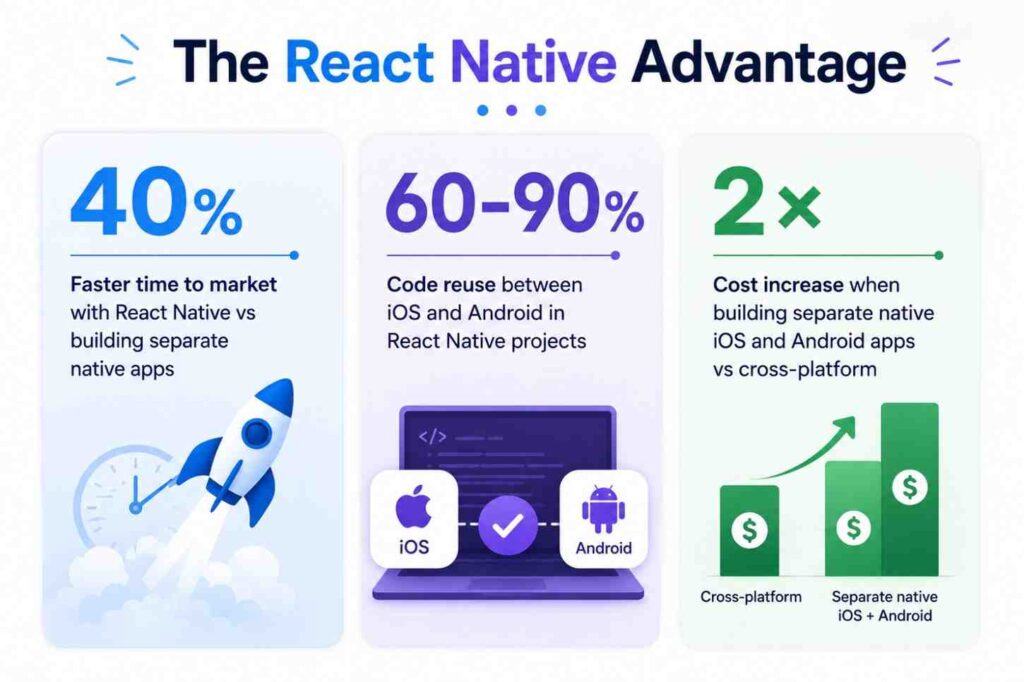
- Shared Codebase (60% to 90%): Logic, API calls, and state management are shared. Only platform-specific UI elements differ.
- Faster MVP Launches: Deliver to both app stores simultaneously, cutting time-to-market by up to 40%.
- Live Reload / Hot Reload: Developers see changes instantly without rebuilding the entire app.
- Access to Device APIs: Camera, GPS, push notifications, and biometrics are all accessible through native modules.
Best use cases for React Native
- Consumer Apps: Startup MVPs, Delivery & logistics apps, Fitness & wellness apps, and Social networking apps
- Business Apps: Fintech & payments, On-demand platforms, Booking & marketplace apps, and Field-service tools
React vs React Native: Key Differences
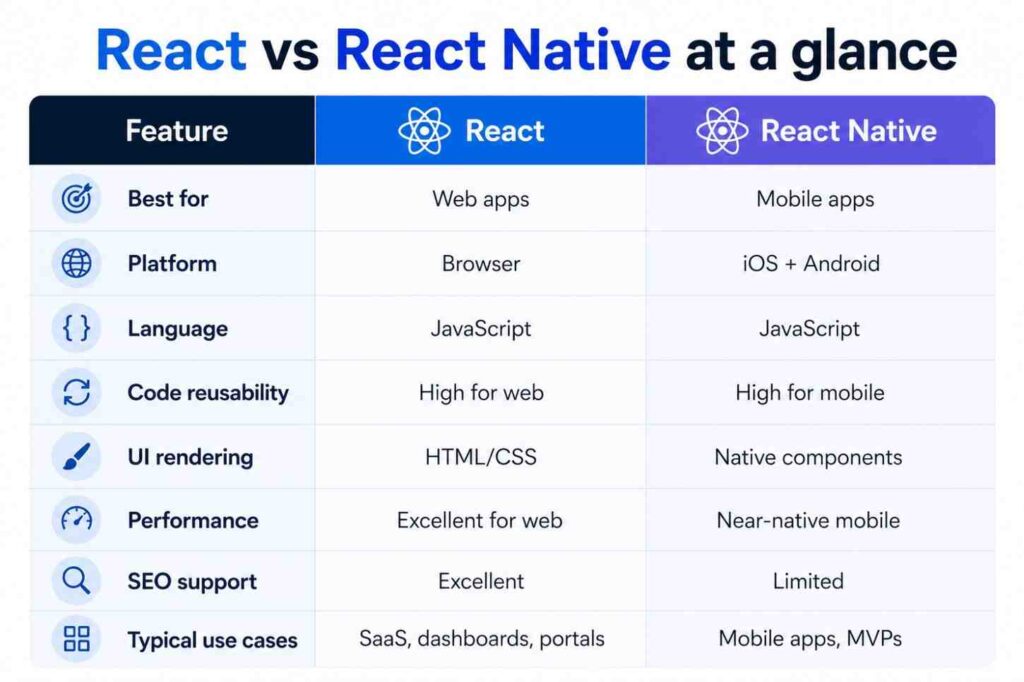
| Parameter | React | React Native |
|---|---|---|
| Platform | Built for web applications that run inside browsers like Chrome, Safari, and Edge. Best suited for websites, SaaS platforms, dashboards, portals, and browser-based enterprise systems. | Built specifically for mobile applications running on iOS and Android devices. Ideal for businesses targeting mobile-first audiences. |
| Rendering | Uses HTML and CSS to render UI elements inside the browser’s DOM (Document Object Model). | Use native APIs and render actual native mobile UI components instead of web elements. |
| Performance | Optimized for browser performance and delivers fast rendering for dynamic web applications. Excellent for interactive websites and SaaS platforms. | Optimized for mobile devices and delivers near-native app performance with smoother mobile interactions and gestures. |
| Learning Curve | Moderate learning curve for developers familiar with JavaScript and front-end development concepts. | Moderate learning curve, but needs additional understanding of mobile concepts like navigation, device permissions, and platform-specific behaviors. |
| SEO support | Excellent SEO capabilities, especially with frameworks like Next.js that support server-side rendering (SSR) and static generation. | Traditional SEO does not apply because apps are distributed through app stores instead of search engines. |
| UI Components | Users use web-based components such as div, span, button, and CSS styling. | Uses native mobile components like view, text, image, and scrollView for platform-specific UI experiences. |
| Development Speed | Enables fast development for cutting-edge web applications using reusable components and a large ecosystem of support. | Faster mobile app development because one shared codebase can support both Android and iOS platforms. |
| Code Sharing | Primarily limited to web application development only. | Allows businesses to share around 60% to 90% of the codebase across Android and iOS apps. |
| Best For | Best for SaaS platforms, enterprise portals, admin dashboards, CRM systems, eCommerce websites, and progressive web apps. | Best for mobile apps, startup MVPs, delivery apps, booking platforms, fintech apps, healthcare apps, and social applications. |
| Maintenance Cost | Moderate maintenance cost due to ongoing front-end updates, browser compatibility, and scalability improvements. | Lower maintenance cost for multi-platform mobile apps because businesses maintain a single shared codebase instead of separate native apps. |
| App Store Deployment | No app store deployment is needed since applications are accessed directly through browsers. | Requires deployment and approval through the Apple App Store and Google Play Store. |
Should You Choose React or React Native?
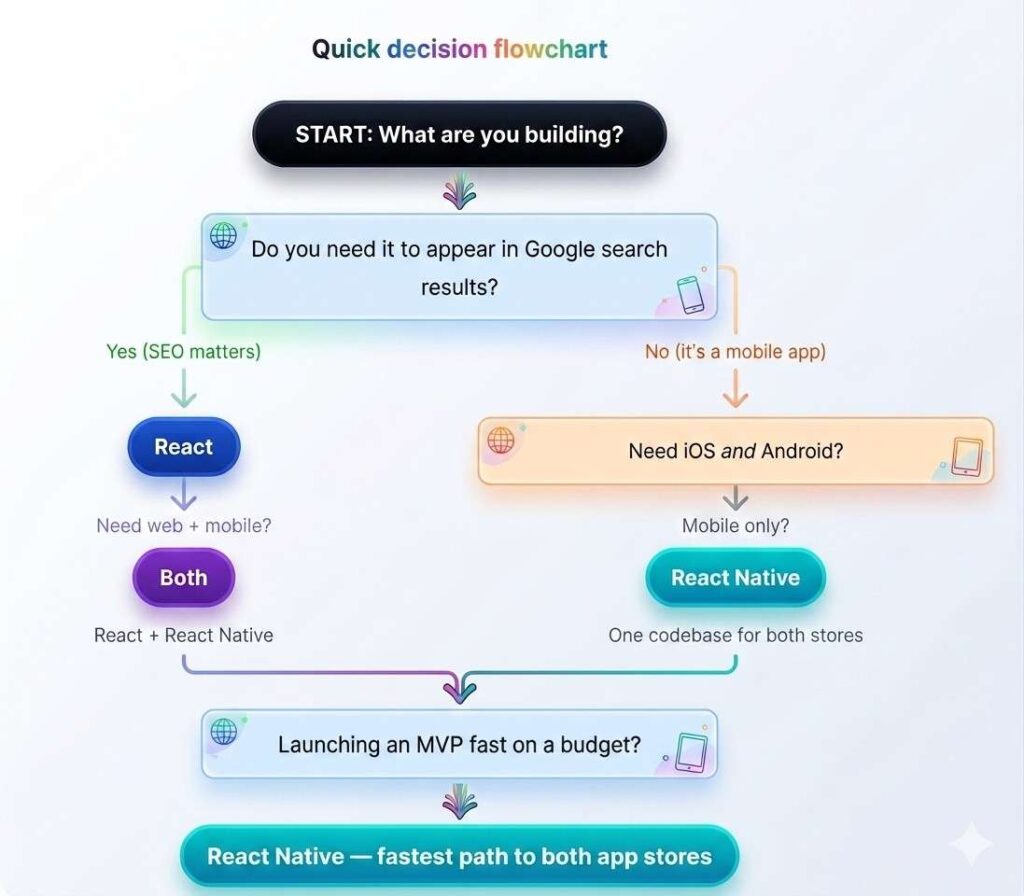
The following flowchart helps you to make a very clear distinction between React and React Native.
React vs. React Native: Business Benefits
| React for Business | React Native for Business |
|---|---|
| Better SEO visibility → more organic traffic | One codebase → lower dev cost vs 2 native apps |
| Faster browser-side performance | Up to 40% faster to market |
| Easier web scalability for SaaS | A single team manages iOS + Android |
| Wide professional talent pool → Hire fast | Easier long-term maintenance |
| Ideal for complex dashboards & portals | Consistent UX across platforms |
| Server-side rendering for data-heavy apps | Strong for MVP validation before full build |
When Should Your Business Choose React?
Choose React if your product lives in a browser. If users will access it on a laptop or desktop, if you care about Google rankings, or if you’re building internal tools for employees, React is the right call.
Choose React If You Need to…
- Rank on Google (SEO is a core growth channel)
- Build a browser-first product; no app store needed
- Create SaaS software with complex dashboards or workflows
- Power internal tools, admin panels, or CRM systems
- Prioritize web scalability as your user base grows
Actual Business Examples
(1) Healthcare: Patient portals and booking systems where users log in from a web browser, and data privacy + SEO traffic matter.
(2) Logistics: Fleet management dashboards and dispatch tools that operations teams use on desktop computers all day.
(3) B2B SaaS: Reporting tools, analytics platforms, and workflow automation software sold to other businesses.
(4) E-commerce: Online stores and product catalogs where organic search traffic directly drives revenue.
Working with a React JS development company that understands your industry is key. The framework is only as good as the team building with it.
When Should Your Business Choose React Native?
Choose React Native if your users will be on their phones. If you are building something people download from an app store, whether it’s a delivery app, a booking tool, or a startup MVP, React Native saves you from paying for two separate native development teams.
Choose React Native If You Need to…
- Launch a mobile app on both iOS and Android simultaneously
- Validate an MVP quickly without a large budget
- Keep one development team (not two separate native teams)
- Reduce long-term maintenance costs
- Push faster updates to both platforms at once
Actual Business Examples
(1) Startups: An MVP that needs to reach both iPhone and Android users by demo day, without hiring two engineering teams.
(2) Delivery & On-demand: Booking, delivery tracking, and marketplace apps where the mobile experience is the entire product.
(3) Fitness & Wellness: Apps using device sensors, GPS tracking, push notifications, and camera, all natively accessible in React Native.
(4) Fintech: Payments, wallets, and banking apps where performance and biometric security (Face ID, fingerprint) matter.
To move fast here, you will want to hire React Native developers who have delivered actual apps, not just engineers who know the framework theoretically.
Development Timeline Comparison: React vs. React Native
| Project Stage | React | React Native |
|---|---|---|
| UI development | Medium – browser components | Fast – component library built-in |
| iOS + Android deployment | Requires separate effort | Unified – single build process |
| MVP Launch | Moderate (4 to 8 weeks typically) | Faster (3 to 6 weeks for both stores) |
| Feature Updates | Instant (web deploy) | Fast (OTA updates via Expo.) |
| Ongoing maintenance | Moderate | Easier – one codebase to maintain |
Can React and React Native Work Together?
Yes, and many successful Canadian companies do exactly this. React handles the web experience. React Native handles mobile. The same backend APIs and business logic power both.
The combined approach gives you a single technology stack, a team that can switch between web and mobile, shared design systems, and far less hiring complexity than maintaining two completely separate codebases.
What is shared across both
- Business logic and API integrations
- Authentication and state management
- Design tokens, colors, typography
- Developer knowledge (same language: JavaScript)
This setup is common at the scale-up stage, when a company has validated their mobile MVP and wants to add a web portal for enterprise buyers or operations teams. A good software development company will plan this architecture from day one to avoid rework later.
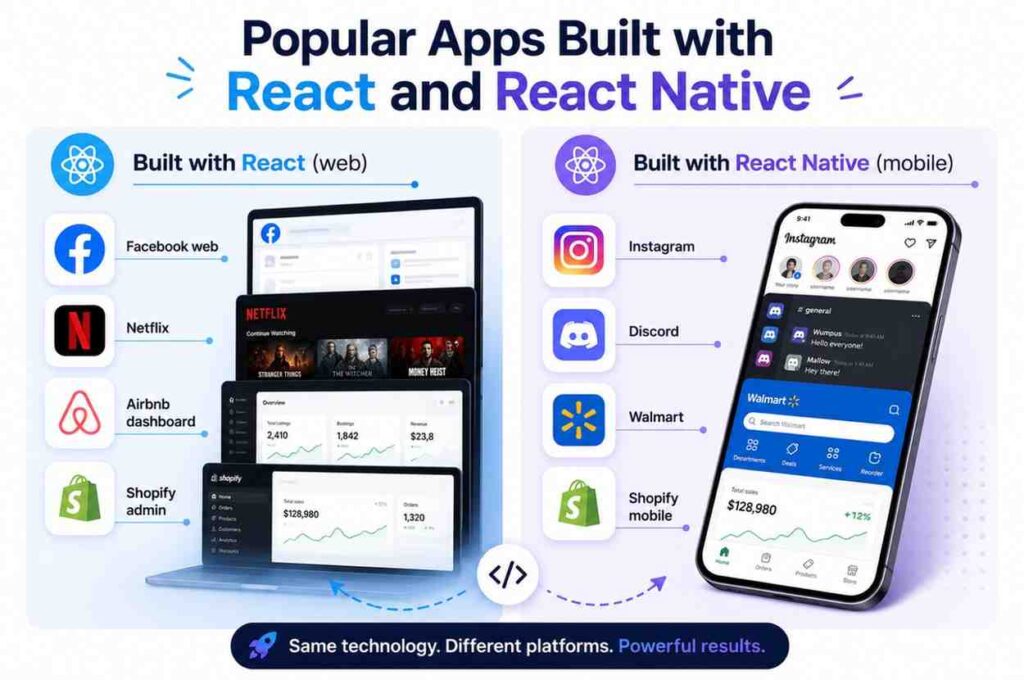
These aren’t niche tools; they’re category-leading products used by millions. Both technologies are proven at massive scale, which matters when you’re evaluating reliability for a business-critical application.
React vs React Native: Which Is Better for Startups?
| Startup Goal | Recommended Technology |
|---|---|
| Build a SaaS platform | React |
| Launch a mobile MVP fast | React Native |
| Need SEO / organic traffic | React |
| Reduce app development cost | React Native |
| Build a web + mobile ecosystem | Both |
| Validate a product idea quickly | React Native |
Startups that want to hire React Native developers for an MVP are making a smart financial decision: one team, one codebase, two app stores. Then they can layer in a React web app once the mobile product is validated.
Challenges to Know Before You Choose
No technology is perfect. Here’s what experienced teams run into so you are not unprepared after contracts are signed.
| React – Known Challenges | React Native – Known Challenges |
|---|---|
| Front-end only, you still need a separate back-end | Some features require native modules (Java/Swift code) |
| SEO setup requires extra configuration (Next.js) | Performance can lag in graphically intensive apps |
| Frequent ecosystem updates can require developer attention | Device testing on multiple OS versions adds QA time |
| Opinionated choices around state management vary by team | App store approval adds 1–3 days per release cycle |
None of these are significant issues; they are manageable with the right team. But knowing them upfront helps you budget accurately and set realistic timelines.
The Future of React and React Native in 2026
Both technologies are advancing, not slowing down. Here’s what’s shaping the market conditions for Canadian businesses right now:
- AI-powered Interfaces: React’s component model makes it the leading framework for integrating AI chat, suggestions, and real-time data into web UIs.
- Cross-platform Dominance: Demand for React Native is surging as companies realize separate native teams are expensive and slow.
- Mobile-first Development: With over 60% of global web traffic now on mobile, companies that don’t have a strong mobile app lose to those that do.
- React Server Components: A major architectural shift (now stable in Next.js) that dramatically improves performance for complex web apps.
- New React Native Architecture: The JSI (JavaScript Interface) rewrite delivers near-native performance, closing the gap with fully native development.
Businesses that choose React or React Native today are investing in technologies that will remain dominant for the next 5 to 7 years, not experimenting with something that might be deprecated tomorrow.
How to Choose the Right Development Partner
The framework matters less than the team building with it. Here is what to look for when evaluating a React Native app development company or a React JS development company for your project:
- Cross-platform expertise: Can they build React web and React Native mobile? Fewer handoffs mean faster delivery.
- Proven portfolio: Ask for live apps you can download or websites you can visit. Demos are nice; real production products are better.
- Dedicated React developers: Not generalists who “also do React.” Specialists ship faster and make fewer expensive mistakes.
- Agile delivery model: You should see working software every 2 weeks, not wait 3 months for a reveal.
- Post-launch support: Apps need maintenance, OS updates, and bug fixes. Confirm this is included or available.
- Canadian business understanding: Timezone alignment and familiarity with Canadian compliance requirements (PIPEDA, Quebec Law 25) reduce friction significantly.
Not sure where to start? A good development partner will help you define which technology is right for your business before any code is written. That conversation alone can save you months.
Build Scalable Web and Mobile Apps with iQlance Solutions
iQlance is a mobile app & software development company in Canada working with startups and enterprises across Canada (HQ: Toronto, Ontario). We specialize in React development, React Native app development, MVP launches, and scalable SaaS platforms, with an agile delivery model built for North American businesses. Book a free consultation or share your app idea with our React and React Native experts now!
 info@iqlance.ca
  CA: +1 647 637 9108
Frequently Asked Questions

 Previous Briefing